

Menu
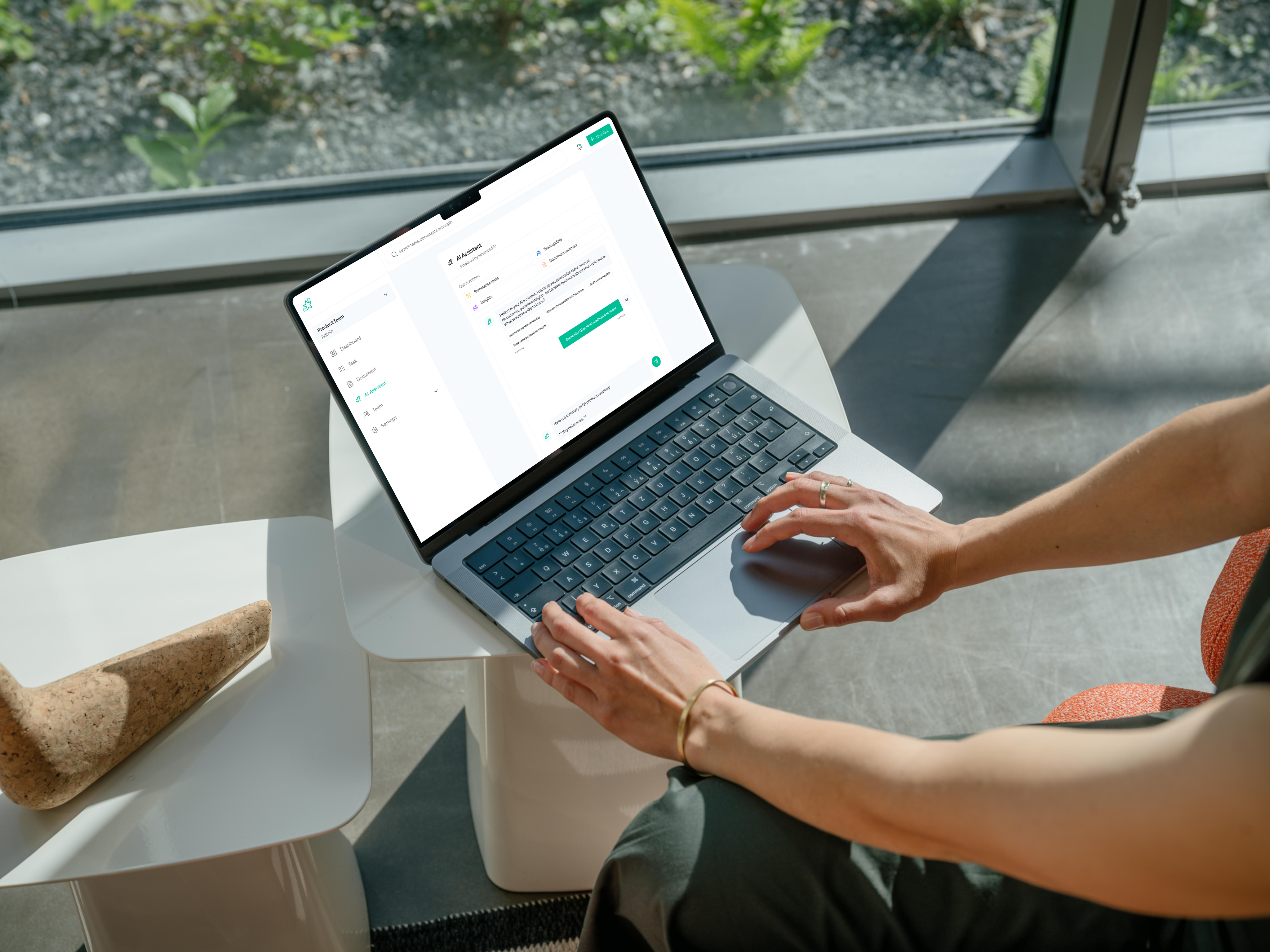
How might we help teams collaborate efficiently without losing clarity or flexibility?
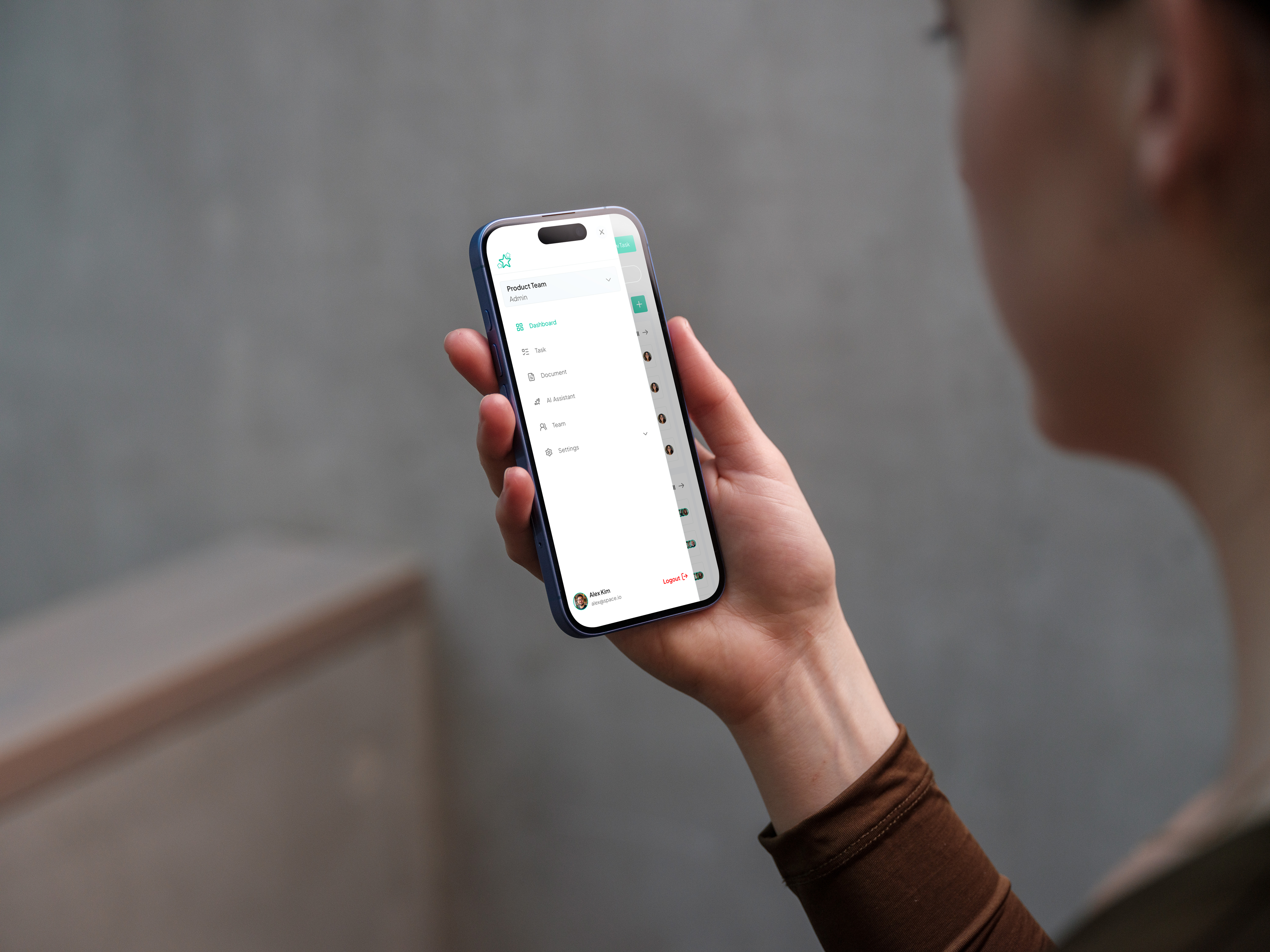
Strata is a modern team collaboration tool designed to help distributed teams streamline communication, organize projects, and maintain clarity without feeling overwhelmed. I led the product design for Strata, focusing on creating a simple yet powerful experience that reduces cognitive load while improving team productivity.
Context
Team Collaboration Tool
2025 June - August
Role
Product Designer
Platform
Responsive Web
(01)
Challenge
Teams often struggle with fragmented communication and scattered project information, leading to missed deadlines, duplicated work, and frustration.
Existing collaboration tools either overwhelm users with features or force them into rigid workflows that don’t adapt to their way of working.
The key challenge was to design a tool that balances flexibility with clarity, ensuring users can focus on what truly matters.

(02)
Approach & Design Framework
I used the Jobs-to-be-Done (JTBD) Framework. I focused on the tasks teams needed to accomplish, ensuring Strata helped them collaborate efficiently without cognitive overload. I did the followimg:
- Define Core Jobs – Identified the primary outcomes teams were hiring Strata to achieve: alignment, context preservation, and task prioritization.
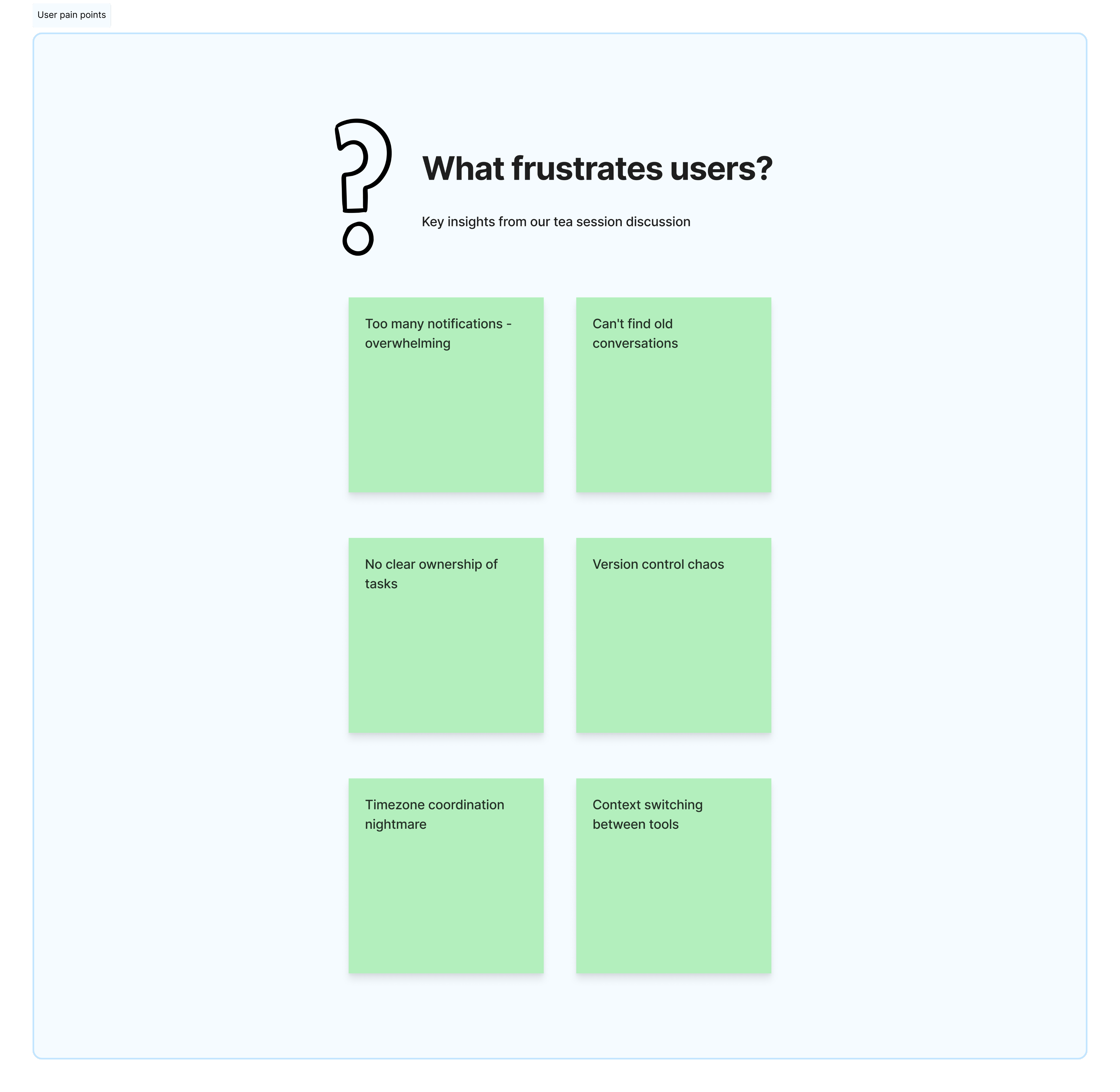
- Map Struggles & Barriers – Documented obstacles preventing users from completing these jobs effectively.
- Ideation Around Jobs – Brainstormed multiple solutions for each core job, prioritizing ideas that directly solved user needs.
- Information Architecture & Flow Mapping – Structured the product to support each job with minimal cognitive load.
- Prototyping & Validation – Developed rapid prototypes and conducted usability tests to ensure features effectively enabled users to complete their jobs.
- Iterative Refinement – Used feedback loops to continuously improve clarity, flexibility, and ease of use.
(03)
Research and Insights
Using a JTBD lens, I focused on uncovering the key jobs teams were trying to complete:
- User Interviews: Conducted 15+ interviews with remote team members to understand what outcomes they were trying to achieve and the obstacles they faced.
- Surveys: Gathered quantitative data from 50+ participants to identify the most critical pain points and desired results.
- Competitive Analysis: Analyzed existing tools to understand where they failed to help users complete their core jobs efficiently.
Key Insights
- Users were hiring collaboration tools to coordinate tasks and maintain context, not just send messages.
- Teams wanted to avoid duplicated work and reduce cognitive load.
- Flexibility was essential, but users also needed clarity and prioritization to focus on what mattered most.
(04)
Design Solution
Strata was designed to help teams complete their core jobs more effectively:
- Unified Workspace – Combines tasks, messages, and files in a single dashboard so teams can stay aligned.
- Contextual Communication – Ties conversations directly to tasks and projects, ensuring critical context is never lost.
- Smart Prioritization – Highlights the most important tasks and deadlines, helping teams focus on what matters.
- Flexible Structure – Allows teams to customize boards and workflows without losing overall clarity.
The Dashboard
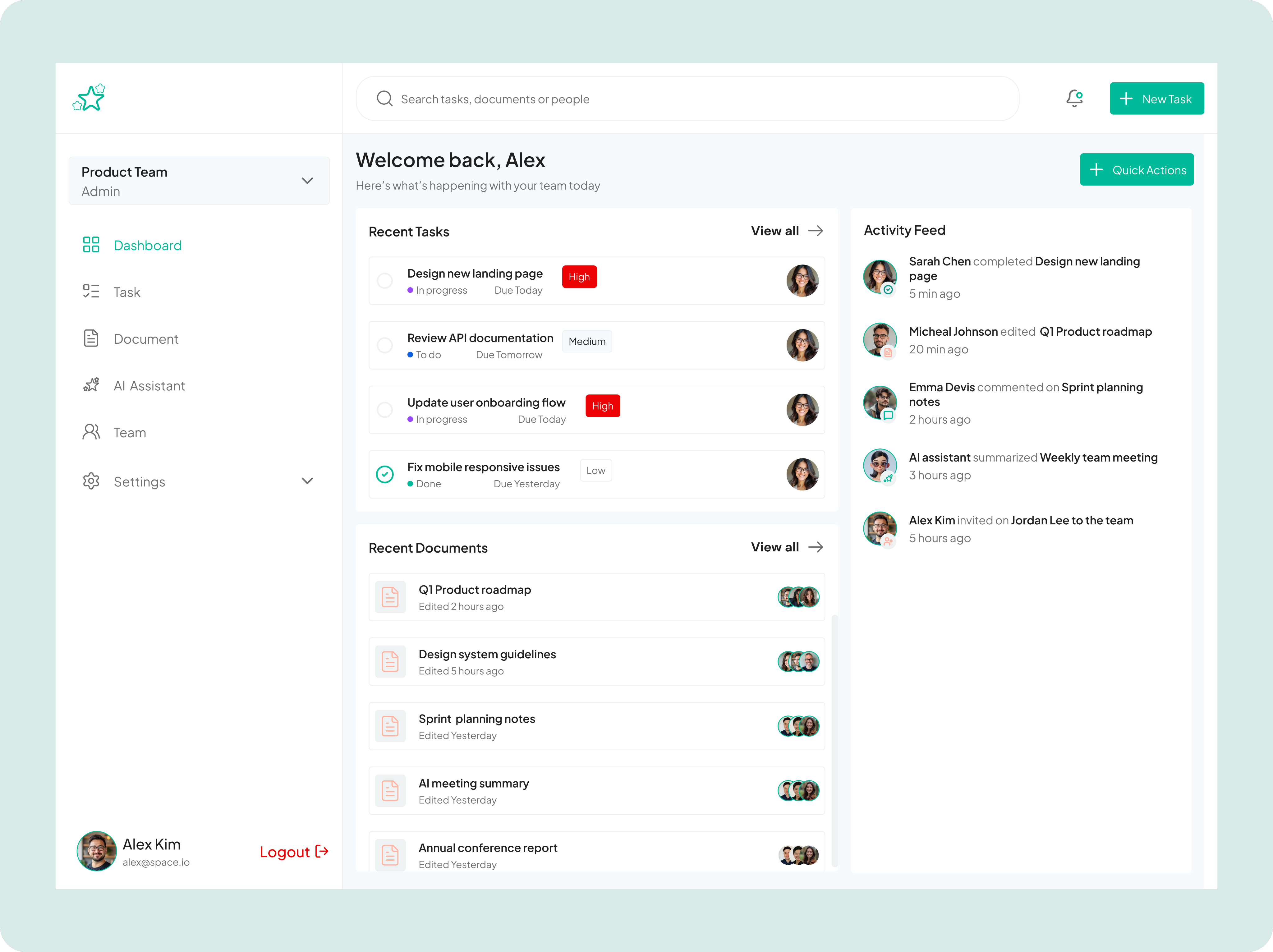
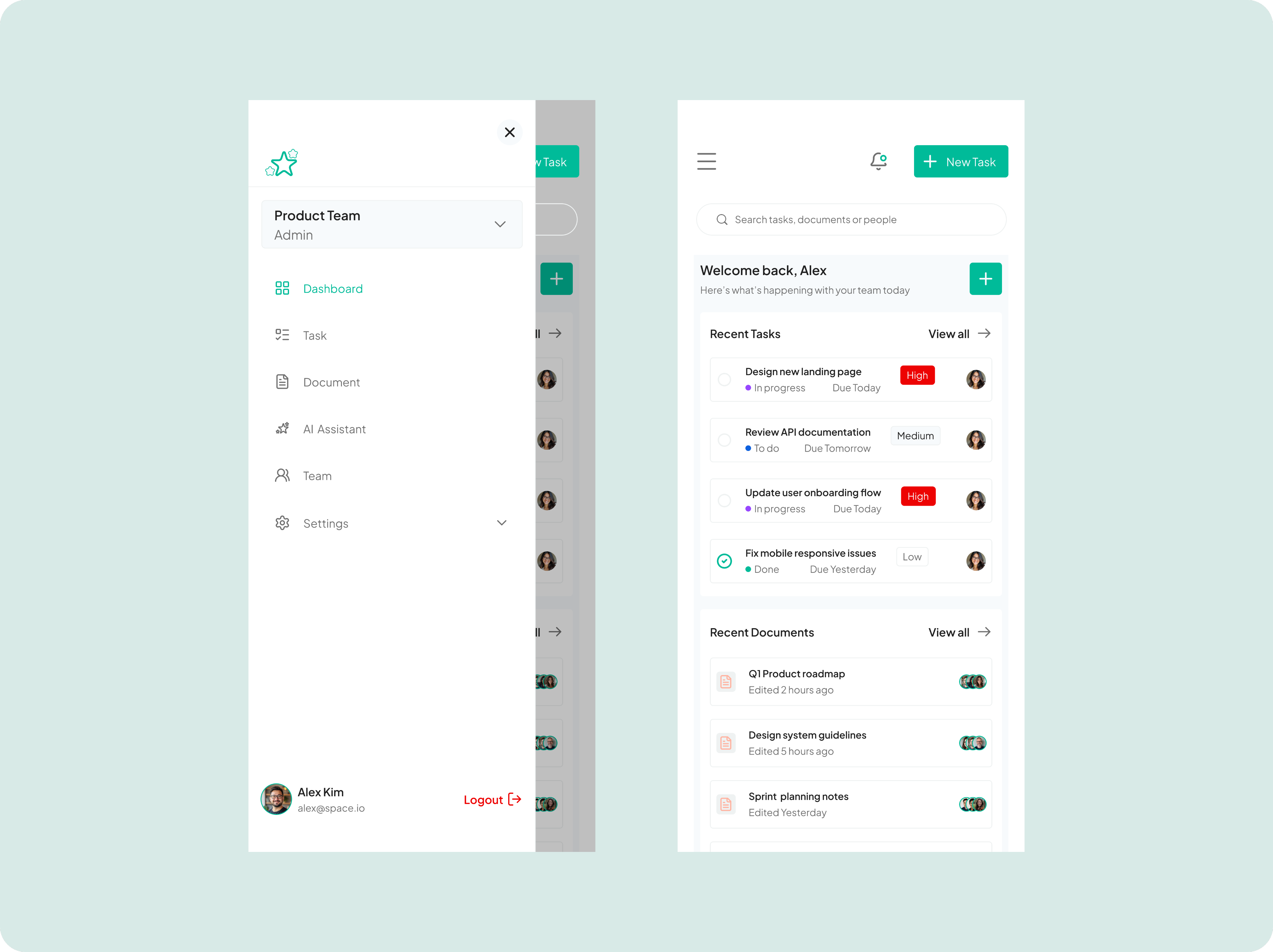
This solves the productivity drain of constantly asking "what's everyone working on?" or "where is that document?" while reducing the anxiety of wondering if important updates have been missed.
This dashboard serves as a unified workspace hub for team collaboration, designed to solve the critical problem of information fragmentation and context switching that plagues modern distributed teams. By combining recent tasks with their priority levels, real-time activity feeds showing what teammates are working on, and quick access to frequently edited documents, it eliminates the need to jump between multiple tools or hunt through endless threads to understand project status. The interface provides Alex with immediate visibility into what's urgent (like the high-priority landing page design), what's been completed, and how team members are contributing, all in a single glance. The dashboard essentially transforms chaotic team coordination into a coherent, actionable overview that helps members stay aligned, prioritize effectively, and maintain momentum without endless status meetings or Slack messages.
Tasks
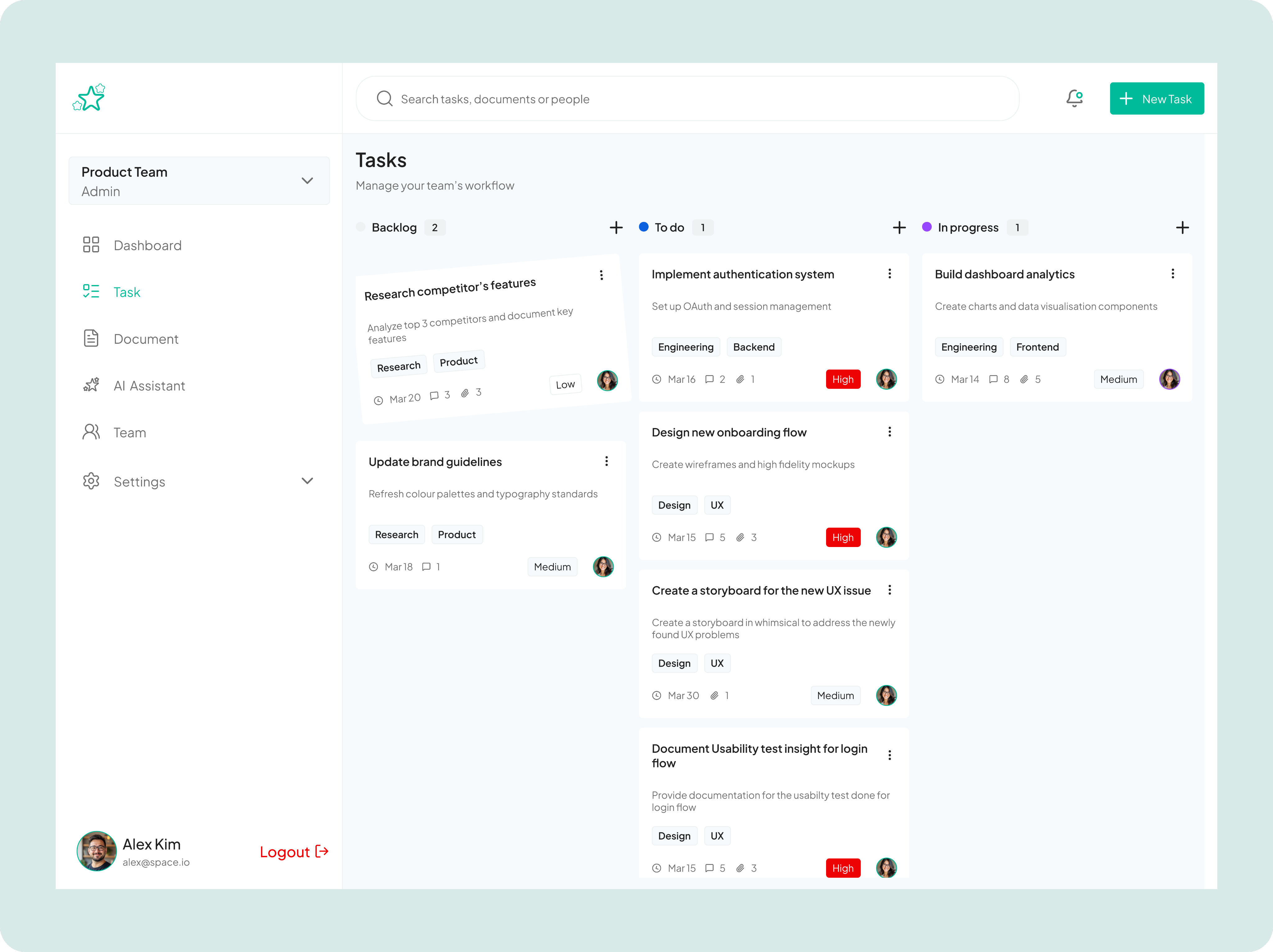
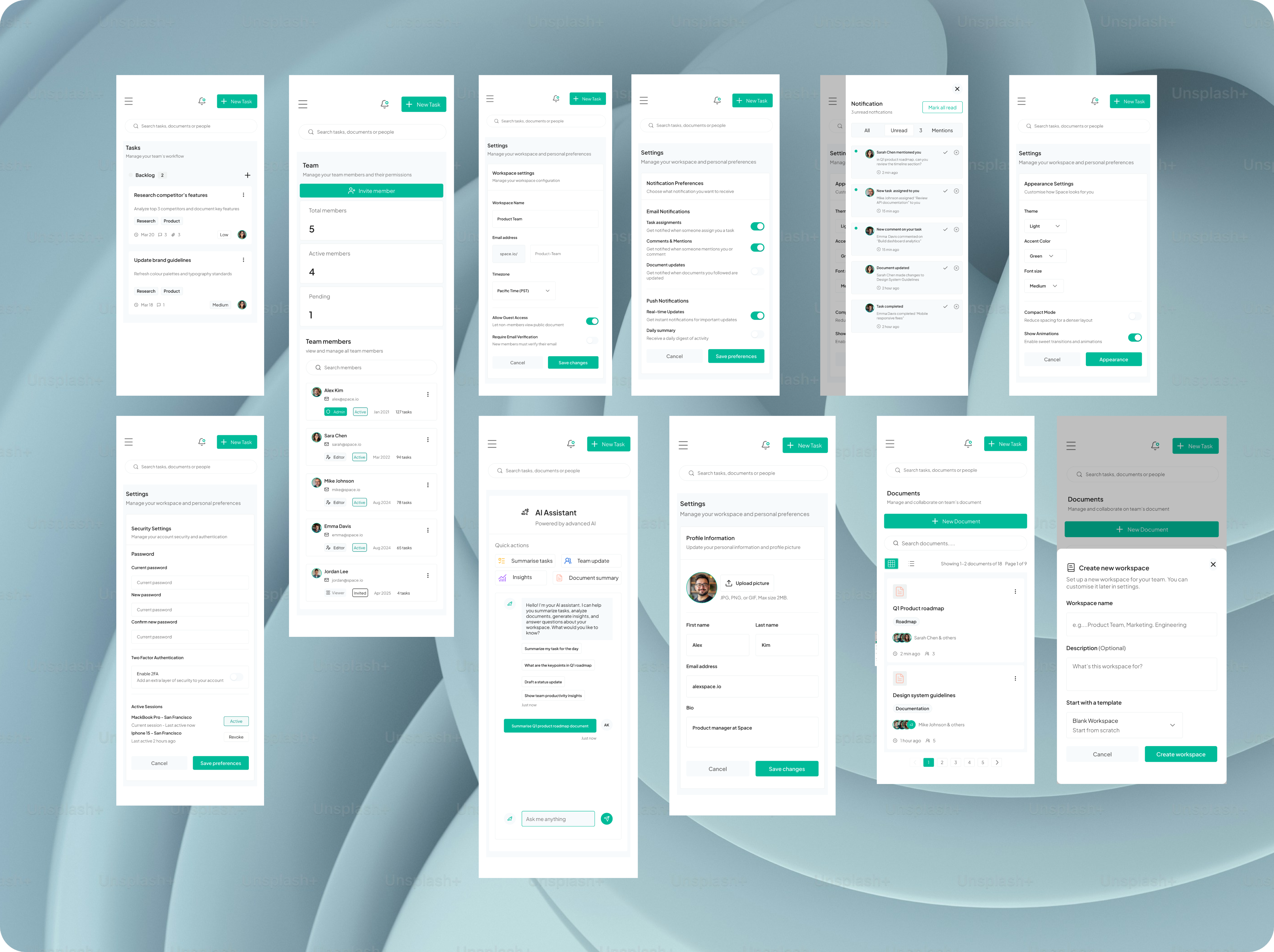
The Task page design solves the critical problem of coordination overhead in cross-functional teams by making task status, ownership, and urgency immediately transparent, while the clean visual hierarchy ensures users can quickly distinguish between high-priority items requiring immediate attention and lower-priority backlog work.
This task management screen demonstrates my approach to designing scalable workflow solutions for product teams. The interface uses a kanban-style board with three swim lanes (Backlog, To do, In progress, Review, and Done tasks) that enables teams to visualize work progression and identify bottlenecks at a glance. Each task card is information-dense yet scannable, displaying key metadata including due dates, comment counts, attachment indicators, priority levels, team tags (like Engineering, Design, UX), and assignee avatars, all designed to minimize the need for users to click into tasks for basic context.
Documents
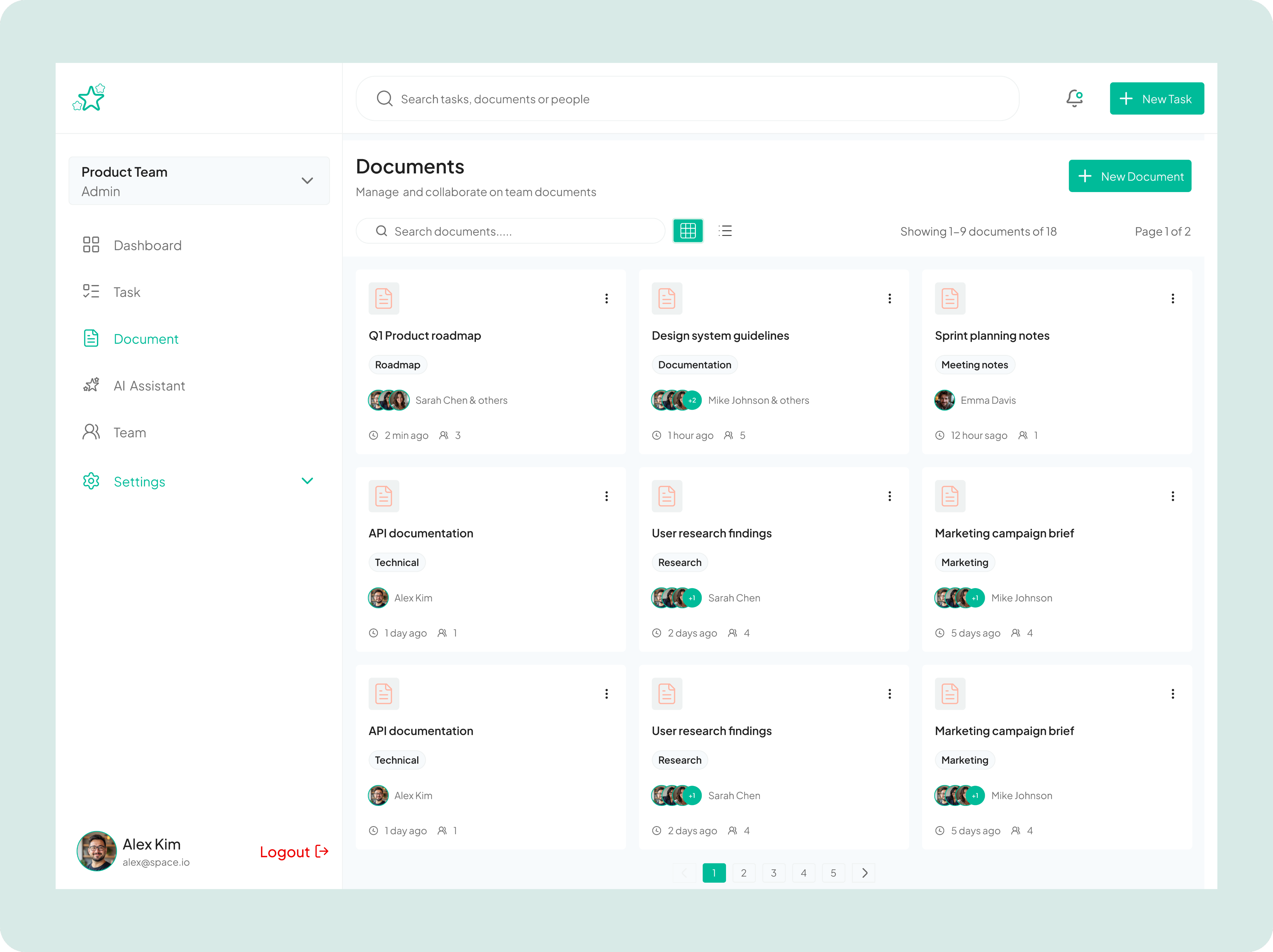
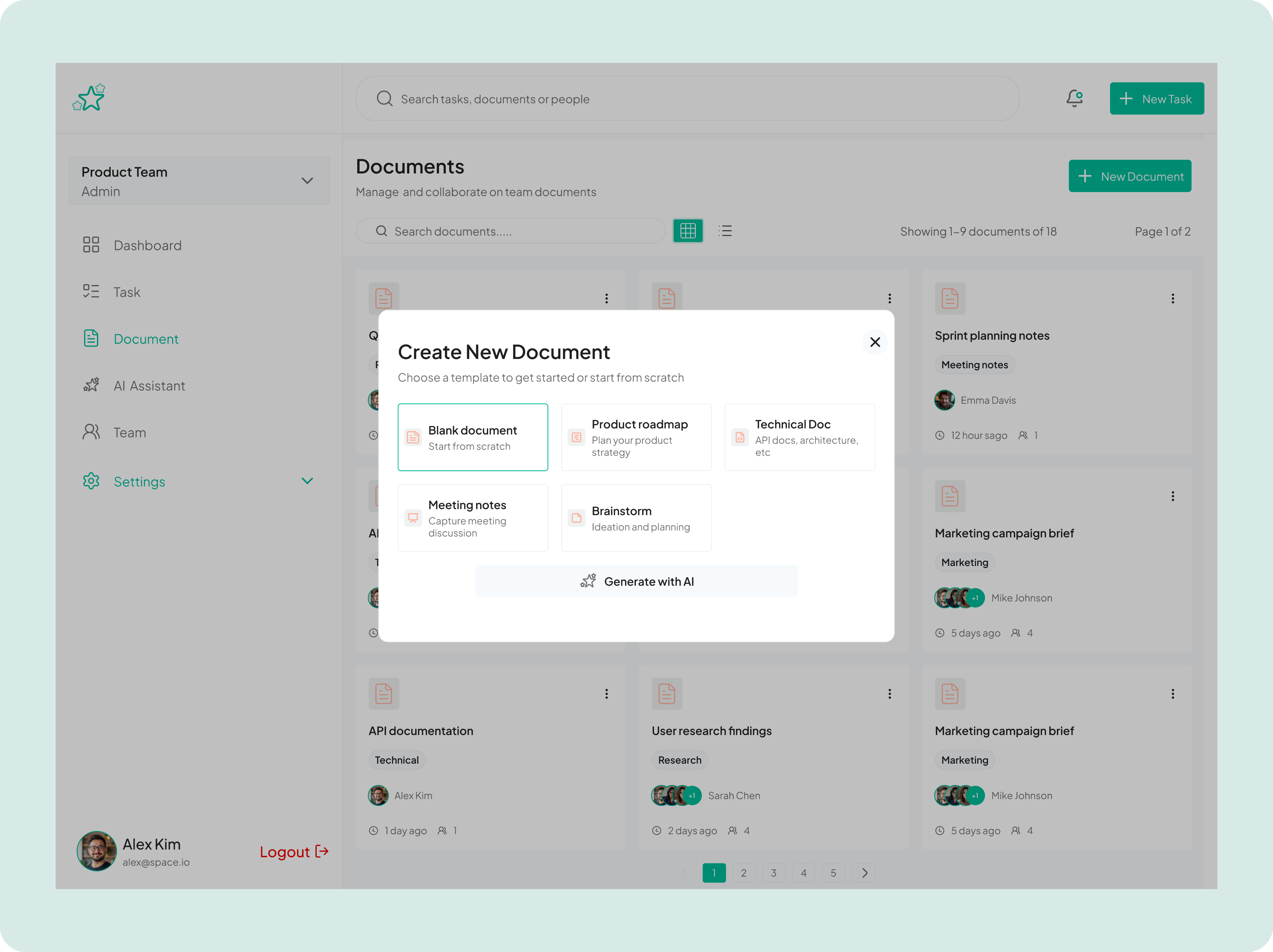
The design addresses the common pain point of "document sprawl" in growing organizations by providing multiple pathways to information
This document management interface showcases my ability to design scalable content organization systems that balance discoverability with collaboration transparency. The grid layout presents documents as scannable cards, each surfacing critical metadata including document type tags (Roadmap, Documentation, Technical), collaborative ownership through stacked avatars showing active contributors, recency indicators, and engagement metrics, all designed to help teams quickly locate relevant documents and understand collaboration patterns without opening files.
AI Assitant
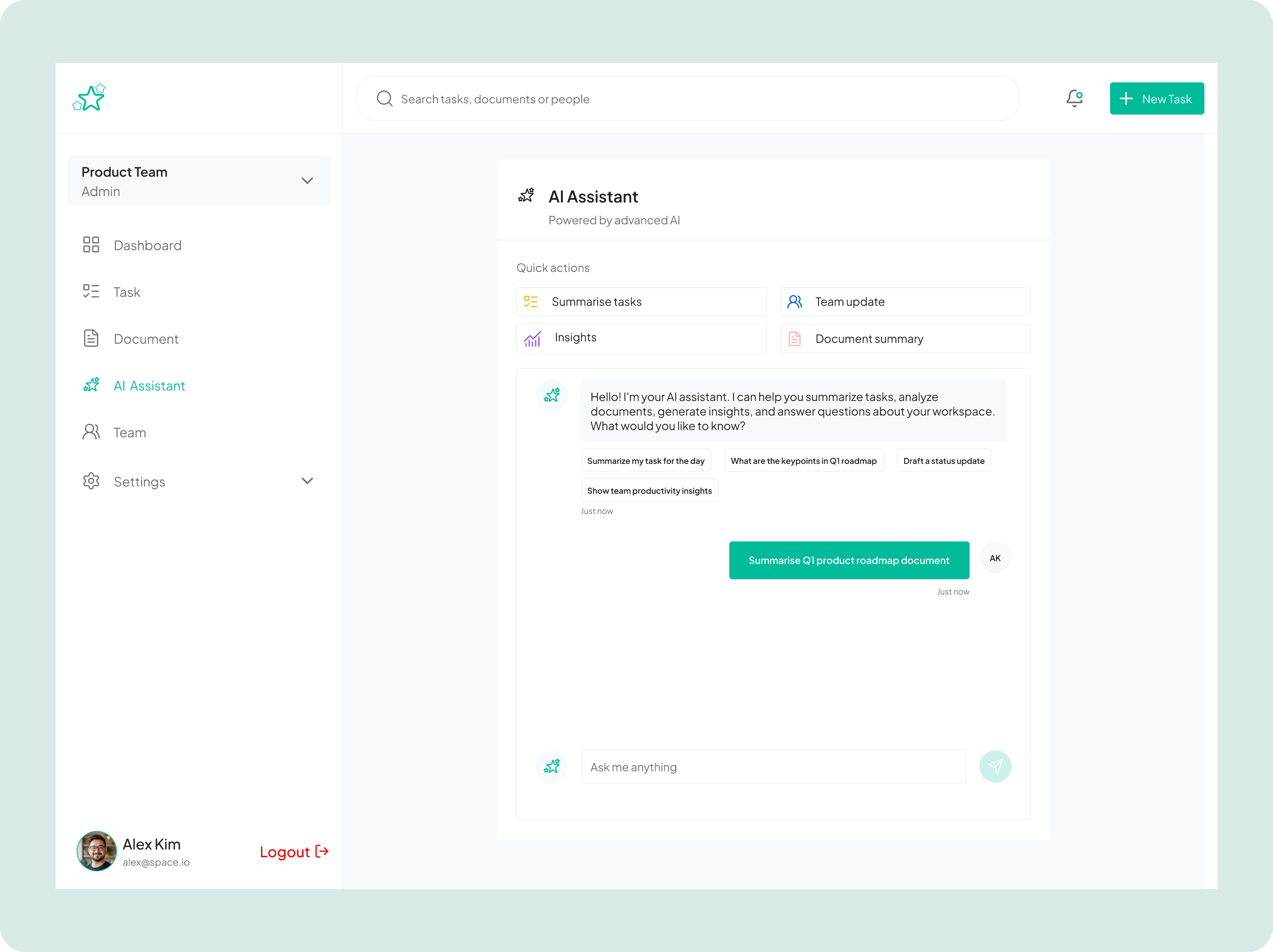
The AI Assistant serves as an intelligent productivity companion that helps teams streamline their workflow by automatically summarizing tasks, analyzing documents, generating insights, and creating status updates.
This screen showcases an AI Assistant feature integrated into strata platform. The AI Assistant serves as an intelligent productivity companion that helps teams streamline their workflow by automatically summarizing tasks, analyzing documents, generating insights, and creating status updates.
It solves the common problem of information overload and time-consuming administrative work that typically bogs down product teams, instead of manually reviewing all tasks, reading through lengthy documents, or compiling team updates, users can simply ask the AI to handle these repetitive knowledge work tasks instantly.
Team
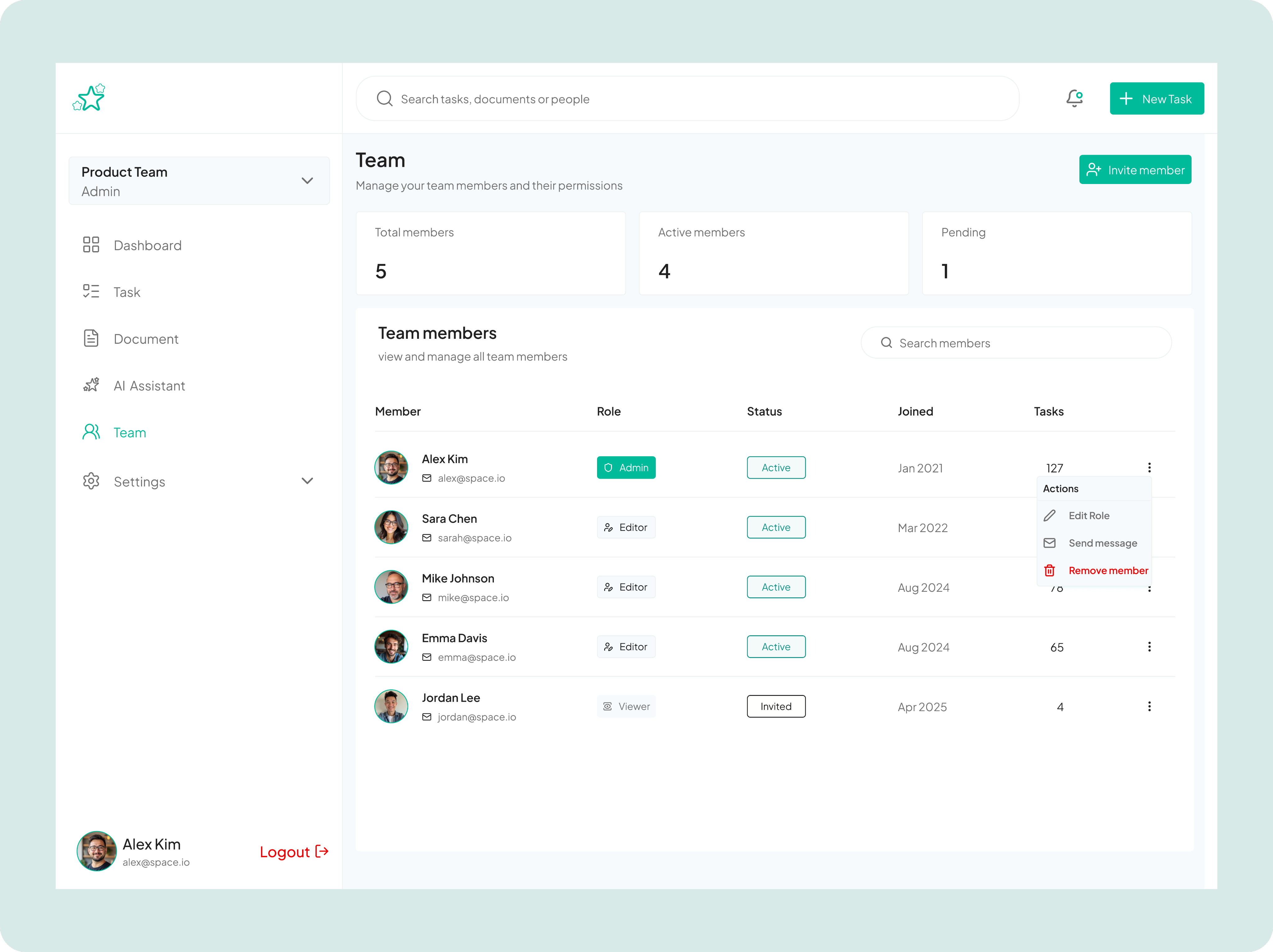
The team page design solves the organizational challenge of managing team composition, permissions, and member activity in one centralized location.
This screen displays a comprehensive team management interface that gives administrators complete visibility and control over their Product Team's membership.
At a glance, administrators can see key metrics, track their members status and join dates, and monitor their task workload. The interface streamlines team administration by providing quick actions to edit roles, send messages, or remove members directly from the list, eliminating the need to navigate through multiple screens or systems to perform common management tasks.
Settings
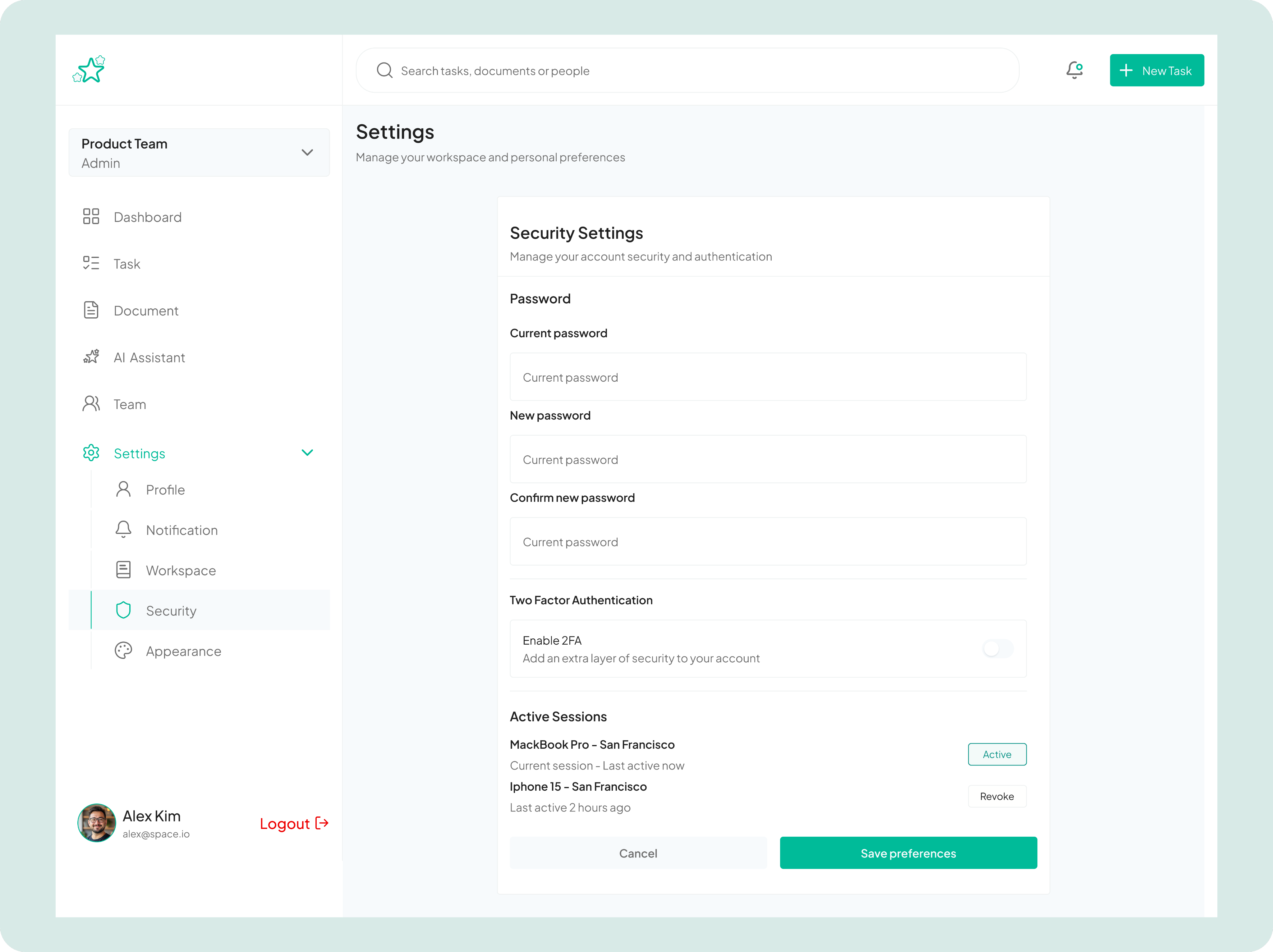
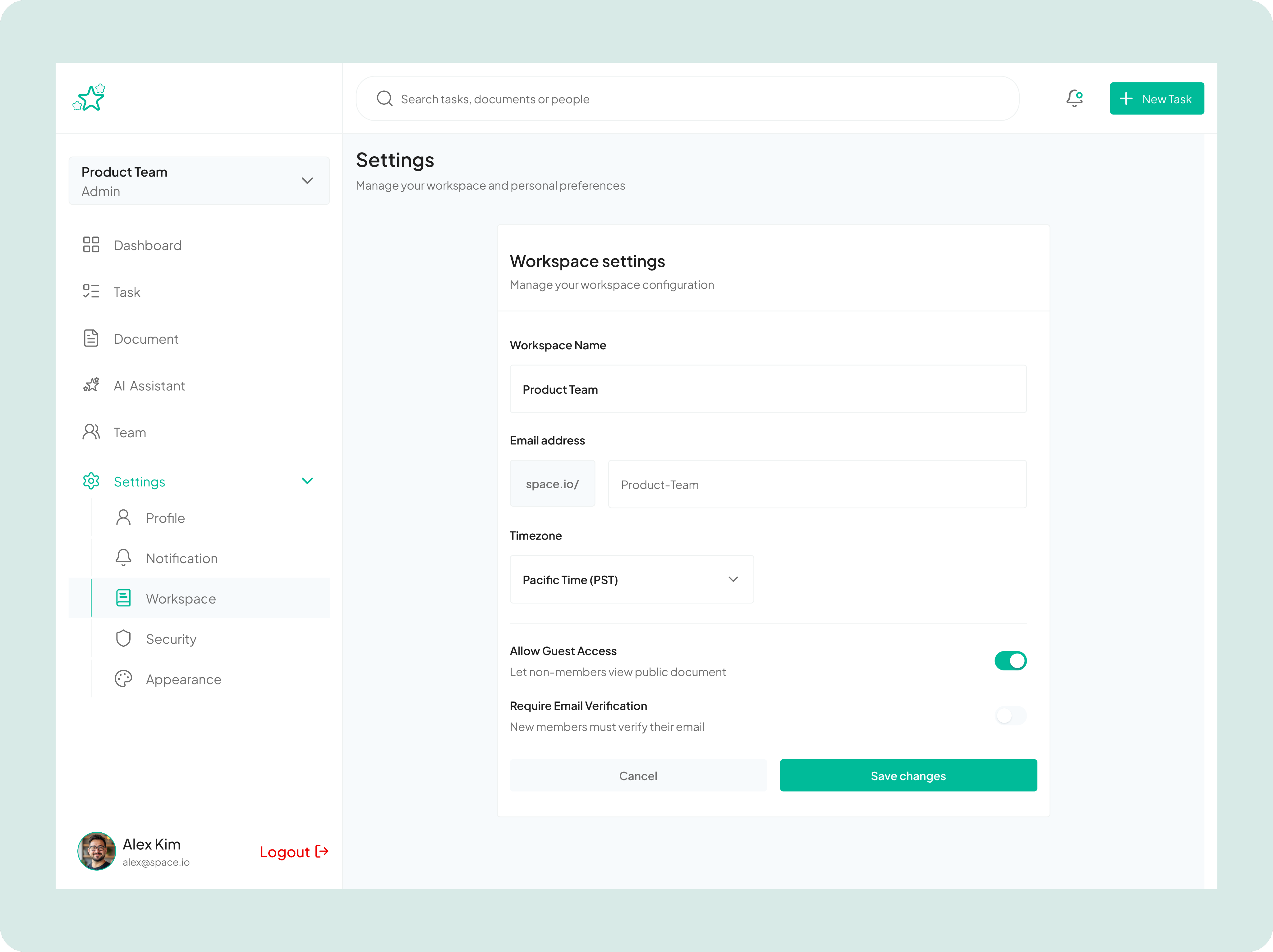
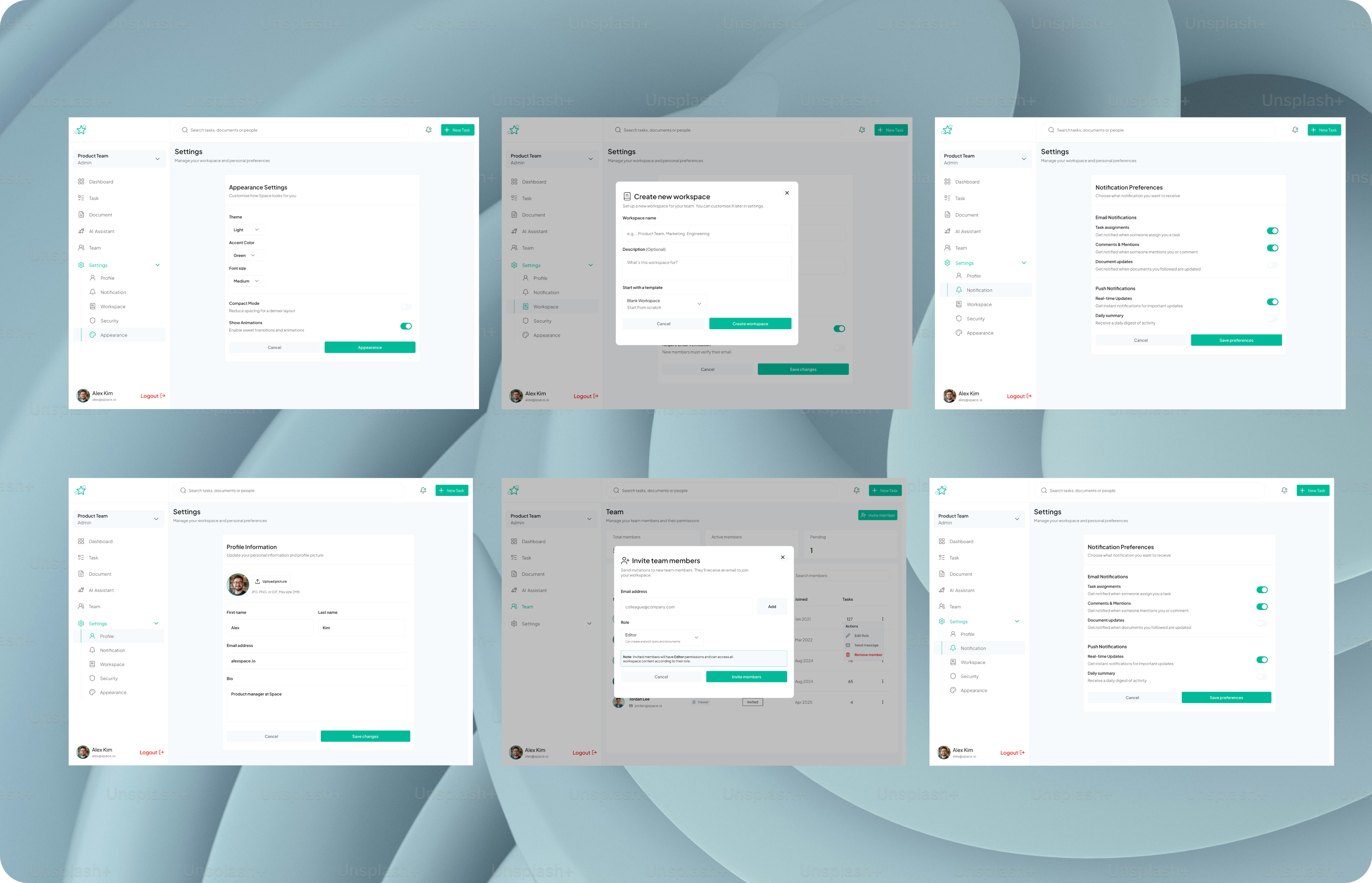
It solves the problem of scattered configuration options by consolidating essential workspace settings, like workspace name, email address, timezone preferences, guest access permissions, and email verification requirements, into a single, organized interface.
This screen provides a centralized settings hub where administrators can configure and customize their workspace to match their team's specific needs and security requirements.
The left sidebar categorizes settings into Profile, Notification, Workspace, Security, and Appearance sections, making it easy to navigate different configuration areas. This streamlined approach prevents administrators from having to hunt through multiple menus or documentation to set up their workspace correctly, ensuring teams can quickly establish the right access controls (like toggling guest access for public documents) and operational parameters (like timezone settings for proper scheduling) that align with their collaboration policies and security standards.
Results and Impacts
Strata helped teams work 42% faster by reducing context-switching, duplicated work, and collaboration overhead.
Lesson
Key Takeaways
- Focusing on the job, not just the user, ensured design decisions solved real problems.
- Less is more: Removing unnecessary features clarified workflows and reduced cognitive load.
- Flexibility and clarity can coexist when designs are explicitly tied to user jobs.
Next Project
Pulse


How might we help teams collaborate efficiently without losing clarity or flexibility?
Strata is a modern team collaboration tool designed to help distributed teams streamline communication, organize projects, and maintain clarity without feeling overwhelmed. I led the product design for Strata, focusing on creating a simple yet powerful experience that reduces cognitive load while improving team productivity.
Context
Team Collaboration Tool
2025 June - August
Role
Product Designer
Platform
Responsive Web
(01)
Challenge
Teams often struggle with fragmented communication and scattered project information, leading to missed deadlines, duplicated work, and frustration.
Existing collaboration tools either overwhelm users with features or force them into rigid workflows that don’t adapt to their way of working.
The key challenge was to design a tool that balances flexibility with clarity, ensuring users can focus on what truly matters.
(02)
Approach & Design Framework
I used the Jobs-to-be-Done (JTBD) Framework. I focused on the tasks teams needed to accomplish, ensuring Strata helped them collaborate efficiently without cognitive overload. I did the followimg:
- Define Core Jobs – Identified the primary outcomes teams were hiring Strata to achieve: alignment, context preservation, and task prioritization.
- Map Struggles & Barriers – Documented obstacles preventing users from completing these jobs effectively.
- Ideation Around Jobs – Brainstormed multiple solutions for each core job, prioritizing ideas that directly solved user needs.
- Information Architecture & Flow Mapping – Structured the product to support each job with minimal cognitive load.
- Prototyping & Validation – Developed rapid prototypes and conducted usability tests to ensure features effectively enabled users to complete their jobs.
- Iterative Refinement – Used feedback loops to continuously improve clarity, flexibility, and ease of use.
(03)
Research and Insights
Using a JTBD lens, I focused on uncovering the key jobs teams were trying to complete:
- User Interviews: Conducted 15+ interviews with remote team members to understand what outcomes they were trying to achieve and the obstacles they faced.
- Surveys: Gathered quantitative data from 50+ participants to identify the most critical pain points and desired results.
- Competitive Analysis: Analyzed existing tools to understand where they failed to help users complete their core jobs efficiently.
Key Insights
- Users were hiring collaboration tools to coordinate tasks and maintain context, not just send messages.
- Teams wanted to avoid duplicated work and reduce cognitive load.
- Flexibility was essential, but users also needed clarity and prioritization to focus on what mattered most.
(04)
Design Solution
Strata was designed to help teams complete their core jobs more effectively:
- Unified Workspace – Combines tasks, messages, and files in a single dashboard so teams can stay aligned.
- Contextual Communication – Ties conversations directly to tasks and projects, ensuring critical context is never lost.
- Smart Prioritization – Highlights the most important tasks and deadlines, helping teams focus on what matters.
- Flexible Structure – Allows teams to customize boards and workflows without losing overall clarity.
The Dashboard
This solves the productivity drain of constantly asking "what's everyone working on?" or "where is that document?" while reducing the anxiety of wondering if important updates have been missed.
This dashboard serves as a unified workspace hub for team collaboration, designed to solve the critical problem of information fragmentation and context switching that plagues modern distributed teams. By combining recent tasks with their priority levels, real-time activity feeds showing what teammates are working on, and quick access to frequently edited documents, it eliminates the need to jump between multiple tools or hunt through endless threads to understand project status. The interface provides Alex with immediate visibility into what's urgent (like the high-priority landing page design), what's been completed, and how team members are contributing, all in a single glance. The dashboard essentially transforms chaotic team coordination into a coherent, actionable overview that helps members stay aligned, prioritize effectively, and maintain momentum without endless status meetings or Slack messages.
Tasks
The Task page design solves the critical problem of coordination overhead in cross-functional teams by making task status, ownership, and urgency immediately transparent, while the clean visual hierarchy ensures users can quickly distinguish between high-priority items requiring immediate attention and lower-priority backlog work.
This task management screen demonstrates my approach to designing scalable workflow solutions for product teams. The interface uses a kanban-style board with three swim lanes (Backlog, To do, In progress, Review, and Done tasks) that enables teams to visualize work progression and identify bottlenecks at a glance. Each task card is information-dense yet scannable, displaying key metadata including due dates, comment counts, attachment indicators, priority levels, team tags (like Engineering, Design, UX), and assignee avatars, all designed to minimize the need for users to click into tasks for basic context.
Documents
The design addresses the common pain point of "document sprawl" in growing organizations by providing multiple pathways to information
This document management interface showcases my ability to design scalable content organization systems that balance discoverability with collaboration transparency. The grid layout presents documents as scannable cards, each surfacing critical metadata including document type tags (Roadmap, Documentation, Technical), collaborative ownership through stacked avatars showing active contributors, recency indicators, and engagement metrics, all designed to help teams quickly locate relevant documents and understand collaboration patterns without opening files.
AI Assitant
The AI Assistant serves as an intelligent productivity companion that helps teams streamline their workflow by automatically summarizing tasks, analyzing documents, generating insights, and creating status updates.
This screen showcases an AI Assistant feature integrated into strata platform. The AI Assistant serves as an intelligent productivity companion that helps teams streamline their workflow by automatically summarizing tasks, analyzing documents, generating insights, and creating status updates.
It solves the common problem of information overload and time-consuming administrative work that typically bogs down product teams, instead of manually reviewing all tasks, reading through lengthy documents, or compiling team updates, users can simply ask the AI to handle these repetitive knowledge work tasks instantly.
Team
The team page design solves the organizational challenge of managing team composition, permissions, and member activity in one centralized location.
This screen displays a comprehensive team management interface that gives administrators complete visibility and control over their Product Team's membership.
At a glance, administrators can see key metrics, track their members status and join dates, and monitor their task workload. The interface streamlines team administration by providing quick actions to edit roles, send messages, or remove members directly from the list, eliminating the need to navigate through multiple screens or systems to perform common management tasks.
Settings
It solves the problem of scattered configuration options by consolidating essential workspace settings, like workspace name, email address, timezone preferences, guest access permissions, and email verification requirements, into a single, organized interface.
This screen provides a centralized settings hub where administrators can configure and customize their workspace to match their team's specific needs and security requirements.
The left sidebar categorizes settings into Profile, Notification, Workspace, Security, and Appearance sections, making it easy to navigate different configuration areas. This streamlined approach prevents administrators from having to hunt through multiple menus or documentation to set up their workspace correctly, ensuring teams can quickly establish the right access controls (like toggling guest access for public documents) and operational parameters (like timezone settings for proper scheduling) that align with their collaboration policies and security standards.
Results and Impacts
Strata helped teams work 42% faster by reducing context-switching, duplicated work, and collaboration overhead.
Lesson
Key Takeaways
- Focusing on the job, not just the user, ensured design decisions solved real problems.
- Less is more: Removing unnecessary features clarified workflows and reduced cognitive load.
- Flexibility and clarity can coexist when designs are explicitly tied to user jobs.
Next Project
Pulse


How might we help teams collaborate efficiently without losing clarity or flexibility?
Strata is a modern team collaboration tool designed to help distributed teams streamline communication, organize projects, and maintain clarity without feeling overwhelmed. I led the product design for Strata, focusing on creating a simple yet powerful experience that reduces cognitive load while improving team productivity.
Context
Team Collaboration Tool
2025 June - August
Role
Product Designer
Platform
Responsive Web
(01)
Challenge
Teams often struggle with fragmented communication and scattered project information, leading to missed deadlines, duplicated work, and frustration.
Existing collaboration tools either overwhelm users with features or force them into rigid workflows that don’t adapt to their way of working.
The key challenge was to design a tool that balances flexibility with clarity, ensuring users can focus on what truly matters.
(02)
Approach & Design Framework
I used the Jobs-to-be-Done (JTBD) Framework. I focused on the tasks teams needed to accomplish, ensuring Strata helped them collaborate efficiently without cognitive overload. I did the followimg:
- Define Core Jobs – Identified the primary outcomes teams were hiring Strata to achieve: alignment, context preservation, and task prioritization.
- Map Struggles & Barriers – Documented obstacles preventing users from completing these jobs effectively.
- Ideation Around Jobs – Brainstormed multiple solutions for each core job, prioritizing ideas that directly solved user needs.
- Information Architecture & Flow Mapping – Structured the product to support each job with minimal cognitive load.
- Prototyping & Validation – Developed rapid prototypes and conducted usability tests to ensure features effectively enabled users to complete their jobs.
- Iterative Refinement – Used feedback loops to continuously improve clarity, flexibility, and ease of use.
(03)
Research and Insights
Using a JTBD lens, I focused on uncovering the key jobs teams were trying to complete:
- User Interviews: Conducted 15+ interviews with remote team members to understand what outcomes they were trying to achieve and the obstacles they faced.
- Surveys: Gathered quantitative data from 50+ participants to identify the most critical pain points and desired results.
- Competitive Analysis: Analyzed existing tools to understand where they failed to help users complete their core jobs efficiently.
Key Insights
- Users were hiring collaboration tools to coordinate tasks and maintain context, not just send messages.
- Teams wanted to avoid duplicated work and reduce cognitive load.
- Flexibility was essential, but users also needed clarity and prioritization to focus on what mattered most.
(04)
Design Solution
Strata was designed to help teams complete their core jobs more effectively:
- Unified Workspace – Combines tasks, messages, and files in a single dashboard so teams can stay aligned.
- Contextual Communication – Ties conversations directly to tasks and projects, ensuring critical context is never lost.
- Smart Prioritization – Highlights the most important tasks and deadlines, helping teams focus on what matters.
- Flexible Structure – Allows teams to customize boards and workflows without losing overall clarity.
The Dashboard
This solves the productivity drain of constantly asking "what's everyone working on?" or "where is that document?" while reducing the anxiety of wondering if important updates have been missed.
This dashboard serves as a unified workspace hub for team collaboration, designed to solve the critical problem of information fragmentation and context switching that plagues modern distributed teams. By combining recent tasks with their priority levels, real-time activity feeds showing what teammates are working on, and quick access to frequently edited documents, it eliminates the need to jump between multiple tools or hunt through endless threads to understand project status. The interface provides Alex with immediate visibility into what's urgent (like the high-priority landing page design), what's been completed, and how team members are contributing, all in a single glance. The dashboard essentially transforms chaotic team coordination into a coherent, actionable overview that helps members stay aligned, prioritize effectively, and maintain momentum without endless status meetings or Slack messages.
Tasks
The Task page design solves the critical problem of coordination overhead in cross-functional teams by making task status, ownership, and urgency immediately transparent, while the clean visual hierarchy ensures users can quickly distinguish between high-priority items requiring immediate attention and lower-priority backlog work.
This task management screen demonstrates my approach to designing scalable workflow solutions for product teams. The interface uses a kanban-style board with three swim lanes (Backlog, To do, In progress, Review, and Done tasks) that enables teams to visualize work progression and identify bottlenecks at a glance. Each task card is information-dense yet scannable, displaying key metadata including due dates, comment counts, attachment indicators, priority levels, team tags (like Engineering, Design, UX), and assignee avatars, all designed to minimize the need for users to click into tasks for basic context.
Documents
The design addresses the common pain point of "document sprawl" in growing organizations by providing multiple pathways to information
This document management interface showcases my ability to design scalable content organization systems that balance discoverability with collaboration transparency. The grid layout presents documents as scannable cards, each surfacing critical metadata including document type tags (Roadmap, Documentation, Technical), collaborative ownership through stacked avatars showing active contributors, recency indicators, and engagement metrics, all designed to help teams quickly locate relevant documents and understand collaboration patterns without opening files.
AI Assitant
The AI Assistant serves as an intelligent productivity companion that helps teams streamline their workflow by automatically summarizing tasks, analyzing documents, generating insights, and creating status updates.
This screen showcases an AI Assistant feature integrated into strata platform.
It solves the common problem of information overload and time-consuming administrative work that typically bogs down product teams, instead of manually reviewing all tasks, reading through lengthy documents, or compiling team updates, users can simply ask the AI to handle these repetitive knowledge work tasks instantly.
Team
The team page design solves the organizational challenge of managing team composition, permissions, and member activity in one centralized location.
This screen displays a comprehensive team management interface that gives administrators complete visibility and control over their Product Team's membership.
At a glance, administrators can see key metrics, track their members status and join dates, and monitor their task workload. The interface streamlines team administration by providing quick actions to edit roles, send messages, or remove members directly from the list, eliminating the need to navigate through multiple screens or systems to perform common management tasks.
Settings
It solves the problem of scattered configuration options by consolidating essential workspace settings, like workspace name, email address, timezone preferences, guest access permissions, and email verification requirements, into a single, organized interface.
This screen provides a centralized settings hub where administrators can configure and customize their workspace to match their team's specific needs and security requirements.
The left sidebar categorizes settings into Profile, Notification, Workspace, Security, and Appearance sections, making it easy to navigate different configuration areas. This streamlined approach prevents administrators from having to hunt through multiple menus or documentation to set up their workspace correctly, ensuring teams can quickly establish the right access controls (like toggling guest access for public documents) and operational parameters (like timezone settings for proper scheduling) that align with their collaboration policies and security standards.
Results and Impacts
Strata helped teams work 42% faster by reducing context-switching, duplicated work, and collaboration overhead.
Lesson
Key Takeaways
- Focusing on the job, not just the user, ensured design decisions solved real problems.
- Less is more: Removing unnecessary features clarified workflows and reduced cognitive load.
- Flexibility and clarity can coexist when designs are explicitly tied to user jobs.
Next Project
Pulse
