

Menu
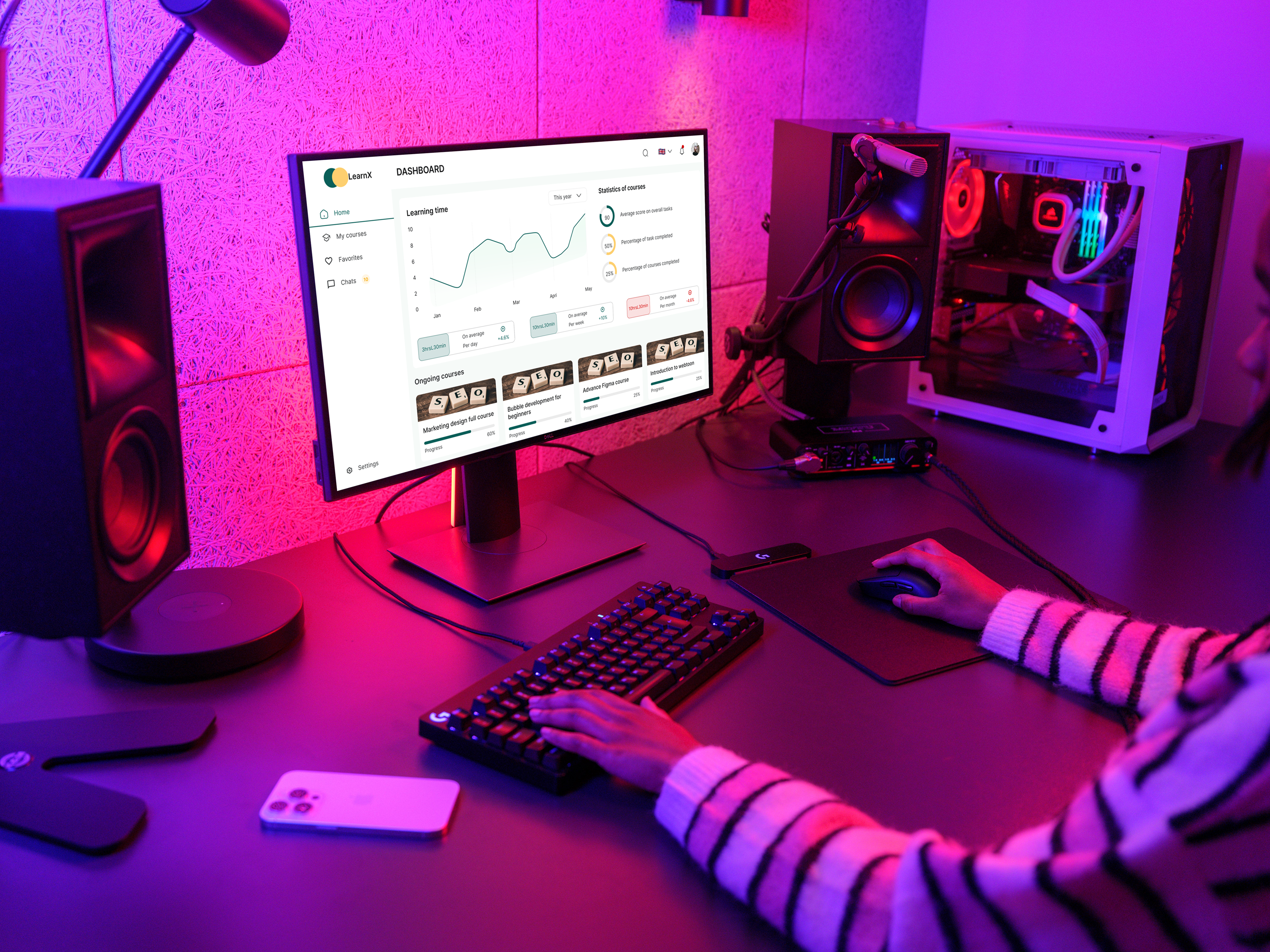
Reimagining How Students Learn
LearnX is a smart Learning Management System (LMS) designed to transform how students engage with their education. By centralising courses, communications, assignments, and achievements into one seamless platform, LearnX removes friction from the learning journey and empowers students to take charge of their progress.
Context
Learning Management System (LMS)
2023
Role
Product Designer
Duration
12 Weeks
Platform
Responsive web app
3,200 +
Students Surveyed
87%+
Engagement Uplift
4.8
Average Rating
40%
Faster Submission
(01)
Challenge
Students across institutions were struggling with fragmented learning tools.
Students across institutions were struggling with fragmented learning tools. Courses lived in one place, communications happened in another, and assignments required a completely different system. This disconnected ecosystem created confusion, disengagement, and poor academic outcomes.
"I spend more time figuring out where to go than actually learning. It's exhausting."
Core Pain-points Identified
- Courses scattered across multiple platforms with no unified view
- No direct, real-time communication between students and instructors
- Assignment submission process was clunky and error-prone
- Students had no way to track progress or celebrate achievements
- Certificates were hard to find, download, or share

(02)
Research and Insights
Understanding the Student
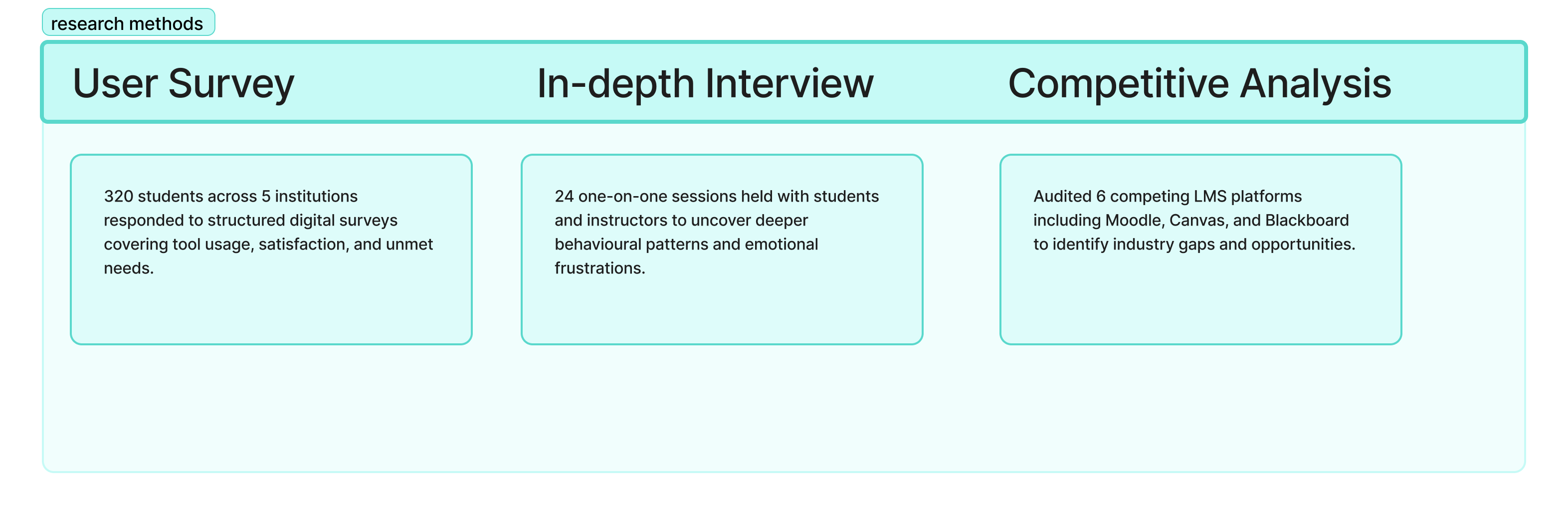
Before jumping to solutions, we invested significant time in understanding who our users are, how they think, and what frustrates them. We combined quantitative surveys with qualitative interviews and competitive audits to build a complete picture.
Key Research Insight
Research Methods
(02)
Approach & Design Framework
How We Got to the Solution
We followed a human-centred design process, moving iteratively through discovery, ideation, prototyping, and validation. Each phase fed directly into the next, ensuring our decisions were always grounded in real user needs.
Empathize
Conducted Surveys, interviews, and competitive audit to understand the full learning landscape.
Define
Synthesised findings into a clear problem statement and defined user journey maps.
Ideate
Ran ideation workshops; produced over 60 concepts before narrowing to core features.
Prototype
Built mid-to-high fidelity Figma prototypes and connected all screens for functionality modeling
Test
Tested the functional prototype with 40 potential users
(04)
Design Solution
Introducing LearnX Features
LearnX brings every aspect of the learning experience together in one intelligent platform. Here is an overview of the core features designed to make learning smarter, faster, and more enjoyable.
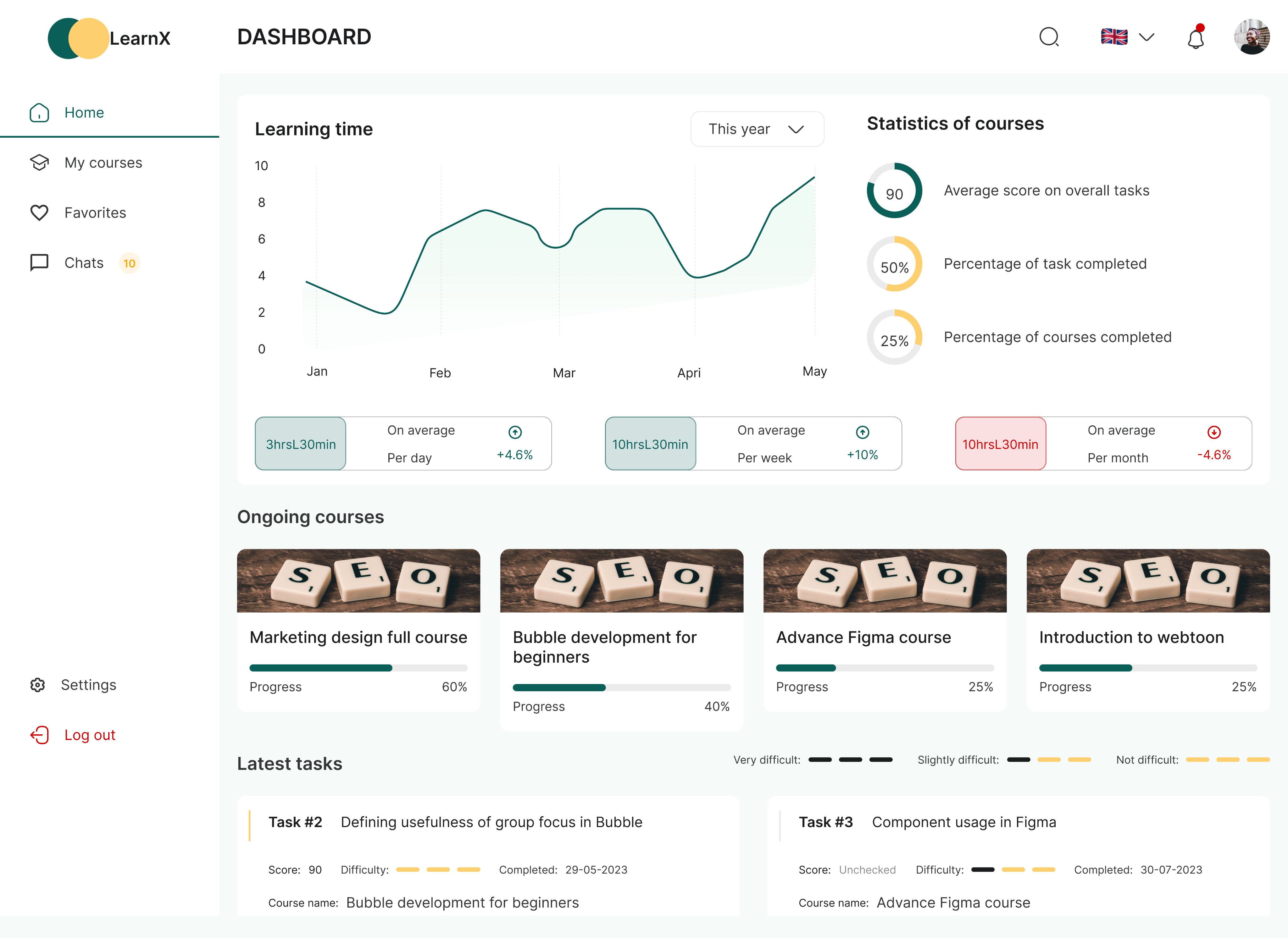
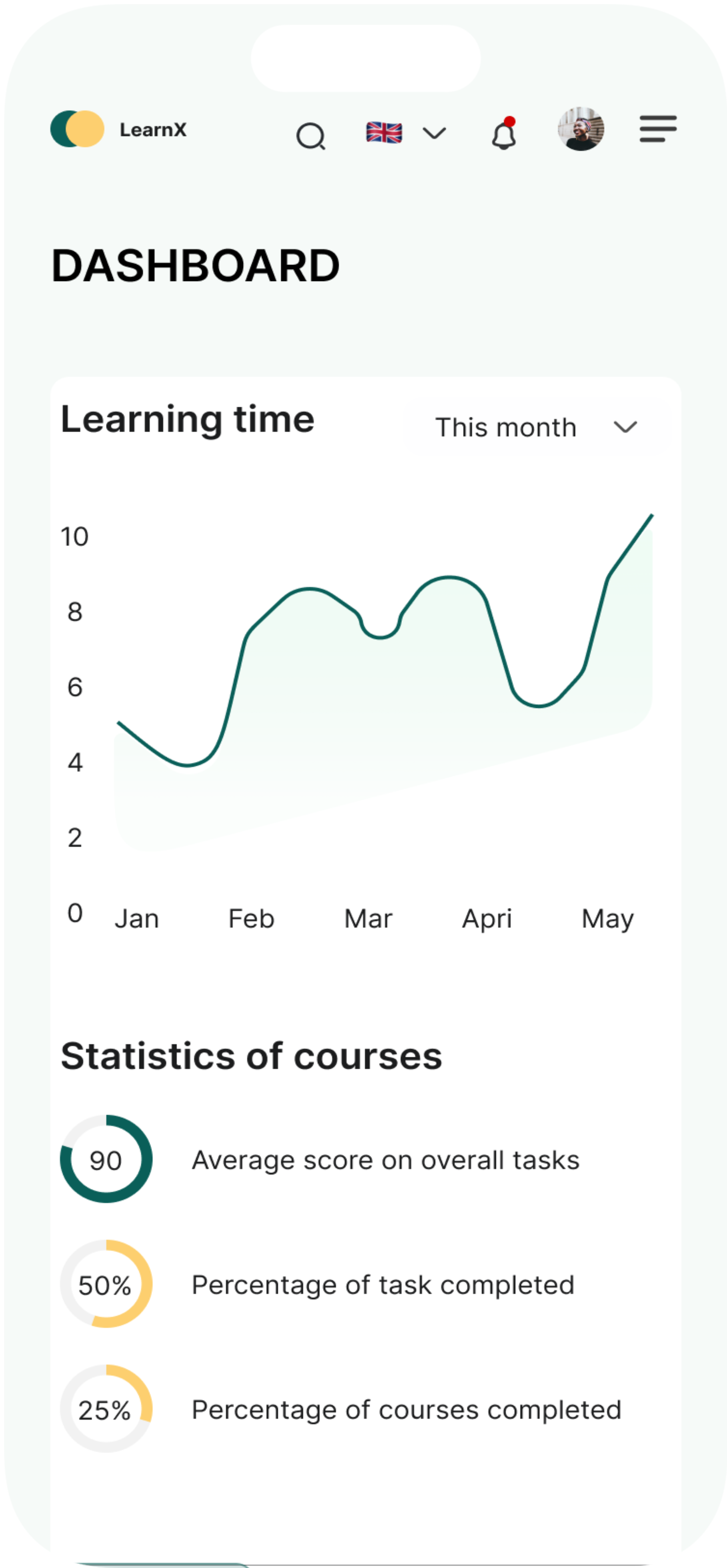
Home screen/Dashboard
Students can view and access all their ongoing courses in one place.
This is the analytics dashboard that provides subscription management and financial insights. It solves the critical problem of fragmented business data by consolidating key performance metrics, ike monthly recurring revenue , active subscriptions, churn rate, and new signups, into a single, accessible view.
The dashboard enables business owners and managers to quickly monitor revenue trends, track customer growth over time, review recent invoicing activity, and identify top-performing customers, all without having to pull reports from multiple systems or spreadsheets.
By visualizing month-over-month changes and growth patterns through charts and comparison metrics, it empowers data-driven decision-making and helps teams spot both opportunities and potential issues in their subscription business before they become significant problems.
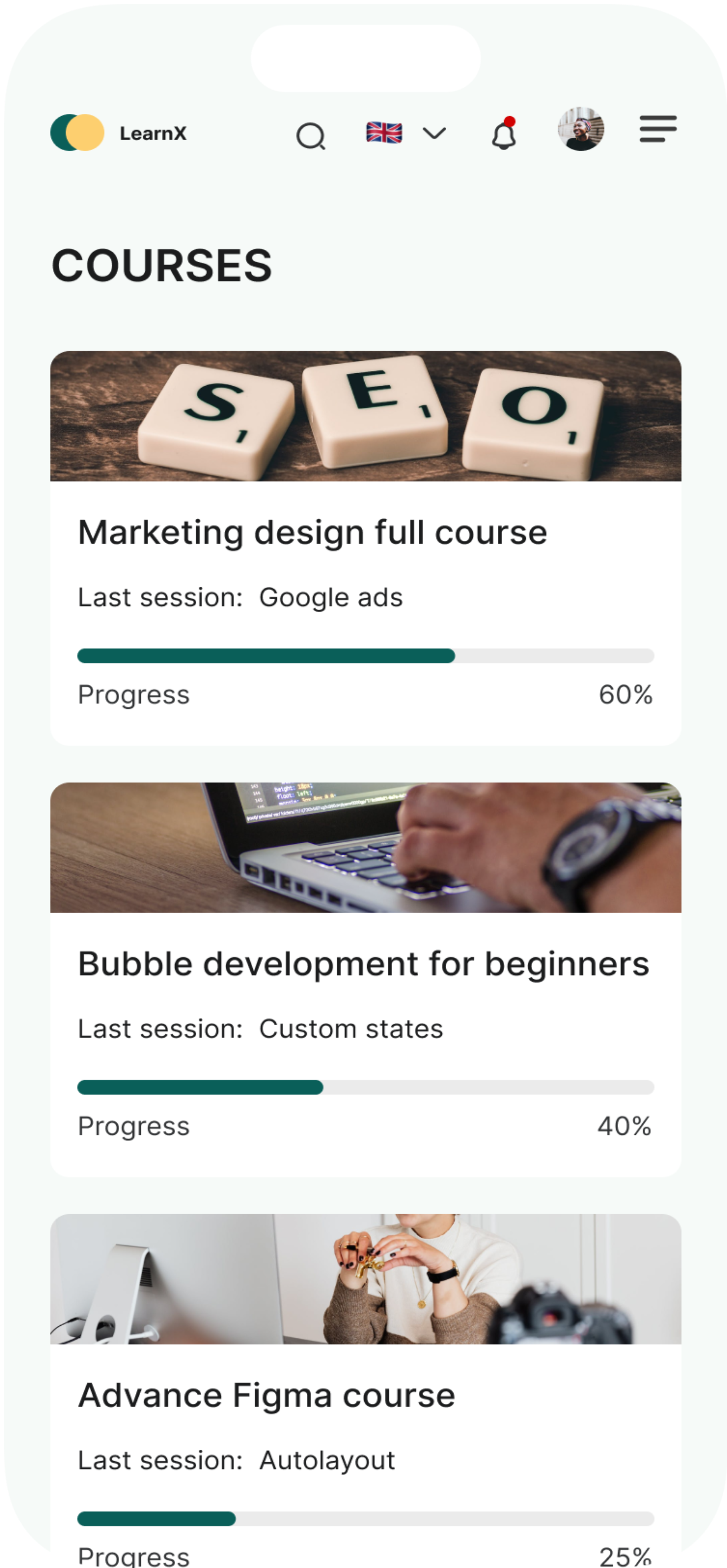
Courses
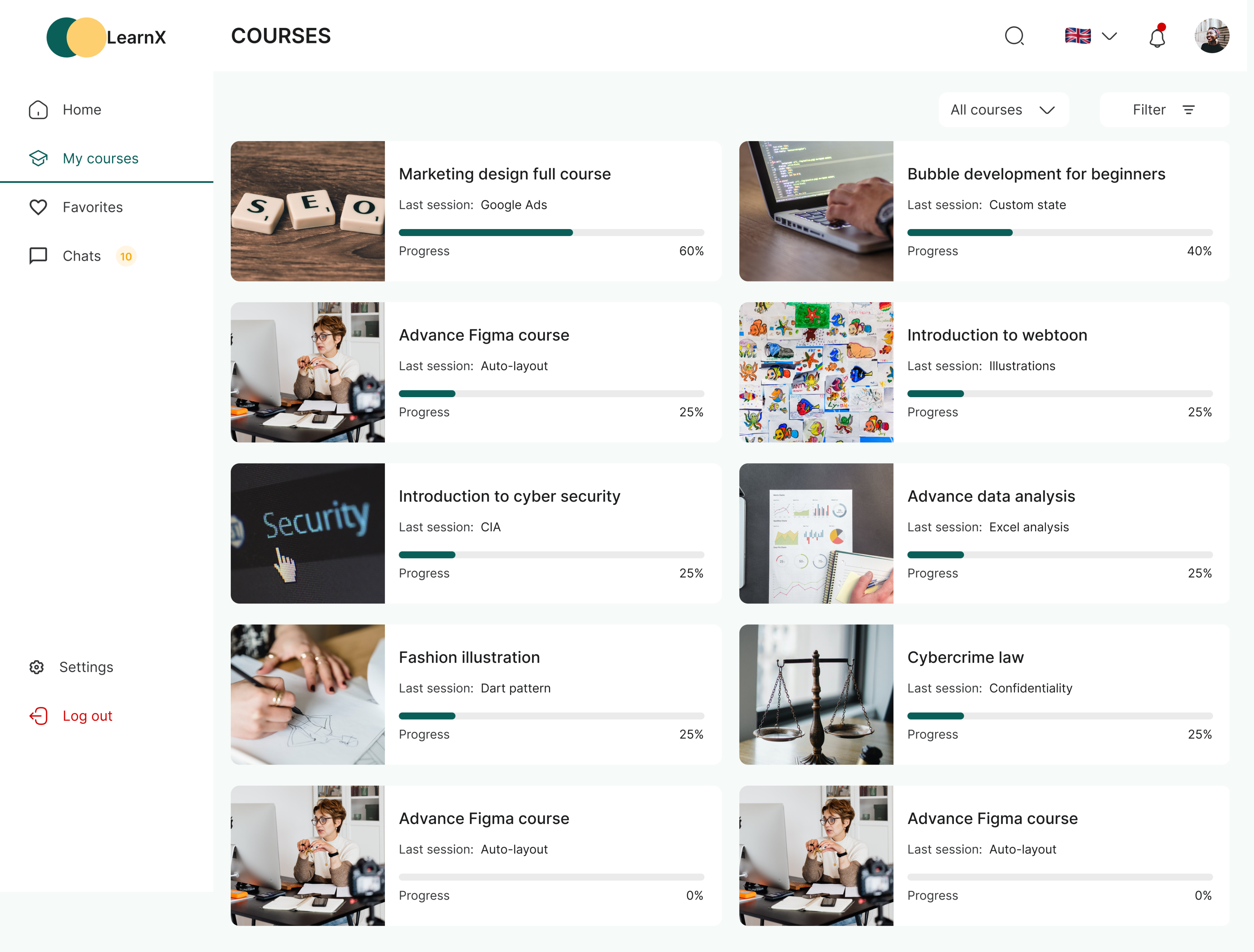
Users will be able to filter by either all courses, completed courses, ongoing courses.
The course page is designed to show users all the courses they registered for. Users will be able to filter by either all courses, completed courses, ongoing courses. They will be also be able to filter according to the kind of profession/field courses fall under. This is to make their experience fast and delightful.
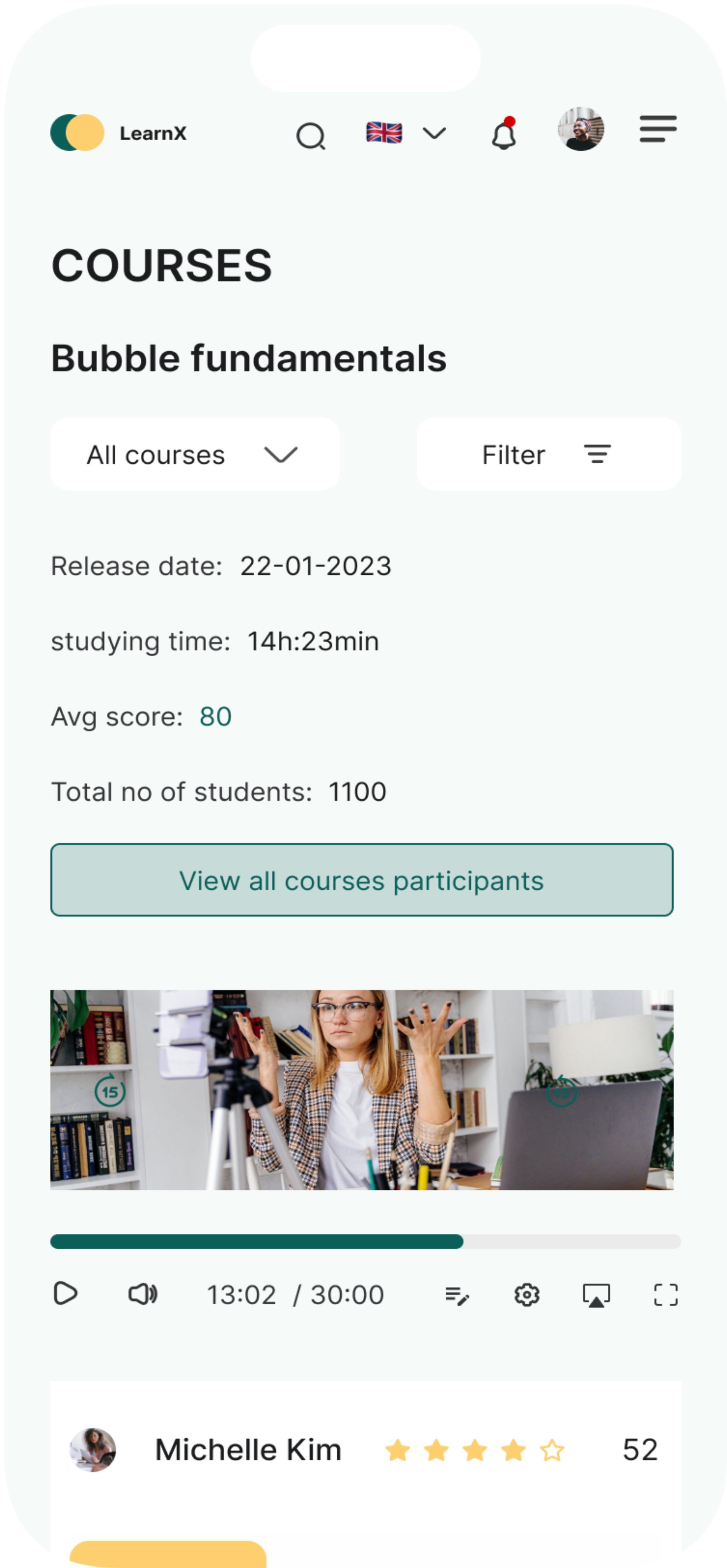
Course Detailed Page
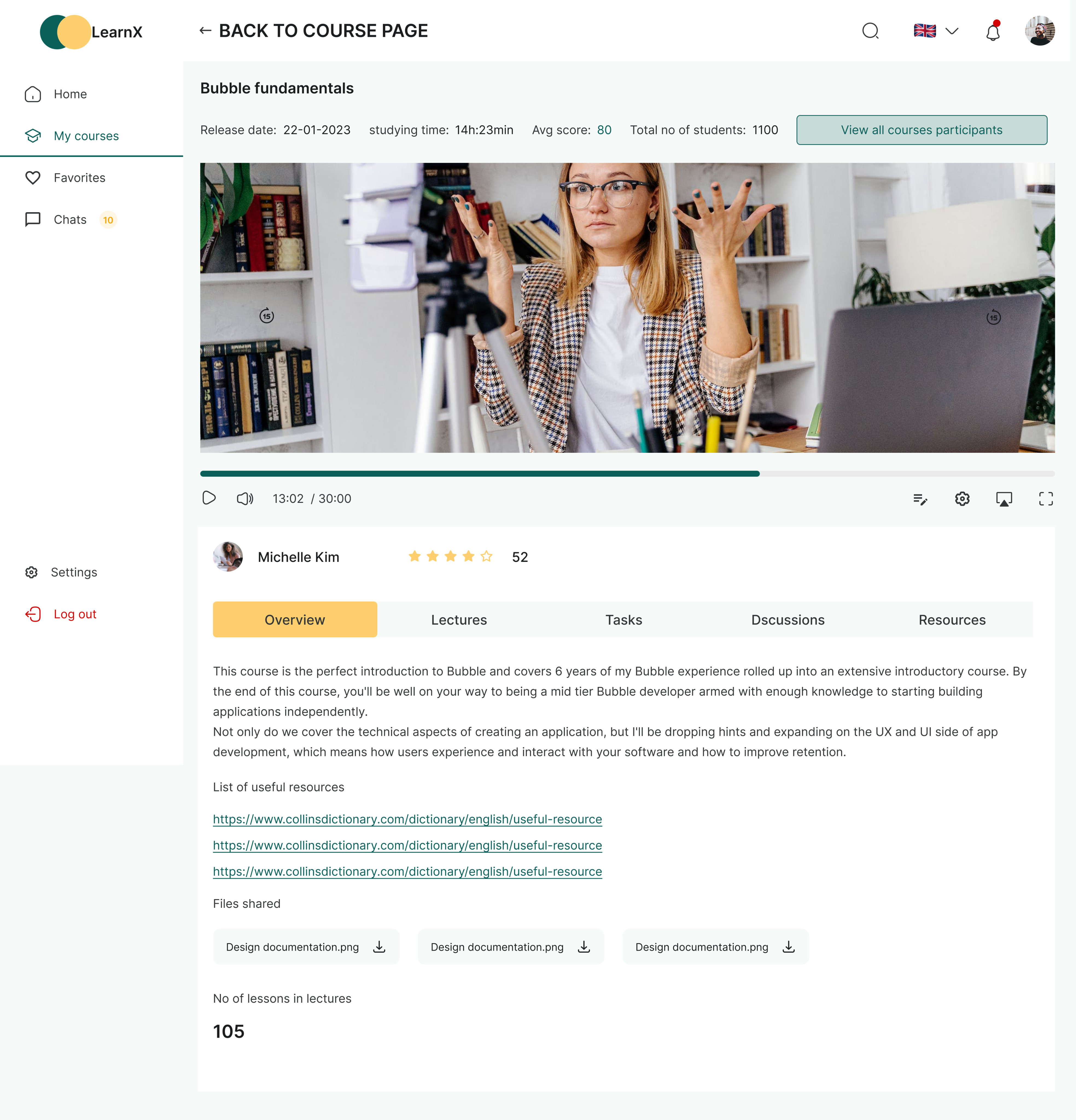
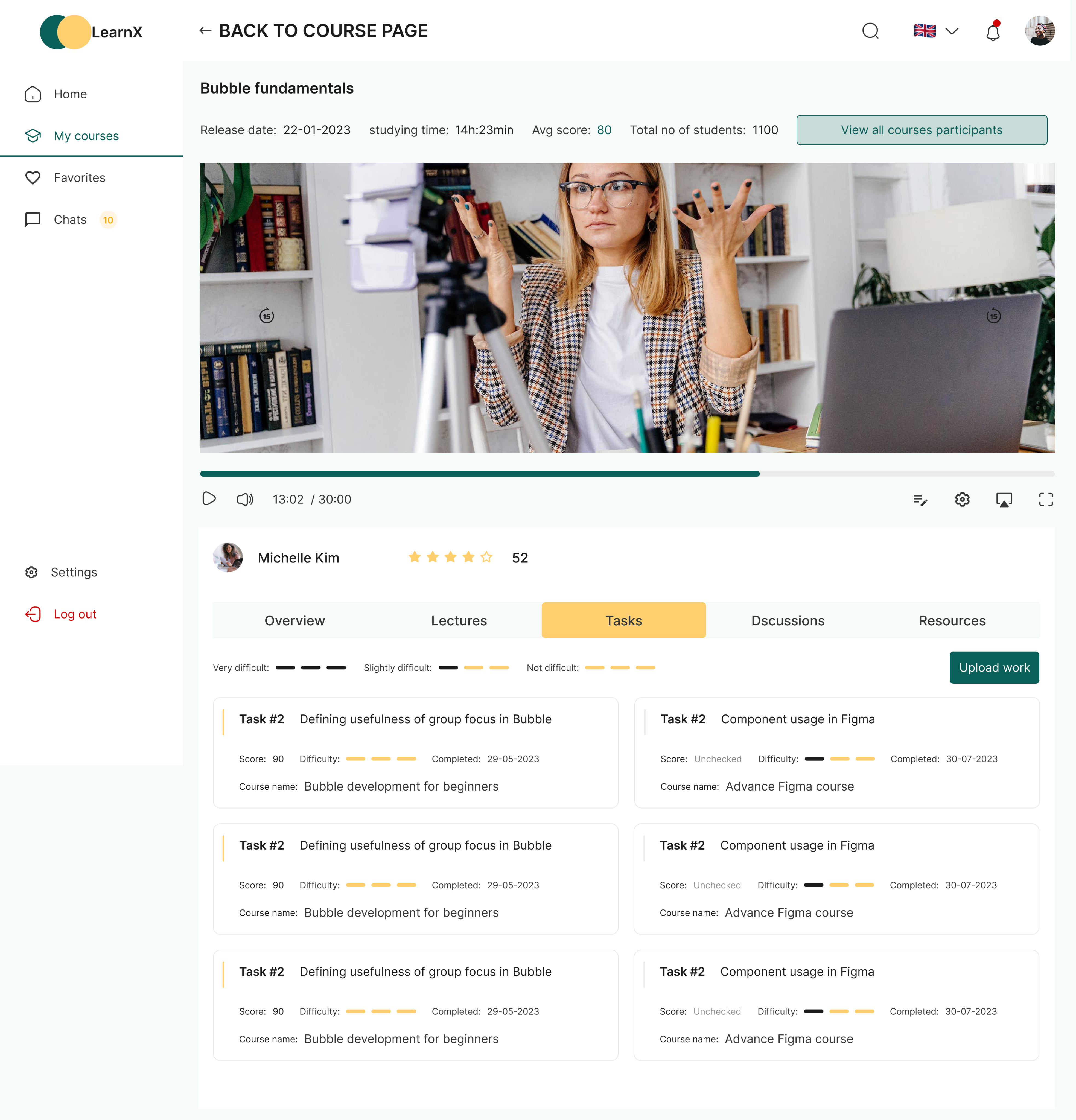
Course detail page is the screen where users will be able to take their selected course by watching the video tutorial and have access to other learning material attached to the course.
Students can upload assignments directly within the relevant course module. Instructors receive instant notifications, can annotate submissions, and push feedback back to students in real time.
Chat
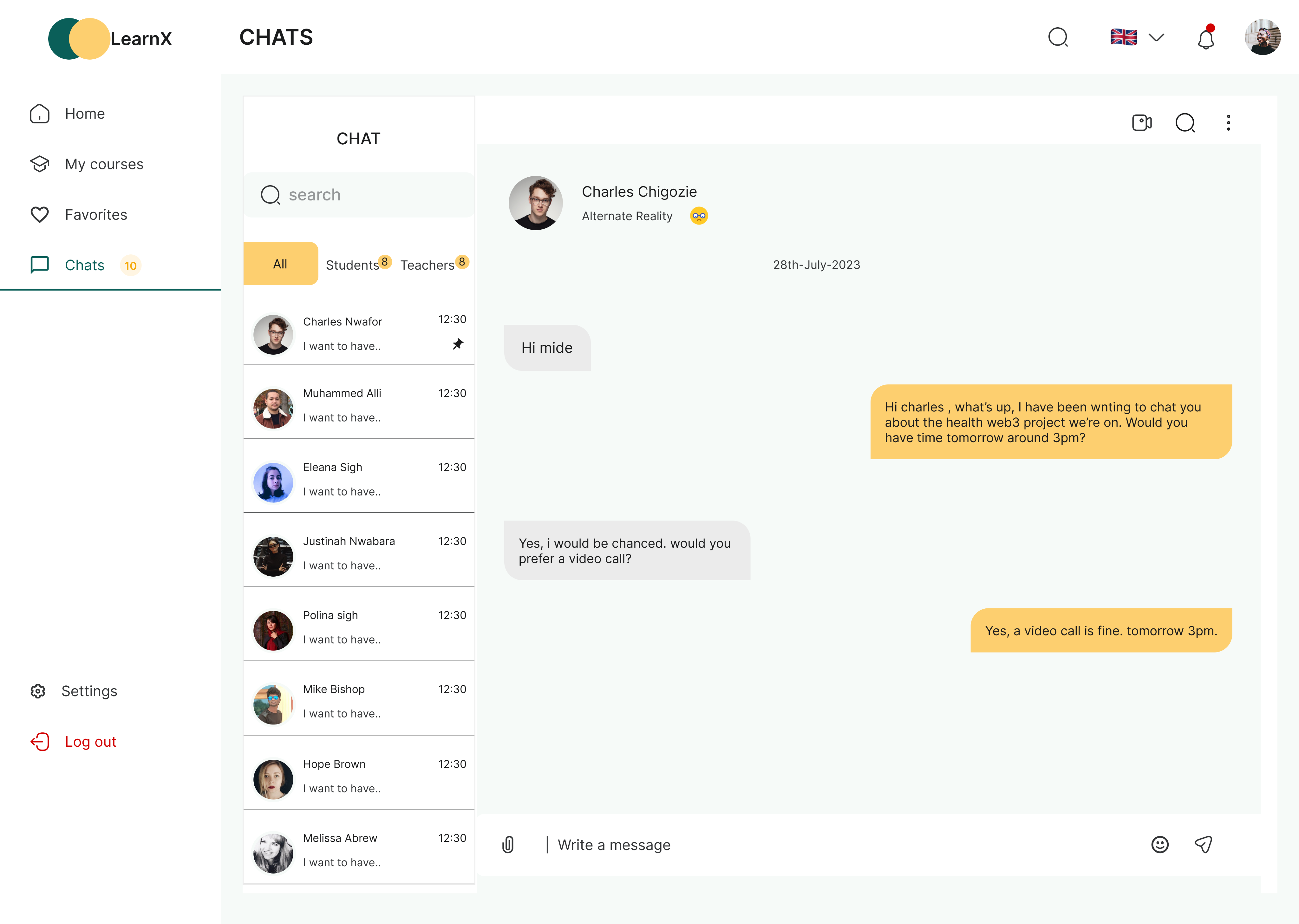
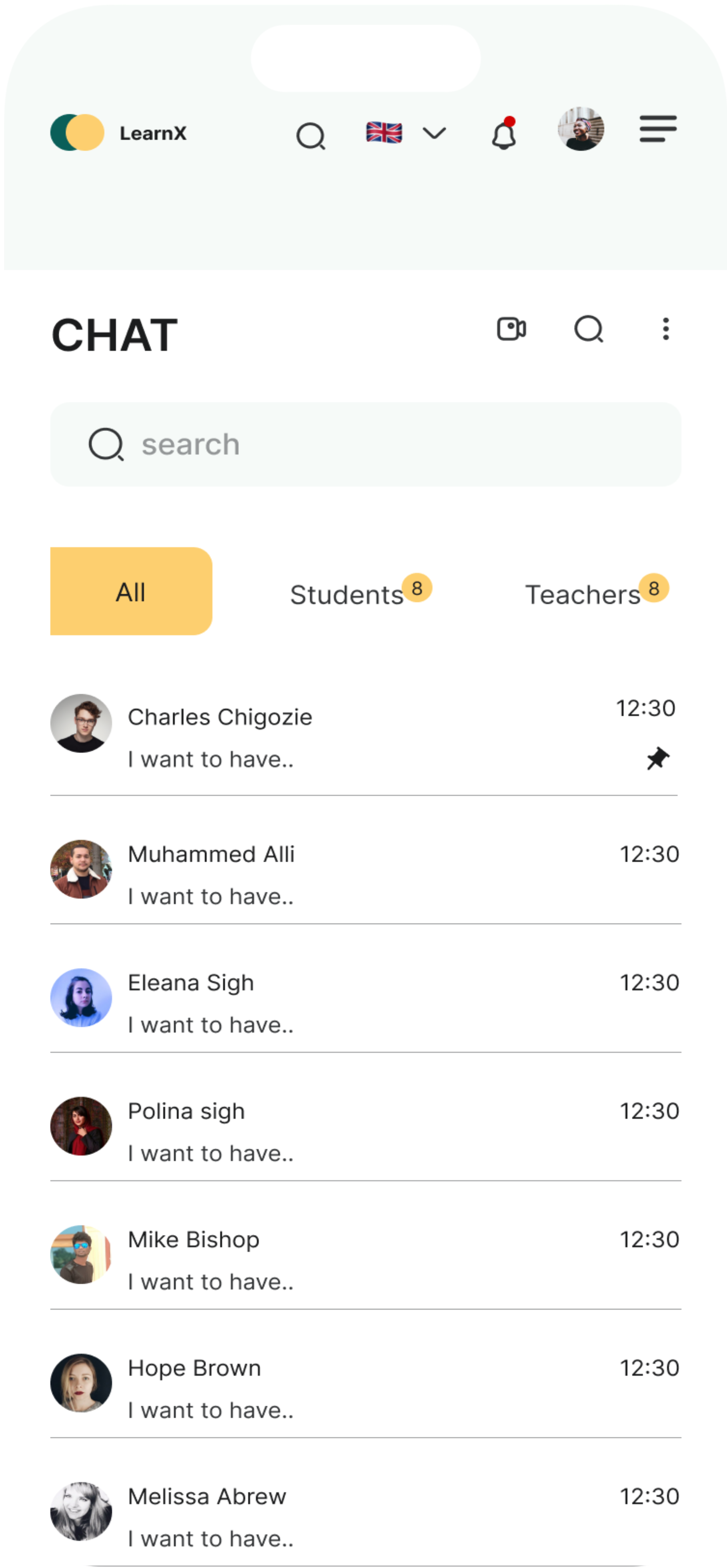
Students will be able to interact with their fellow students and instructors right on the chat screen. This is to improve collaboration and communication amongst students and instructors.
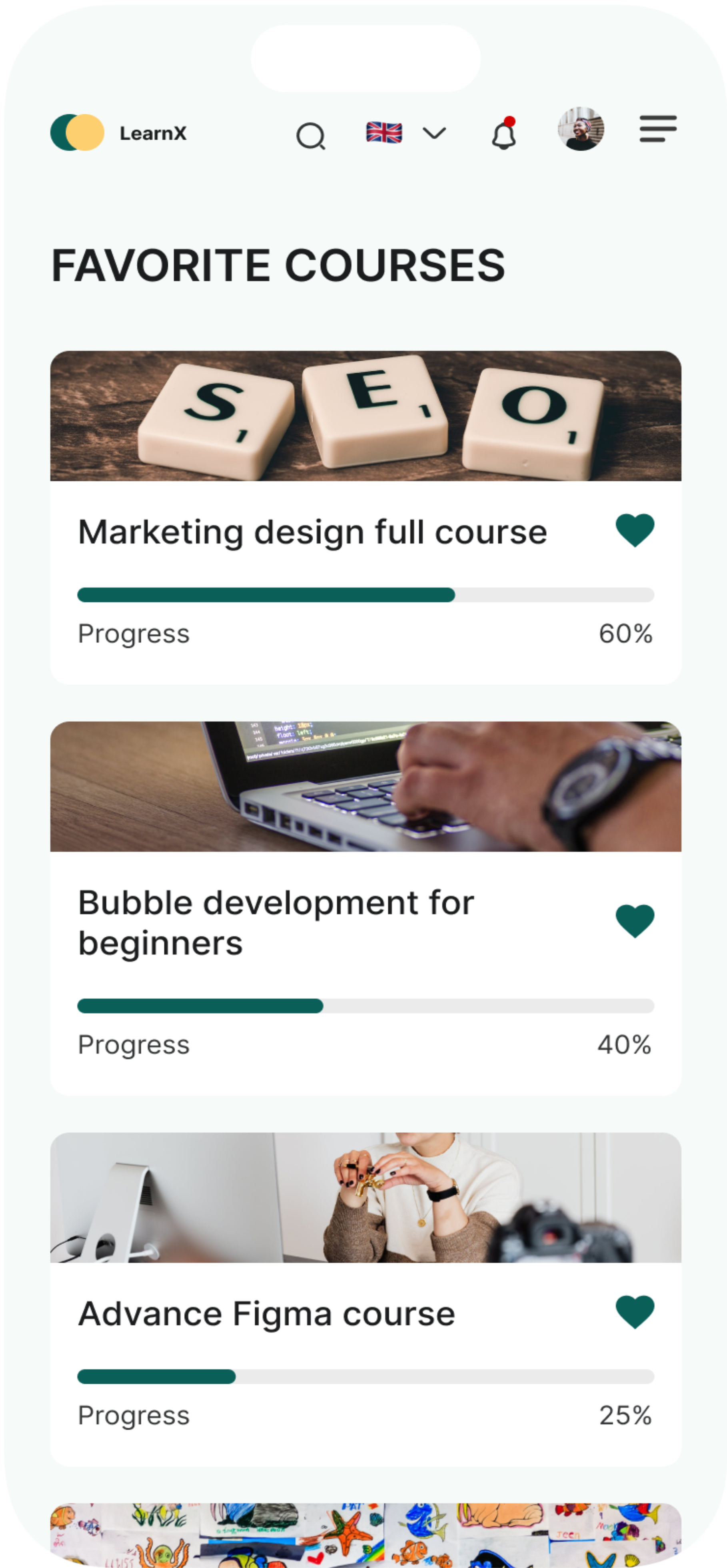
Favourite Course Page
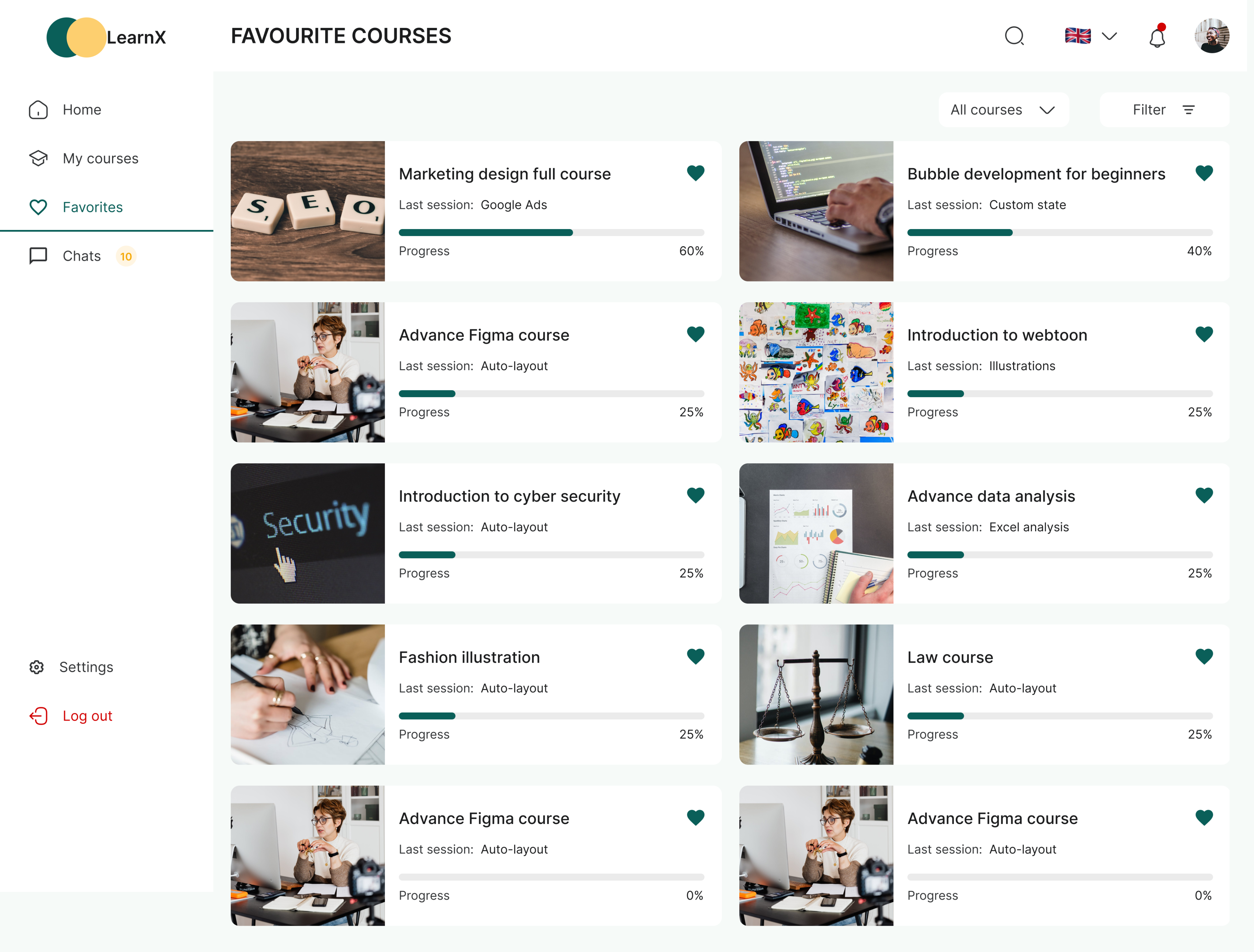
This page will show the list of all the courses users have favorited on the website. This might be the course they will want to register for later or share with others.
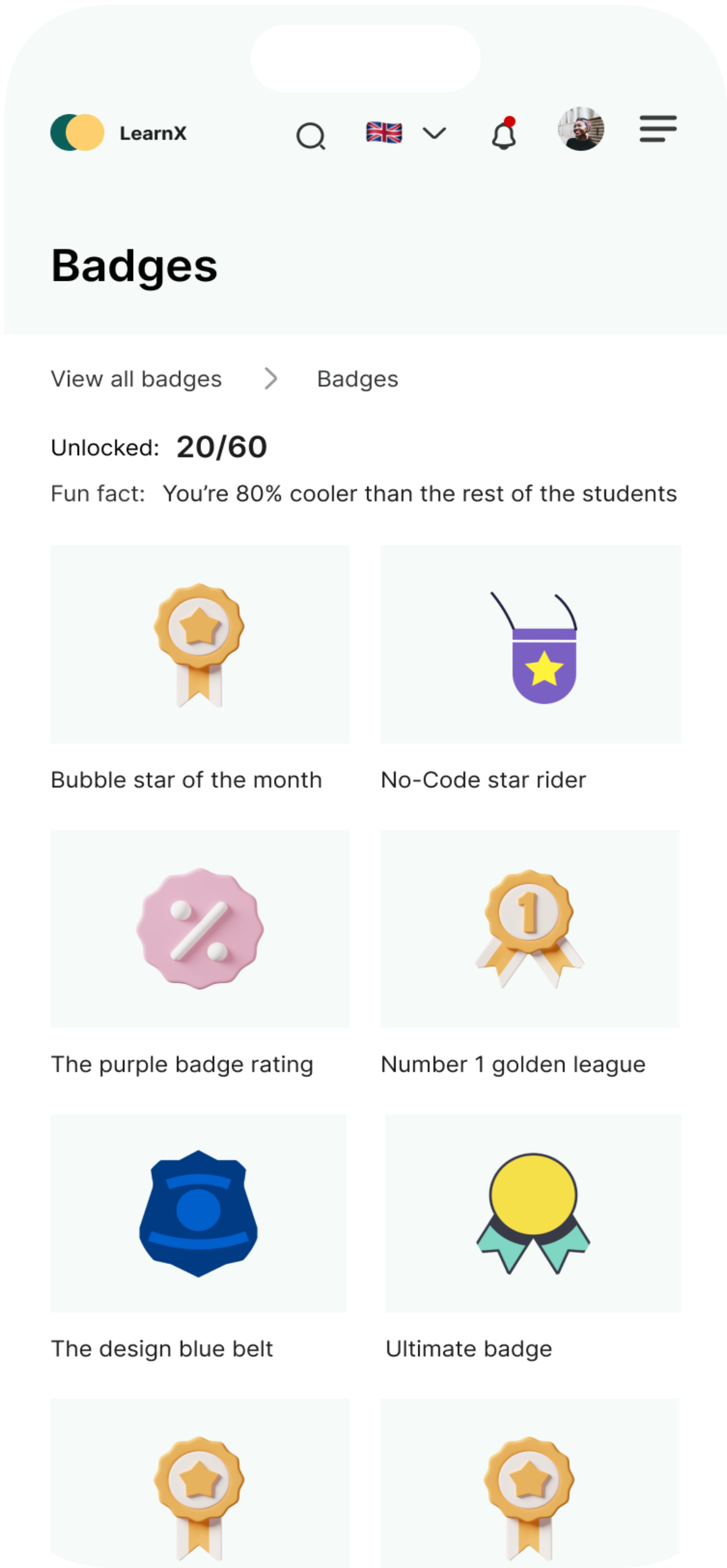
Badges
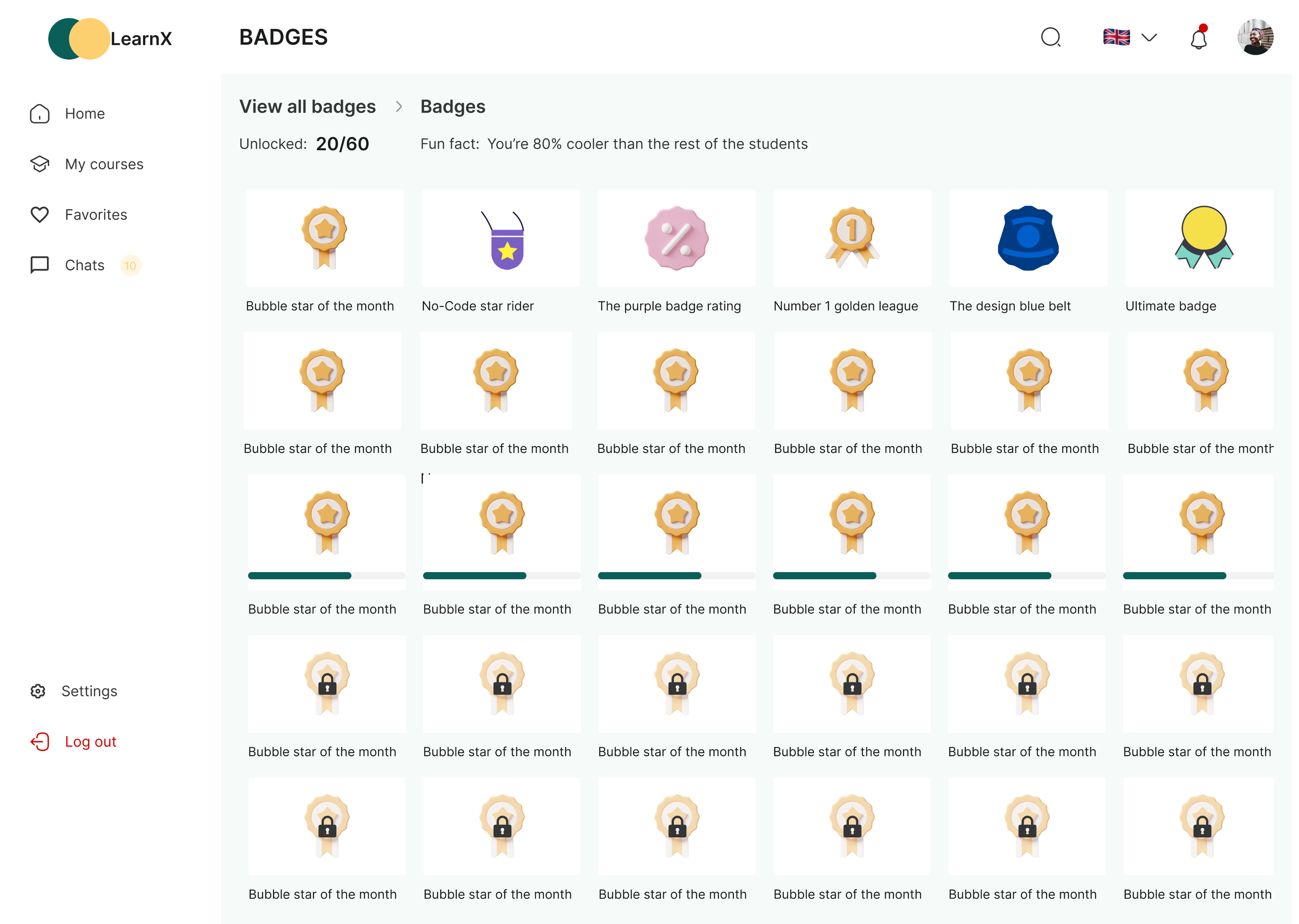
Users are to earn badges upon completing tasks on this platform. The badges page will display all the badges earned so far by the users and other badges they are about to unlock.
Participants
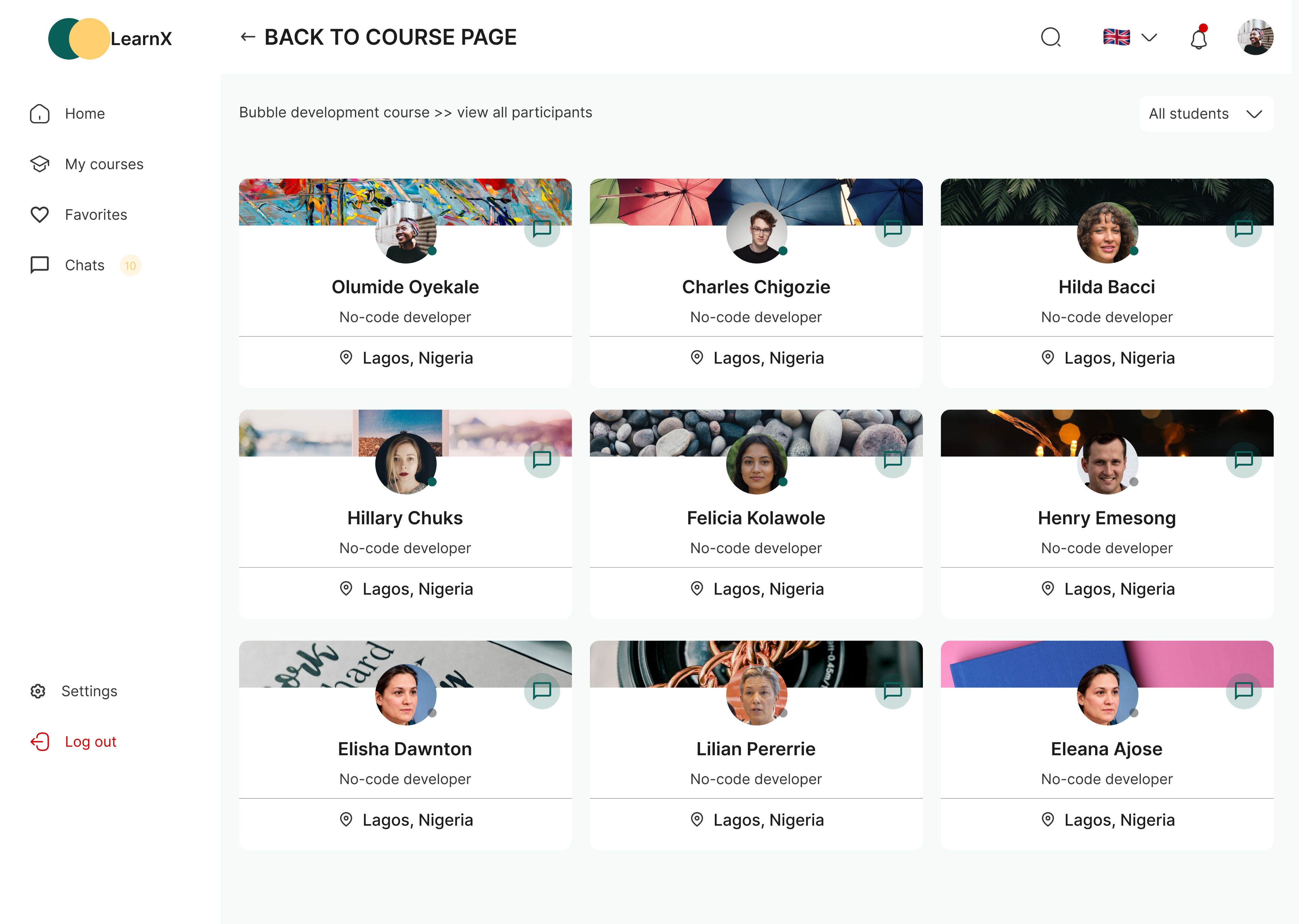
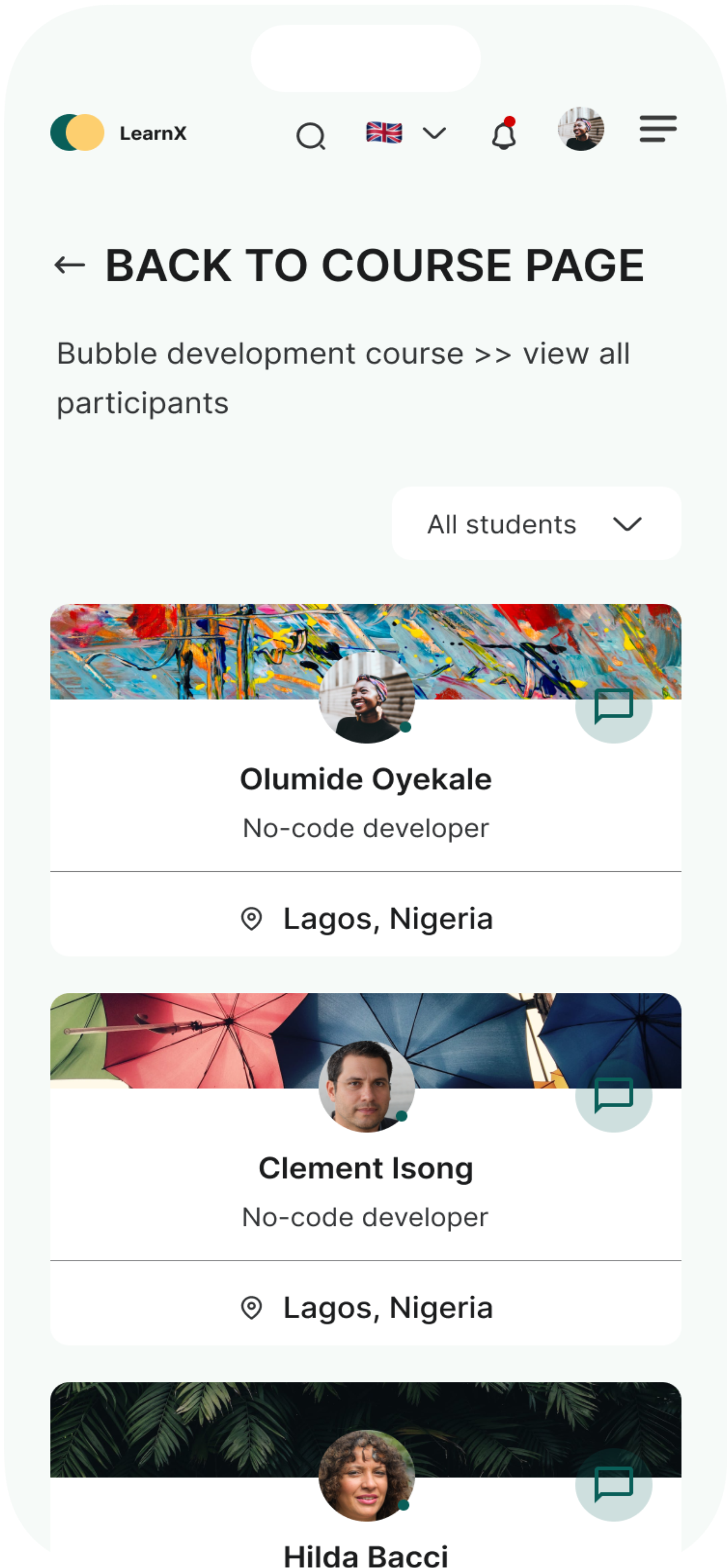
Participants page show all the students and instructors on particular course. Users can filter eiher by students or teachers and a chat icon is on each profile card to enable a user interact with their fellow student or instructor right from the participant page.
Profile
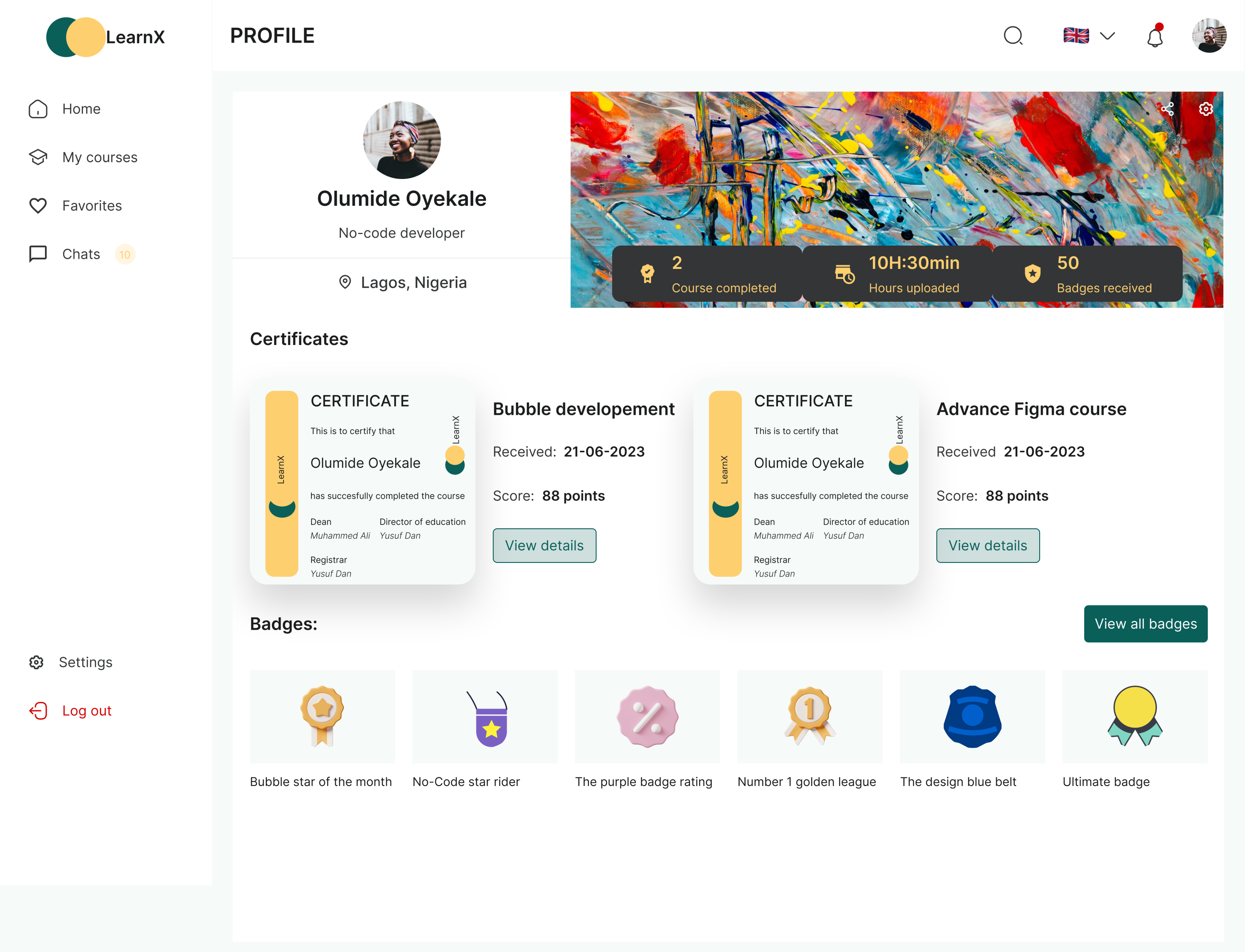
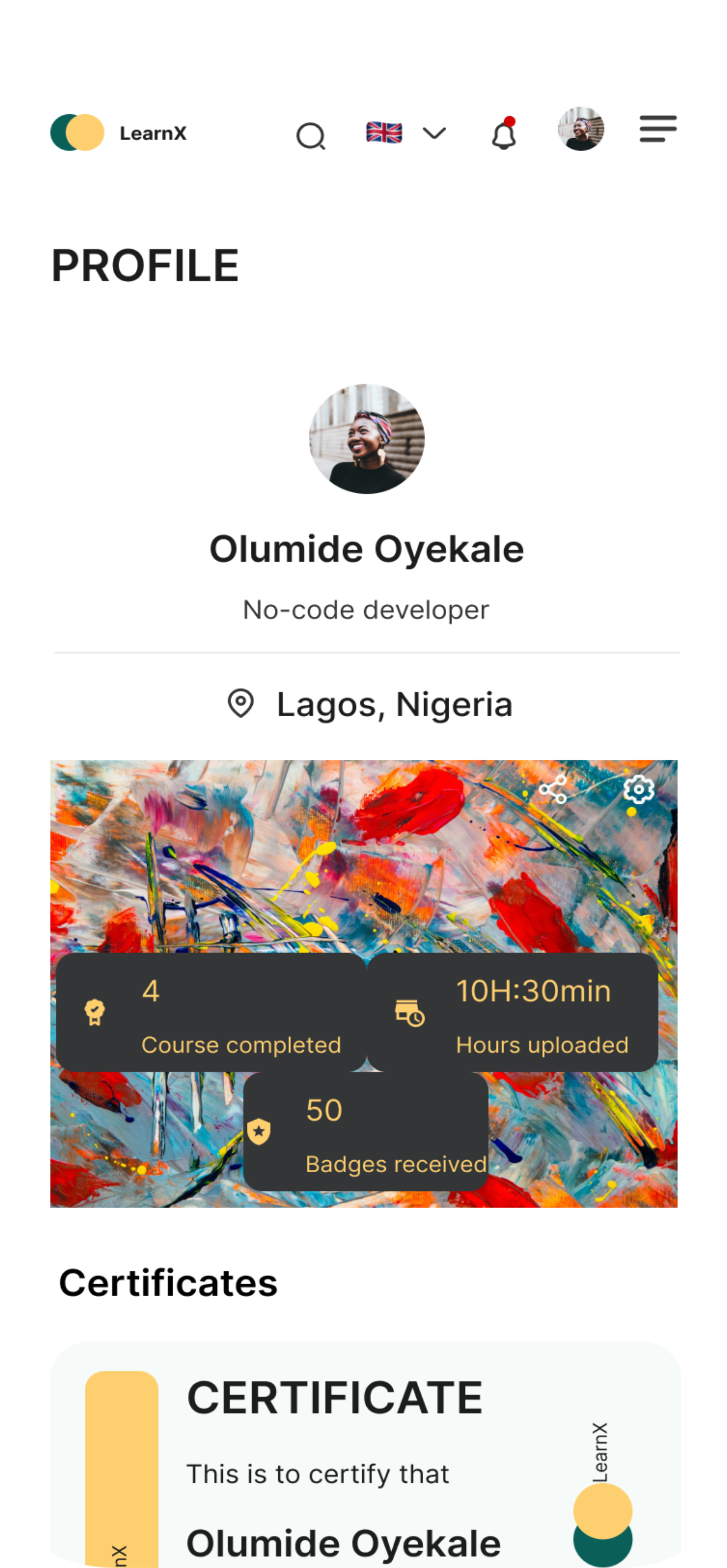
Users will be able to see their profile picture, name, location and also add a cover photo on their profile page. Their certificates and badges earned will also be display on this page.
Settings
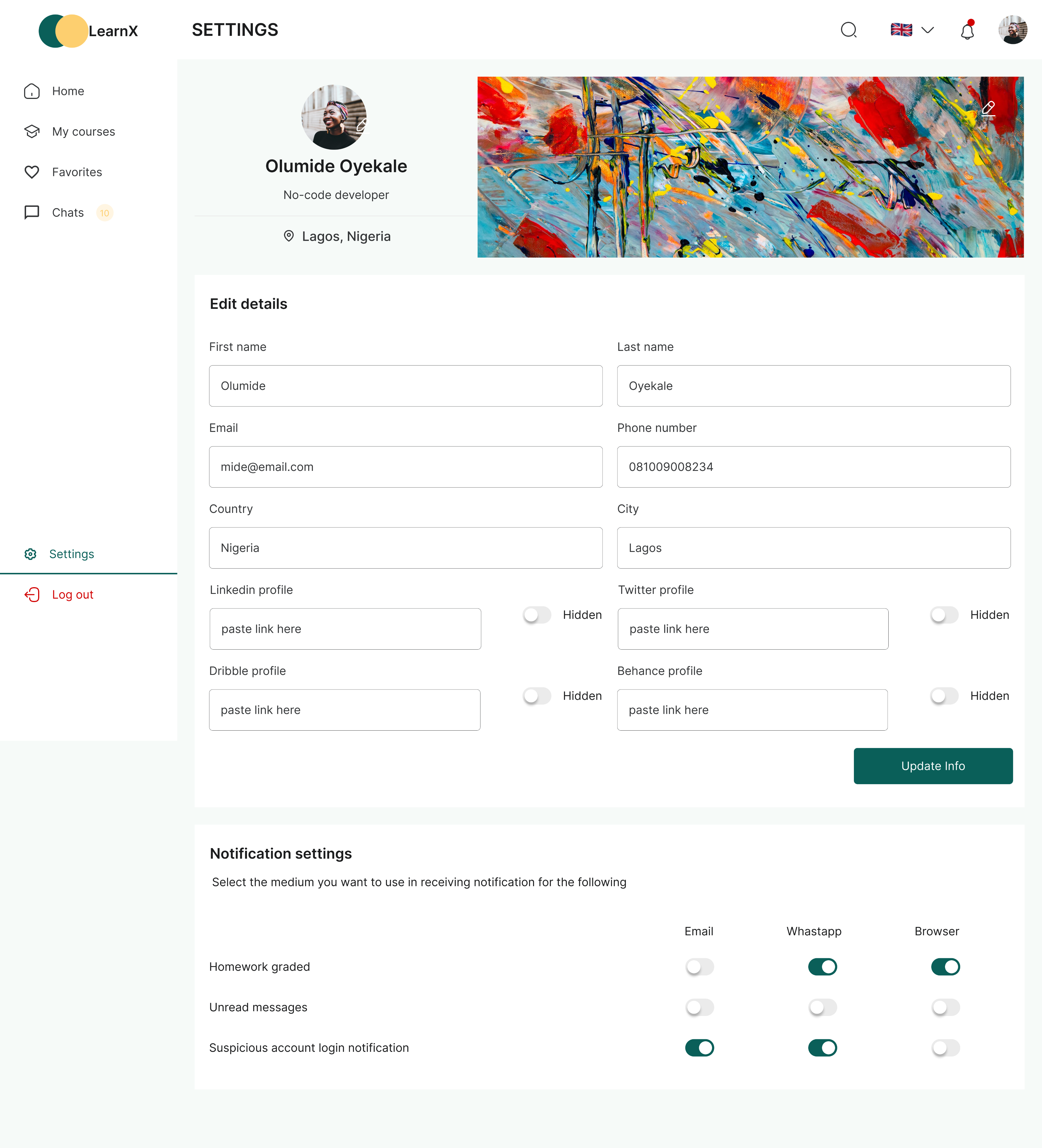
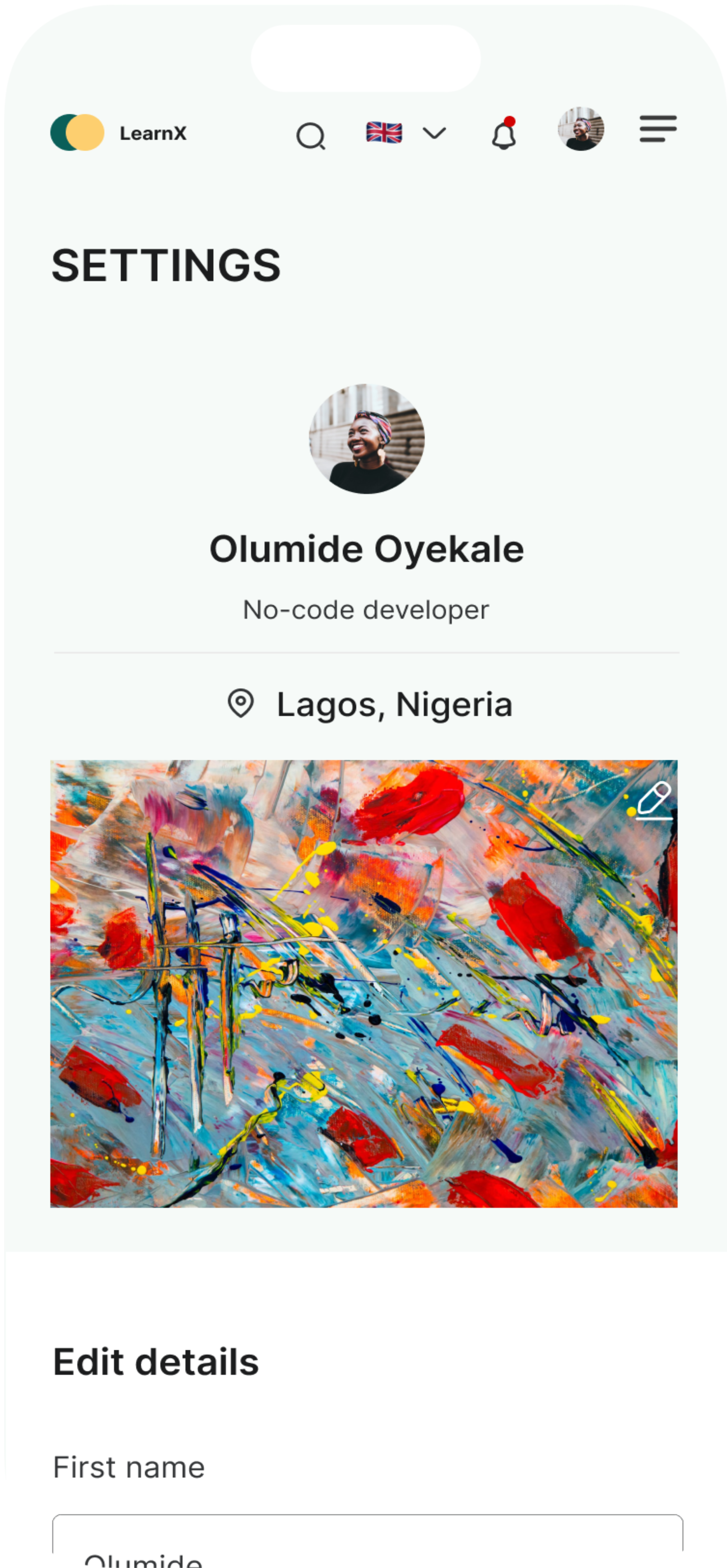
This page is to display users data, users will be able to edit and manage their data on the settings page.
There is also notification settings on this page which will enable users to be able to manage how they want to be receiving notification about LearnX and their activities on LearnX.


(05)
Usability Testing
Validating With Real Users
We conducted two rounds of moderated usability testing with 40 participants (28 students, 12 instructors) using high-fidelity Figma prototypes. Sessions were recorded, transcribed, and synthesised using affinity mapping.
40
Participants
94%
Task Success Rate
2 Rounds
of Testing
12 min
Avg. Session Length
Critical Changes Post-Testing
- Redesigned the assignment upload flow after 6 of 8 users struggled to locate the upload button, moved to a prominent floating action button
- Introduced a badge notification toast after users were unaware they had earned achievements
- Simplified the certificate page, removing 3 unnecessary steps from download to print
- Added an unread message indicator to the chat icon in the global navigation
Outcomes & Impact
Measurable Results
LearnX launched to a pilot group of 1,200 students across three institutions. Within the first 8 weeks, the data told a compelling story of improved engagement, satisfaction, and academic performance.
87%
Increase in daily active students
40%
Faster assignment submission time
3.2x
More student-instructor interactions
92%
Certificate download success rate
What students said:
"LearnX is the first platform that actually felt like it was built for students."
"Submitting assignments used to stress me out. Now it takes 30 seconds."
"The badges keep me coming back. I actually look forward to finishing modules now."
Lesson Learned
What This Project Taught Us
- Test early, test often. The biggest improvements to LearnX came not from initial ideation, but from watching real users interact with prototypes. Investing in two testing rounds paid dividends in the final product quality.
- Simplicity is earned, not assumed. Removing clutter from the interface required deliberate effort and difficult trade-offs. Every feature that made the cut had to prove its value through user testing and data.
- Collaboration between design and development is non-negotiable. Early involvement of the engineering team during ideation prevented costly rework and resulted in a more technically feasible set of features.
- Motivation is a design problem. The badge and achievement system was initially underestimated by the team. Post-launch data showed it was one of the highest-rated features, reinforcing that emotional engagement deserves as much attention as functional usability.
Next Steps
What Comes Next for LearnX
LearnX is a living product. Based on launch feedback and ongoing analytics, the following improvements are planned for future iterations:
- AI-powered personalised learning path recommendations based on student performance data
- Peer review and collaborative annotation tools for group assignments
- An instructor analytics dashboard showing engagement heatmaps and submission trends
- Offline mode to support students in low-connectivity regions
- Integration with third-party tools including Google Workspace, Zoom, and Grammarly
"LearnX isn't just a platform, it is a commitment to making quality education accessible, engaging, and human. Every design decision was made with one question in mind: does this make learning easier for the student?"

Next Project
You4me


Reimagining How Students Learn
LearnX is a smart Learning Management System (LMS) designed to transform how students engage with their education. By centralising courses, communications, assignments, and achievements into one seamless platform, LearnX removes friction from the learning journey and empowers students to take charge of their progress.
Context
Learning Management System (LMS)
2023
Role
Product Designer
Duration
12 Weeks
Platform
Responsive web app
3,200 +
Students Surveyed
87%+
Engagement Uplift
4.8
Average Rating
40%
Faster Submission
(01)
Challenge
Students across institutions were struggling with fragmented learning tools.
Students across institutions were struggling with fragmented learning tools. Courses lived in one place, communications happened in another, and assignments required a completely different system. This disconnected ecosystem created confusion, disengagement, and poor academic outcomes.
"I spend more time figuring out where to go than actually learning. It's exhausting."
Core Pain-points Identified
- Courses scattered across multiple platforms with no unified view
- No direct, real-time communication between students and instructors
- Assignment submission process was clunky and error-prone
- Students had no way to track progress or celebrate achievements
- Certificates were hard to find, download, or share
(02)
Research and Insights
Understanding the Student
Before jumping to solutions, we invested significant time in understanding who our users are, how they think, and what frustrates them. We combined quantitative surveys with qualitative interviews and competitive audits to build a complete picture.
Key Research Insight
- 78% of students used 3 or more separate platforms to manage their studies
- Only 14% felt confident knowing when assignments were due
- Over 65% had missed instructor communications due to poor notification systems
- Students reported certificates as "nearly impossible" to locate and download
- Gamification elements (like badges) were cited by 82% as motivating factors
Research Methods
(02)
Approach & Design Framework
How We Got to the Solution
We followed a human-centred design process, moving iteratively through discovery, ideation, prototyping, and validation. Each phase fed directly into the next, ensuring our decisions were always grounded in real user needs.
How We Got to the Solution
We followed a human-centred design process, moving iteratively through discovery, ideation, prototyping, and validation. Each phase fed directly into the next, ensuring our decisions were always grounded in real user needs.
Empathize
Conducted Surveys, interviews, and competitive audit to understand the full learning landscape.
Define
Synthesised findings into a clear problem statement and defined user journey maps.
Ideate
Ran ideation workshops; produced over 60 concepts before narrowing to core features.
Prototype
Built mid-to-high fidelity Figma prototypes and connected all screens for functionality modeling
Test
Tested the functional prototype with 40 potential users
(04)
Design Solution
Introducing LearnX Features
LearnX brings every aspect of the learning experience together in one intelligent platform. Here is an overview of the core features designed to make learning smarter, faster, and more enjoyable.
Introducing LearnX Features
LearnX brings every aspect of the learning experience together in one intelligent platform. Here is an overview of the core features designed to make learning smarter, faster, and more enjoyable.
Home screen/Dashboard
Students can view and access all their ongoing courses in one place.
This is the analytics dashboard that provides subscription management and financial insights. It solves the critical problem of fragmented business data by consolidating key performance metrics, ike monthly recurring revenue , active subscriptions, churn rate, and new signups, into a single, accessible view.
The dashboard enables business owners and managers to quickly monitor revenue trends, track customer growth over time, review recent invoicing activity, and identify top-performing customers, all without having to pull reports from multiple systems or spreadsheets.
By visualizing month-over-month changes and growth patterns through charts and comparison metrics, it empowers data-driven decision-making and helps teams spot both opportunities and potential issues in their subscription business before they become significant problems.
Courses
Users will be able to filter by either all courses, completed courses, ongoing courses.
This is a customer management screen that serves as the central hub for monitoring and administering all subscribers.
The screen enables quick search and filtering capabilities, making it easy to find specific customers or segment them by criteria, while the "Add Customers" button allows for seamless onboarding of new subscribers.
This unified view helps subscription businesses stay on top of their customer relationships, identify at-risk accounts (like those with "Past due" status), track revenue per customer, and take immediate action through the menu options on each row, eliminating the need to navigate through multiple systems or databases to manage subscriber data effectively.
Course Detailed Page
Course detail page is the screen where users will be able to take their selected course by watching the video tutorial and have access to other learning material attached to the course.
Students can upload assignments directly within the relevant course module. Instructors receive instant notifications, can annotate submissions, and push feedback back to students in real time.
Chat
Students will be able to interact with their fellow students and instructors right on the chat screen. This is to improve collaboration and communication amongst students and instructors.
Favourite Course Page
This page will show the list of all the courses users have favorited on the website. This might be the course they will want to register for later or share with others.
Badges
Users are to earn badges upon completing tasks on this platform. The badges page will display all the badges earned so far by the users and other badges they are about to unlock.
Participants
Participants page show all the students and instructors on particular course. Users can filter eiher by students or teachers and a chat icon is on each profile card to enable a user interact with their fellow student or instructor right from the participant page.
Profile
Users will be able to see their profile picture, name, location and also add a cover photo on their profile page. Their certificates and badges earned will also be display on this page.
Settings
This page is to display users data, users will be able to edit and manage their data on the settings page.
There is also notification settings on this page which will enable users to be able to manage how they want to be receiving notification about LearnX and their activities on LearnX.
(05)
Usability Testing
Validating With Real Users
We conducted two rounds of moderated usability testing with 40 participants (28 students, 12 instructors) using high-fidelity Figma prototypes. Sessions were recorded, transcribed, and synthesised using affinity mapping.
Validating With Real Users
We conducted two rounds of moderated usability testing with 40 participants (28 students, 12 instructors) using high-fidelity Figma prototypes. Sessions were recorded, transcribed, and synthesised using affinity mapping.
40
Participants
94%
Task Success Rate
2 Rounds
of Testing
12 min
Avg. Session Length
Critical Changes Post-Testing
- Redesigned the assignment upload flow after 6 of 8 users struggled to locate the upload button, moved to a prominent floating action button
- Introduced a badge notification toast after users were unaware they had earned achievements
- Simplified the certificate page, removing 3 unnecessary steps from download to print
- Added an unread message indicator to the chat icon in the global navigation
Outcomes & Impact
Measurable Results
LearnX launched to a pilot group of 1,200 students across three institutions. Within the first 8 weeks, the data told a compelling story of improved engagement, satisfaction, and academic performance.
87%
Increase in daily active students
40%
Faster assignment submission time
3.2x
More student-instructor interactions
92%
Certificate download success rate
What students said:
"LearnX is the first platform that actually felt like it was built for students."
"Submitting assignments used to stress me out. Now it takes 30 seconds."
"The badges keep me coming back. I actually look forward to finishing modules now."
Lesson Learned
What This Project Taught Us
- Test early, test often. The biggest improvements to LearnX came not from initial ideation, but from watching real users interact with prototypes. Investing in two testing rounds paid dividends in the final product quality.
- Simplicity is earned, not assumed. Removing clutter from the interface required deliberate effort and difficult trade-offs. Every feature that made the cut had to prove its value through user testing and data.
- Collaboration between design and development is non-negotiable. Early involvement of the engineering team during ideation prevented costly rework and resulted in a more technically feasible set of features.
- Motivation is a design problem. The badge and achievement system was initially underestimated by the team. Post-launch data showed it was one of the highest-rated features, reinforcing that emotional engagement deserves as much attention as functional usability.
Next Steps
What Comes Next for LearnX
LearnX is a living product. Based on launch feedback and ongoing analytics, the following improvements are planned for future iterations:
- AI-powered personalised learning path recommendations based on student performance data
- Peer review and collaborative annotation tools for group assignments
- An instructor analytics dashboard showing engagement heatmaps and submission trends
- Offline mode to support students in low-connectivity regions
- Integration with third-party tools including Google Workspace, Zoom, and Grammarly
"LearnX isn't just a platform, it is a commitment to making quality education accessible, engaging, and human. Every design decision was made with one question in mind: does this make learning easier for the student?"
Next Project
You4me


Reimagining How Students Learn
LearnX is a smart Learning Management System (LMS) designed to transform how students engage with their education. By centralising courses, communications, assignments, and achievements into one seamless platform, LearnX removes friction from the learning journey and empowers students to take charge of their progress.
Context
Learning Management System (LMS)
2023
Role
Product Designer
Duration
12 Weeks
Platform
Responsive web app
3,200 +
Students Surveyed
87%+
Engagement Uplift
4.8
Average Rating
40%
Faster Submission
(01)
Challenge
Students across institutions were struggling with fragmented learning tools.
Courses lived in one place, communications happened in another, and assignments required a completely different system. This disconnected ecosystem created confusion, disengagement, and poor academic outcomes.
"I spend more time figuring out where to go than actually learning. It's exhausting."
Core Pain-points Identified
- Courses scattered across multiple platforms with no unified view
- No direct, real-time communication between students and instructors
- Assignment submission process was clunky and error-prone
- Students had no way to track progress or celebrate achievements
- Certificates were hard to find, download, or share
(02)
Research and Insights
Understanding the Student
Before jumping to solutions, we invested significant time in understanding who our users are, how they think, and what frustrates them. We combined quantitative surveys with qualitative interviews and competitive audits to build a complete picture.
Key Research Insight
- 78% of students used 3 or more separate platforms to manage their studies
- Only 14% felt confident knowing when assignments were due
- Over 65% had missed instructor communications due to poor notification systems
- Students reported certificates as "nearly impossible" to locate and download
- Gamification elements (like badges) were cited by 82% as motivating factors
Research Methods
(02)
Approach & Design Framework
How We Got to the Solution
We followed a human-centred design process, moving iteratively through discovery, ideation, prototyping, and validation. Each phase fed directly into the next, ensuring our decisions were always grounded in real user needs.
Empathize
Conducted Surveys, interviews, and competitive audit to understand the full learning landscape.
Define
Synthesised findings into a clear problem statement and defined user journey maps.
Ideate
Ran ideation workshops; produced over 60 concepts before narrowing to core features.
Prototype
Built mid-to-high fidelity Figma prototypes and connected all screens for functionality modeling
Test
Tested the functional prototype with 40 potential users
(04)
Design Solution
Introducing LearnX Features
LearnX brings every aspect of the learning experience together in one intelligent platform. Here is an overview of the core features designed to make learning smarter, faster, and more enjoyable.
Home screen/Dashboard
Students can view and access all their ongoing courses in one place.
On the home screen, users can view their learning time chat to see the approximate time that are spending on their courses either per year/month/day.
The dashboard also consist of the statistics of courses where users can see their average score, percentage of task completed, e.t.c. Users will be able to also see their ongoing courses and latest tasks right on their dashboard/home page
Courses
Users will be able to filter by either all courses, completed courses, ongoing courses.
The course page is designed to show users all the courses they registered for. Users will be able to filter by either all courses, completed courses, ongoing courses. They will be also be able to filter according to the kind of profession/field courses fall under. This is to make their experience fast and delightful.
Course Detailed Page
Course detail page is the screen where users will be able to take their selected course by watching the video tutorial and have access to other learning material attached to the course.
Students can upload assignments directly within the relevant course module. Instructors receive instant notifications, can annotate submissions, and push feedback back to students in real time.
Chat
Students will be able to interact with their fellow students and instructors right on the chat screen. This is to improve collaboration and communication amongst students and instructors.
Favourite Course Page
This page will show the list of all the courses users have favorited on the website. This might be the course they will want to register for later or share with others.
Badges
Users are to earn badges upon completing tasks on this platform. The badges page will display all the badges earned so far by the users and other badges they are about to unlock.
Participants
Participants page show all the students and instructors on particular course. Users can filter eiher by students or teachers and a chat icon is on each profile card to enable a user interact with their fellow student or instructor right from the participant page.
Profile
Users will be able to see their profile picture, name, location and also add a cover photo on their profile page. Their certificates and badges earned will also be display on this page.
Settings
This page is to display users data, users will be able to edit and manage their data on the settings page.
There is also notification settings on this page which will enable users to be able to manage how they want to be receiving notification about LearnX and their activities on LearnX.
(05)
Usability Testing
Validating With Real Users
We conducted two rounds of moderated usability testing with 40 participants (28 students, 12 instructors) using high-fidelity Figma prototypes. Sessions were recorded, transcribed, and synthesised using affinity mapping.
40
Participants
94%
Task Success Rate
2 Rounds
of Testing
12 min
Avg. Session Length
Critical Changes Post-Testing
- Redesigned the assignment upload flow after 6 of 8 users struggled to locate the upload button, moved to a prominent floating action button
- Introduced a badge notification toast after users were unaware they had earned achievements
- Simplified the certificate page, removing 3 unnecessary steps from download to print
- Added an unread message indicator to the chat icon in the global navigation
Outcomes & Impact
Measurable Results
LearnX launched to a pilot group of 1,200 students across three institutions. Within the first 8 weeks, the data told a compelling story of improved engagement, satisfaction, and academic performance.
87%
Increase in daily active students
40%
Faster assignment submission time
3.2x
More student-instructor interactions
92%
Certificate download success rate
What students said:
"LearnX is the first platform that actually felt like it was built for students."
"Submitting assignments used to stress me out. Now it takes 30 seconds."
"The badges keep me coming back. I actually look forward to finishing modules now."
Lesson Learned
What This Project Taught Us
- Test early, test often. The biggest improvements to LearnX came not from initial ideation, but from watching real users interact with prototypes. Investing in two testing rounds paid dividends in the final product quality.
- Simplicity is earned, not assumed. Removing clutter from the interface required deliberate effort and difficult trade-offs. Every feature that made the cut had to prove its value through user testing and data.
- Collaboration between design and development is non-negotiable. Early involvement of the engineering team during ideation prevented costly rework and resulted in a more technically feasible set of features.
- Motivation is a design problem. The badge and achievement system was initially underestimated by the team. Post-launch data showed it was one of the highest-rated features, reinforcing that emotional engagement deserves as much attention as functional usability.
Next Steps
What Comes Next for LearnX
LearnX is a living product. Based on launch feedback and ongoing analytics, the following improvements are planned for future iterations:
- AI-powered personalised learning path recommendations based on student performance data
- Peer review and collaborative annotation tools for group assignments
- An instructor analytics dashboard showing engagement heatmaps and submission trends
- Offline mode to support students in low-connectivity regions
- Integration with third-party tools including Google Workspace, Zoom, and Grammarly
"LearnX isn't just a platform, it is a commitment to making quality education accessible, engaging, and human. Every design decision was made with one question in mind: does this make learning easier for the student?"
Next Project
You4me
