

Menu
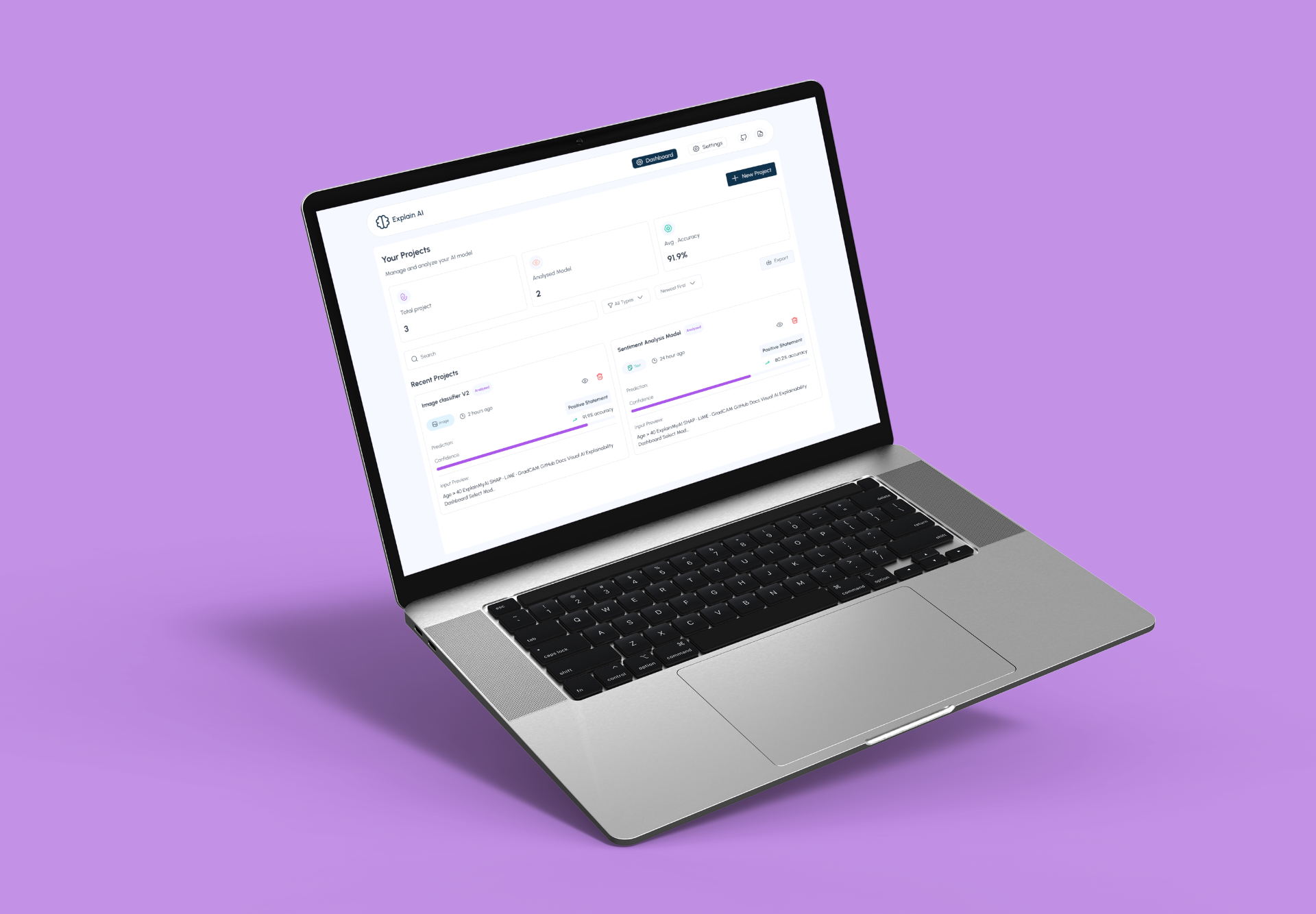
Models make decisions, but humans don’t understand why.
As AI adoption increases across sensitive domains, finance, healthcare, HR, teams need more than accuracy scores. They need clarity, confidence, and accountability.
Context
AI product Web app
2025 sep - oct
Role
Product Designer
Platform
Desktop
(01)
Challenge
Designing a single AI explainability experience that works for both technical and non-technical users, without overwhelming either.
Designing ExplainAI meant making complex machine-learning decisions understandable without oversimplifying them.The product had to serve technical teams and non-technical stakeholders within the same interface.We needed to balance depth and clarity so users could quickly assess trust and confidence.The challenge was reducing cognitive overload while still preserving meaningful explanations.Ultimately, the goal was to turn opaque AI outputs into decisions people could confidently rely on.

(02)
Approach & Design Framework
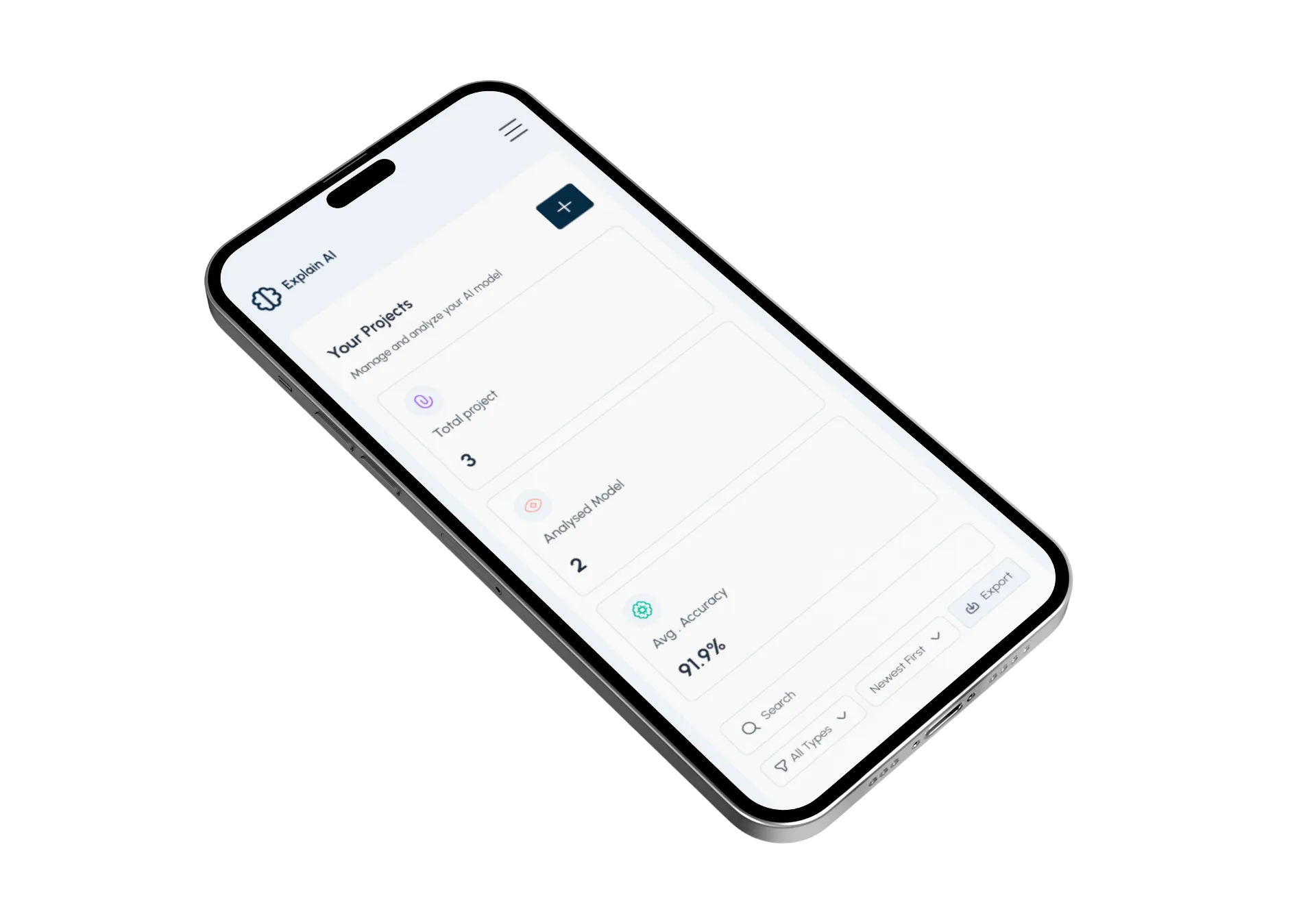
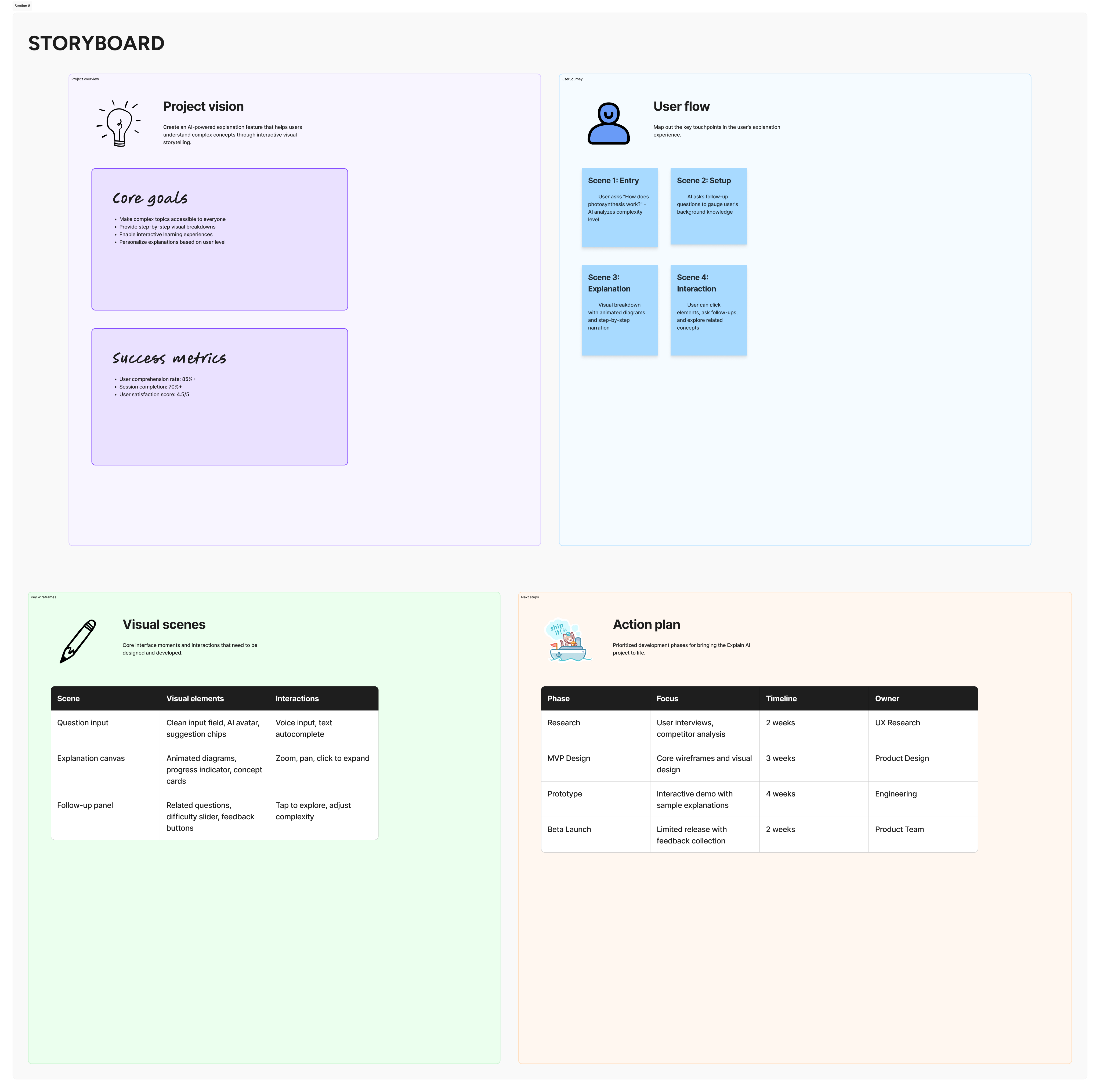
Human-Centered framework allowed the team to design an explainability system that feels calm, trustworthy, and actionable, without sacrificing technical integrity.
Human-Centered AI framework grounded in Jobs-to-Be-Done (JTBD), paired with an iterative, insight-driven design process, starting from understanding users’ trust and clarity gaps with AI decisions, translating those into explainability jobs, prototyping explanation patterns, and refining them through feedback to make AI outputs transparent and actionable for non-technical users.
(03)
Research and Insights
Clarity Builds Trust in Complex Systems
We used a mixed-method research approach, combining qualitative and evaluative methods to understand both user needs and system constraints.
Methods used:
- Stakeholder interviews with product managers, ML engineers, and compliance-facing team members
- User conversations with non-technical stakeholders who consume AI outputs (founders, ops, analysts)
- Competitive analysis of existing AI explainability and monitoring tools
- Workflow mapping with engineers to understand how models are evaluated and validated internally
- Internal data review of past model predictions, confidence scores, and failure cases
Key Insights
- Users don’t trust what they can’t explain
Stakeholders were less concerned about raw accuracy and more concerned about whether they could confidently justify a model’s decision to others.
- Raw metrics create anxiety, not clarity
Probability scores and feature weights confused non-technical users when shown without context or interpretation.
- Confidence is a perception problem, not just a data problem
Users formed trust based on visual cues, consistency, and clarity, often before reading any detailed explanation.
- Different users ask different questions at different moments
Founders want fast reassurance, while engineers want depth only when investigating anomalies.
- Existing tools optimize for experts, not shared understanding
Most explainability platforms assume ML knowledge, leaving product and business teams out of the conversation.

(04)
Design Solution
The final design translates complex AI behavior into clear, confidence-building insights by prioritizing human understanding over raw technical output.
The final design translates complex AI behavior into clear, confidence-building insights by prioritizsng human understanding over raw technical output.
The dashboard surfaces high-level system health and trust signals first, allowing users to quickly assess model reliability before diving deeper when needed.
Through progressive disclosure, visual hierarchy, and human-readable explanations, the interface supports both fast decision-making for leaders and deeper investigation for technical teams.
Every interaction was designed to reduce cognitive load, reinforce trust, and make AI decisions feel transparent, defensible, and actionable in real-world product environments.
The Dashboard
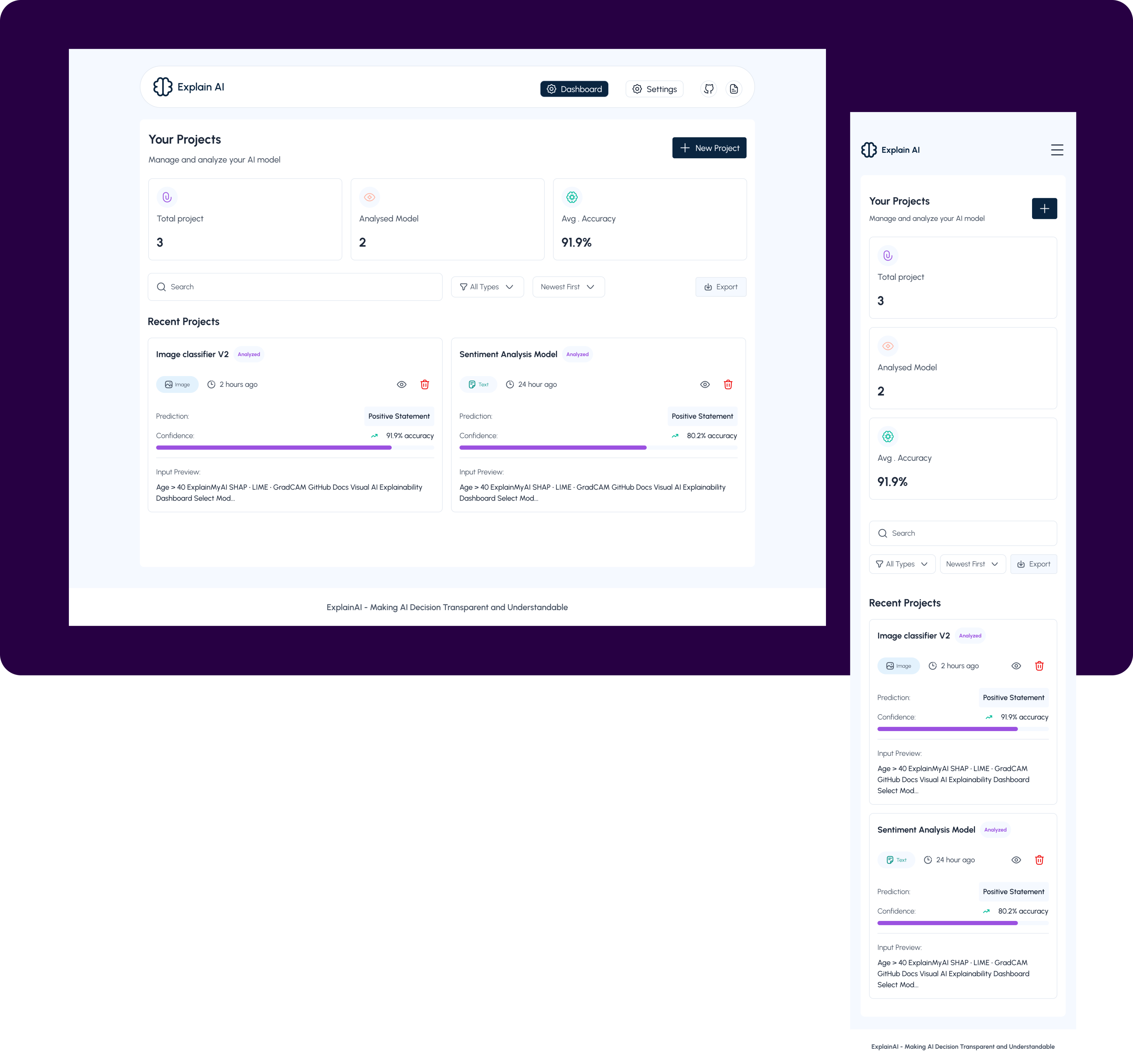
This dashboard serves as the control center for monitoring, understanding, and trusting AI models. It is designed to give users immediate clarity on model health, recent activity, and decision confidence, without requiring technical expertise. Every element answers a core question a user would naturally ask when interacting with AI systems.
- Top Navigation (Context & Orientation)
UX intent: Help users instantly understand where they are and what they can do next.
- Your Projects Section (System Status at a Glance)
UX intent: Reduce anxiety by answering “Is everything okay?” immediately.
- New Project Button
UX intent: Encourage action without overwhelming the user.
- Search, Filter & Sort Controls (Scalability)
UX intent: Design for scale without adding visual clutter.
- Recent Projects Section (Where Understanding Happens)
UX intent: Build immediate confidence that the model is active and reviewed.
- Recent Projects Section (Where Understanding Happens)
UX intent: Build immediate confidence that the model is active and reviewed.
- Prediction Output
UX intent: Make AI decisions understandable to non-technical users.
- Confidence Visualization
UX intent: Translate statistical certainty into emotional trust.
- Input Preview
UX intent: Reinforce transparency and accountability.
- Quick Actions (Efficiency & Control)
UX intent: Support power users while maintaining a clean interface.
New Project
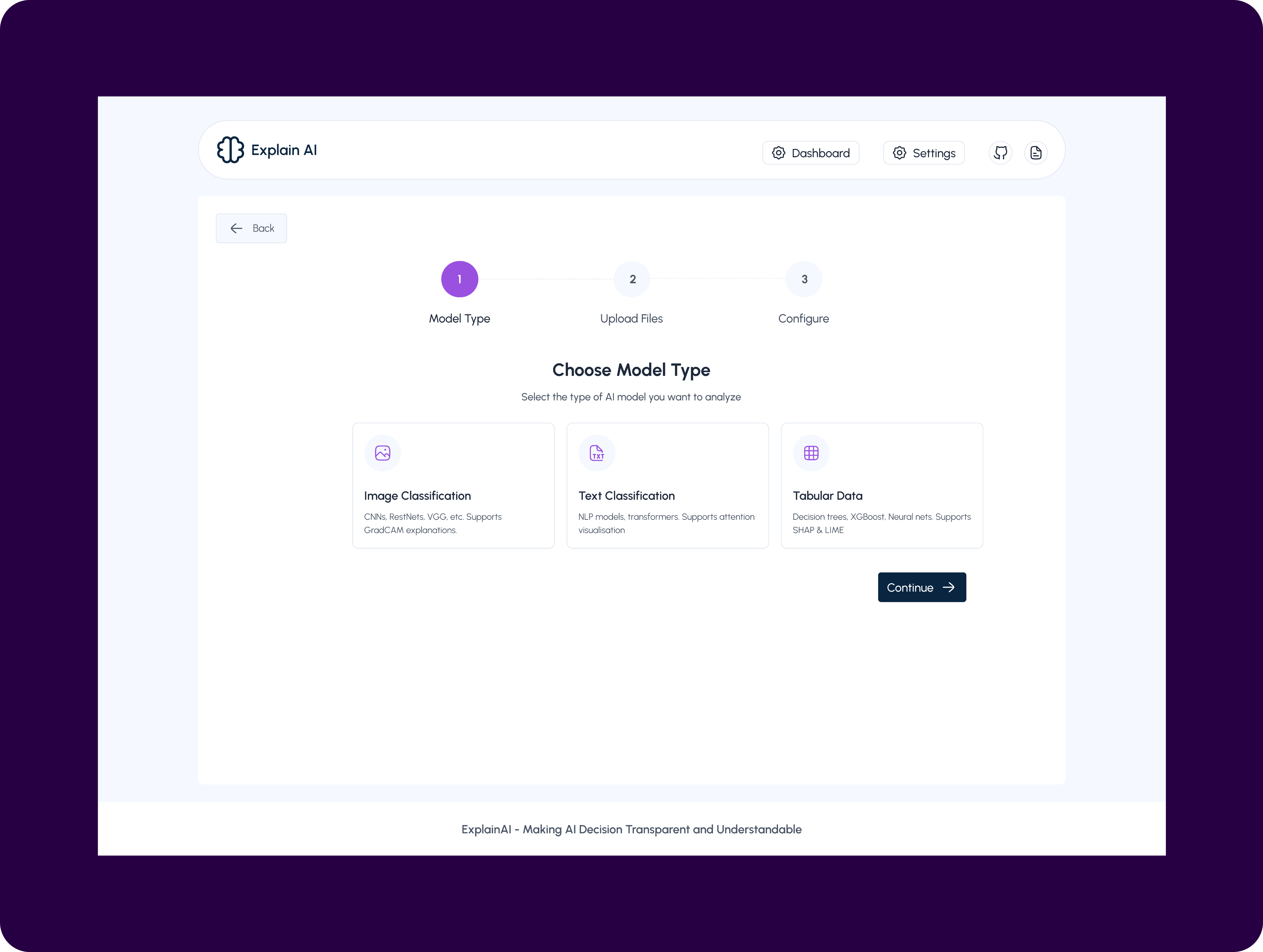
This screen is the first step in creating a new project on Explain AI, where users define the type of AI model they want to analyze.
It guides users through a structured, step-by-step flow, starting with model selection before moving on to file upload and configuration. By presenting clear options, Image Classification, Text Classification, and Tabular Data, the screen helps users quickly identify the category that best fits their use case, while also setting expectations about the explanation techniques supported for each model type.
The clean card-based layout reduces cognitive load, makes complex AI workflows feel approachable, and ensures users make an informed choice before proceeding to the next stage of analysis.
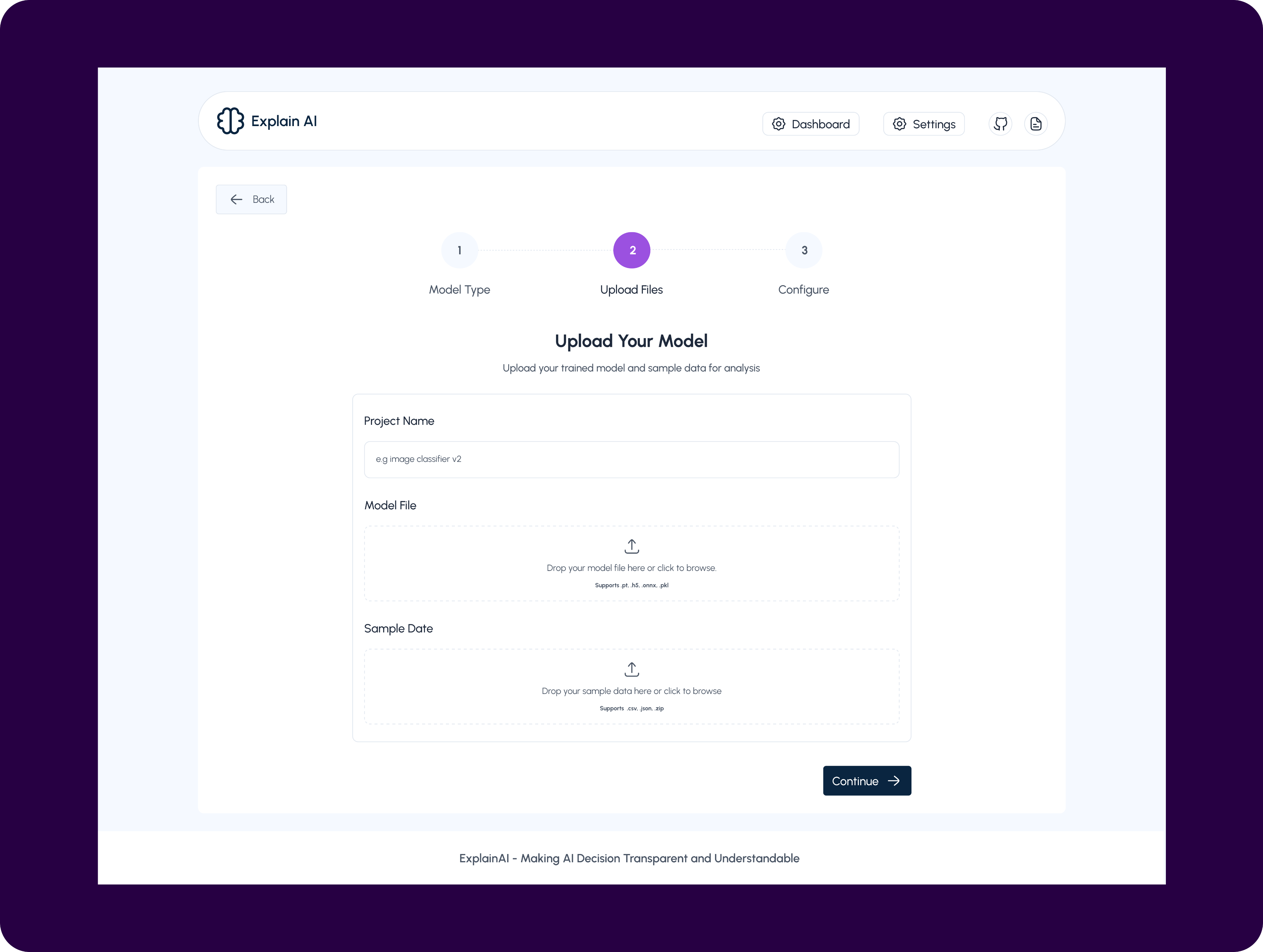
Upload Files - New project
This screen represents the second step in setting up a project on Explain AI, where users upload their trained model and sample data for analysis. It focuses on capturing the essential inputs required to generate meaningful explanations, including a clear project name, the model file, and representative sample data. The structured form and drag-and-drop interactions simplify a typically technical process, reducing friction for both technical and non-technical users. By validating supported file formats upfront and keeping the flow linear, this step ensures users provide clean, compatible inputs before moving into configuration and explanation generation.
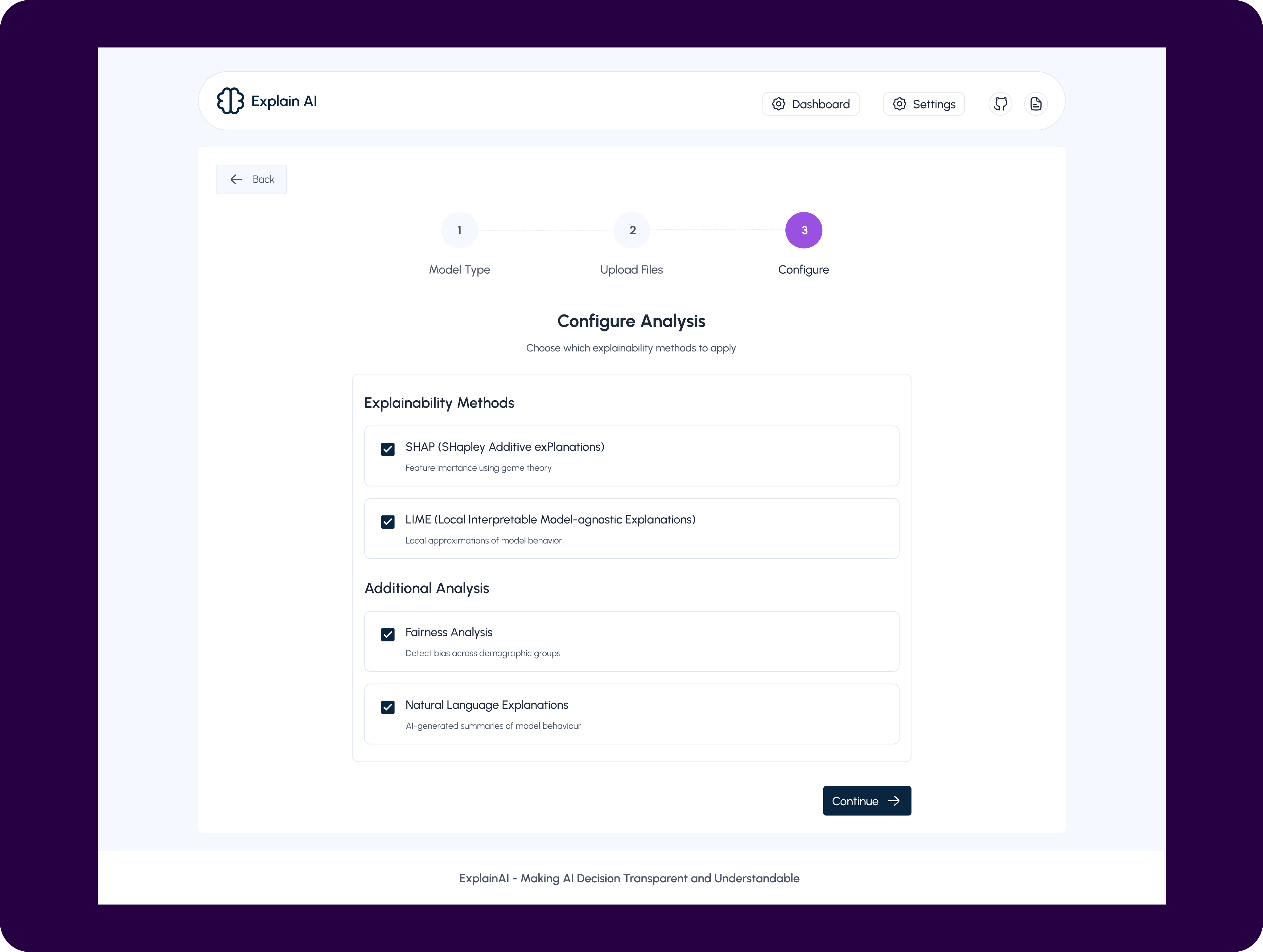
Configure - New project
This screen represents the final step in setting up an Explain AI project, where users configure how their model will be analyzed and explained. It solves the problem of overwhelming technical choice by translating complex explainability techniques into clear, selectable options such as SHAP, LIME, fairness analysis, and natural language explanations. Instead of requiring users to understand or manually implement each method, the interface guides them to choose only what’s relevant to their goals. By centralising these decisions in one step, the product ensures consistency, transparency, and trust in the analysis before results are generated, while keeping the workflow accessible to both technical and non-technical users.
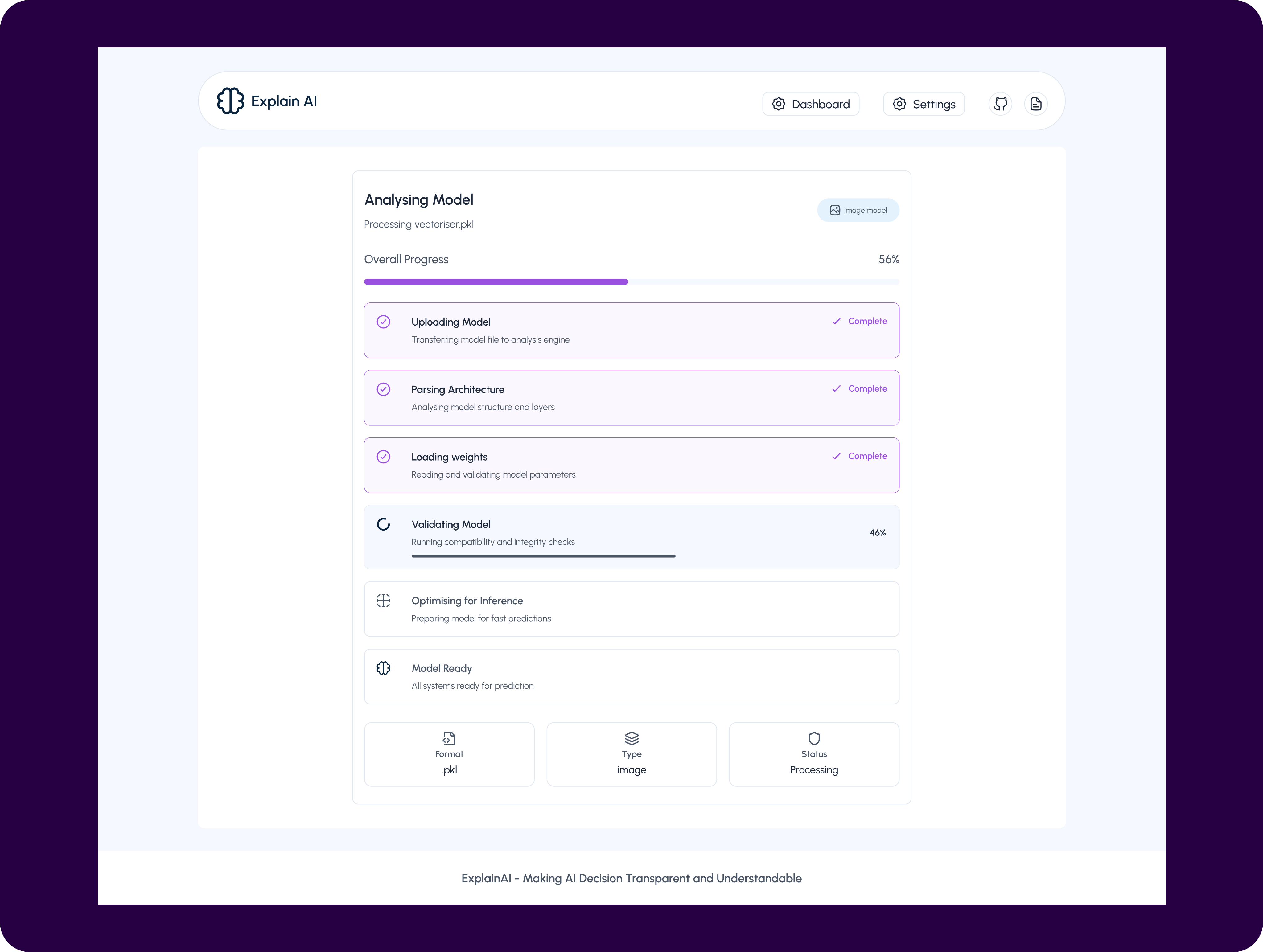
Analysing Model
This screen shows the real-time model analysis and preparation process, giving users clear visibility into what is happening after their model is submitted.
It solves the common problem of uncertainty and lack of trust during long, opaque ML processing steps by breaking the pipeline into understandable stages such as uploading, parsing architecture, loading weights, validation, and optimisation. Progress indicators and status labels reassure users that the system is working as expected and highlight exactly where the process is at any moment.
By making the analysis pipeline transparent, the interface reduces anxiety, improves confidence in the platform, and sets clear expectations before insights and explanations are generated.
Project Details
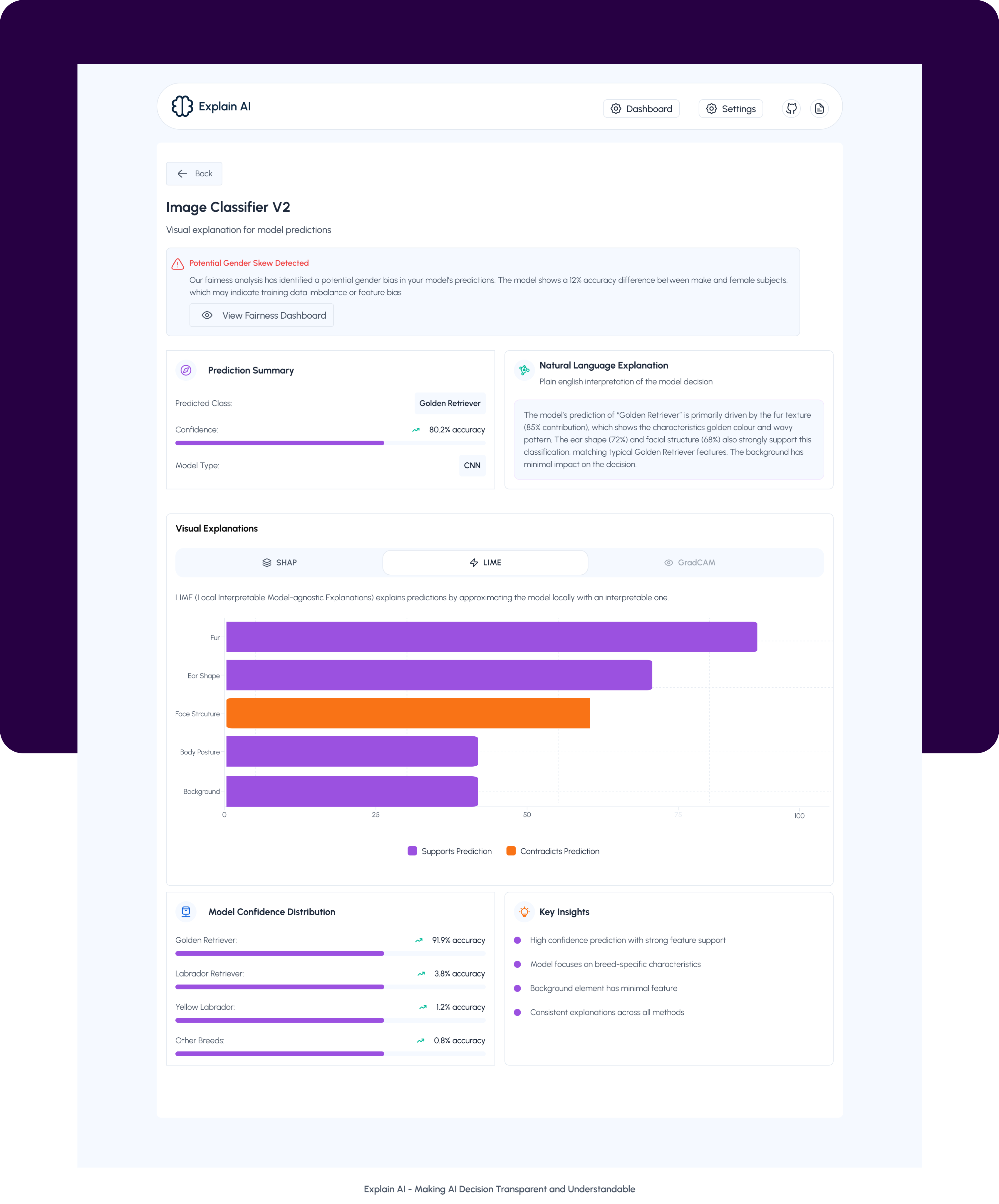
This screen provides a deep, yet accessible explanation of how the image classification model arrived at its prediction. It combines a clear prediction summary with a plain-language explanation, helping users understand not just what the model predicted, but why. Visual explanation methods like SHAP, LIME, and Grad-CAM break down feature contributions, highlighting what supports or contradicts the prediction, while confidence distribution and key insights add further context and validation. Together, this screen is designed to surface bias signals, build trust, and enable both technical and non-technical stakeholders to confidently interpret and defend the model’s decision.
Results and Impacts
I led the product design and strategy for ExplainAI, My work enabled faster model validation, reduced compliance effort by ~50%, and positioned ExplainAI as a trust-building, human-centered AI platform.
I led the product design and strategy for ExplainAI, My work enabled faster model validation, reduced compliance effort by ~50%, and positioned ExplainAI as a trust-building, human-centered AI platform.
Lesson
One key lesson from this project was that transparency is just as much a UX problem as it is a technical one. While explainable AI focuses on making model decisions understandable, we learned that users also need clarity throughout the entire workflow, from setup to processing and results.
Breaking complex ML concepts into progressive, well-labeled steps significantly improved user confidence and reduced friction, especially for non-expert users. We also learned the importance of designing for trust by exposing system states, progress, and limitations instead of hiding complexity. Ultimately, this project reinforced that good product design doesn’t remove complexity, It makes it understandable at the right moment.

Next Project
Strata


Models make decisions, but humans don’t understand why.
As AI adoption increases across sensitive domains, finance, healthcare, HR, teams need more than accuracy scores. They need clarity, confidence, and accountability.
Context
AI product Web app
2025 sep - oct
Role
Product Designer
Platform
Desktop
(01)
Challenge
Designing a single AI explainability experience that works for both technical and non-technical users, without overwhelming either.
Designing ExplainAI meant making complex machine-learning decisions understandable without oversimplifying them.The product had to serve technical teams and non-technical stakeholders within the same interface.We needed to balance depth and clarity so users could quickly assess trust and confidence.The challenge was reducing cognitive overload while still preserving meaningful explanations.Ultimately, the goal was to turn opaque AI outputs into decisions people could confidently rely on.
(02)
Approach & Design Framework
Human-Centered framework allowed the team to design an explainability system that feels calm, trustworthy, and actionable, without sacrificing technical integrity.
Human-Centered AI framework grounded in Jobs-to-Be-Done (JTBD), paired with an iterative, insight-driven design process, starting from understanding users’ trust and clarity gaps with AI decisions, translating those into explainability jobs, prototyping explanation patterns, and refining them through feedback to make AI outputs transparent and actionable for non-technical users.
(03)
Research and Insights
Clarity Builds Trust in Complex Systems
We used a mixed-method research approach, combining qualitative and evaluative methods to understand both user needs and system constraints.
Methods used:
- Stakeholder interviews with product managers, ML engineers, and compliance-facing team members
- User conversations with non-technical stakeholders who consume AI outputs (founders, ops, analysts)
- Competitive analysis of existing AI explainability and monitoring tools
- Workflow mapping with engineers to understand how models are evaluated and validated internally
- Internal data review of past model predictions, confidence scores, and failure cases
Key Insights
- Users don’t trust what they can’t explain
Stakeholders were less concerned about raw accuracy and more concerned about whether they could confidently justify a model’s decision to others.
- Raw metrics create anxiety, not clarity
Probability scores and feature weights confused non-technical users when shown without context or interpretation.
- Confidence is a perception problem, not just a data problem
Users formed trust based on visual cues, consistency, and clarity, often before reading any detailed explanation.
- Different users ask different questions at different moments
Founders want fast reassurance, while engineers want depth only when investigating anomalies.
- Existing tools optimize for experts, not shared understanding
Most explainability platforms assume ML knowledge, leaving product and business teams out of the conversation.
(04)
Design Solution
The final design translates complex AI behavior into clear, confidence-building insights by prioritizing human understanding over raw technical output.
The final design translates complex AI behavior into clear, confidence-building insights by prioritizsng human understanding over raw technical output.
The dashboard surfaces high-level system health and trust signals first, allowing users to quickly assess model reliability before diving deeper when needed.
Through progressive disclosure, visual hierarchy, and human-readable explanations, the interface supports both fast decision-making for leaders and deeper investigation for technical teams.
Every interaction was designed to reduce cognitive load, reinforce trust, and make AI decisions feel transparent, defensible, and actionable in real-world product environments.
The Dashboard
This dashboard serves as the control center for monitoring, understanding, and trusting AI models. It is designed to give users immediate clarity on model health, recent activity, and decision confidence, without requiring technical expertise. Every element answers a core question a user would naturally ask when interacting with AI systems.
- Top Navigation (Context & Orientation)
UX intent: Help users instantly understand where they are and what they can do next.
- Your Projects Section (System Status at a Glance)
UX intent: Reduce anxiety by answering “Is everything okay?” immediately.
- New Project Button
UX intent: Encourage action without overwhelming the user.
- Search, Filter & Sort Controls (Scalability)
UX intent: Design for scale without adding visual clutter.
- Recent Projects Section (Where Understanding Happens)
UX intent: Build immediate confidence that the model is active and reviewed.
- Recent Projects Section (Where Understanding Happens)
UX intent: Build immediate confidence that the model is active and reviewed.
- Prediction Output
UX intent: Make AI decisions understandable to non-technical users.
- Confidence Visualization
UX intent: Translate statistical certainty into emotional trust.
- Input Preview
UX intent: Reinforce transparency and accountability.
- Quick Actions (Efficiency & Control)
UX intent: Support power users while maintaining a clean interface.
New Project
This screen is the first step in creating a new project on Explain AI, where users define the type of AI model they want to analyze.
It guides users through a structured, step-by-step flow, starting with model selection before moving on to file upload and configuration. By presenting clear options, Image Classification, Text Classification, and Tabular Data, the screen helps users quickly identify the category that best fits their use case, while also setting expectations about the explanation techniques supported for each model type.
The clean card-based layout reduces cognitive load, makes complex AI workflows feel approachable, and ensures users make an informed choice before proceeding to the next stage of analysis.
Upload Files - New project
This screen represents the second step in setting up a project on Explain AI, where users upload their trained model and sample data for analysis. It focuses on capturing the essential inputs required to generate meaningful explanations, including a clear project name, the model file, and representative sample data. The structured form and drag-and-drop interactions simplify a typically technical process, reducing friction for both technical and non-technical users. By validating supported file formats upfront and keeping the flow linear, this step ensures users provide clean, compatible inputs before moving into configuration and explanation generation.
Configure - New project
This screen represents the final step in setting up an Explain AI project, where users configure how their model will be analyzed and explained. It solves the problem of overwhelming technical choice by translating complex explainability techniques into clear, selectable options such as SHAP, LIME, fairness analysis, and natural language explanations. Instead of requiring users to understand or manually implement each method, the interface guides them to choose only what’s relevant to their goals. By centralising these decisions in one step, the product ensures consistency, transparency, and trust in the analysis before results are generated, while keeping the workflow accessible to both technical and non-technical users.
Analysing Model
This screen shows the real-time model analysis and preparation process, giving users clear visibility into what is happening after their model is submitted.
It solves the common problem of uncertainty and lack of trust during long, opaque ML processing steps by breaking the pipeline into understandable stages such as uploading, parsing architecture, loading weights, validation, and optimisation. Progress indicators and status labels reassure users that the system is working as expected and highlight exactly where the process is at any moment.
By making the analysis pipeline transparent, the interface reduces anxiety, improves confidence in the platform, and sets clear expectations before insights and explanations are generated.
Project Details
This screen provides a deep, yet accessible explanation of how the image classification model arrived at its prediction. It combines a clear prediction summary with a plain-language explanation, helping users understand not just what the model predicted, but why. Visual explanation methods like SHAP, LIME, and Grad-CAM break down feature contributions, highlighting what supports or contradicts the prediction, while confidence distribution and key insights add further context and validation. Together, this screen is designed to surface bias signals, build trust, and enable both technical and non-technical stakeholders to confidently interpret and defend the model’s decision.
Results and Impacts
I led the product design and strategy for ExplainAI, My work enabled faster model validation, reduced compliance effort by ~50%, and positioned ExplainAI as a trust-building, human-centered AI platform.
I led the product design and strategy for ExplainAI, My work enabled faster model validation, reduced compliance effort by ~50%, and positioned ExplainAI as a trust-building, human-centered AI platform.
Lesson
One key lesson from this project was that transparency is just as much a UX problem as it is a technical one. While explainable AI focuses on making model decisions understandable, we learned that users also need clarity throughout the entire workflow, from setup to processing and results.
Breaking complex ML concepts into progressive, well-labeled steps significantly improved user confidence and reduced friction, especially for non-expert users. We also learned the importance of designing for trust by exposing system states, progress, and limitations instead of hiding complexity. Ultimately, this project reinforced that good product design doesn’t remove complexity, It makes it understandable at the right moment.
Next Project
Strata


Models make decisions, but humans don’t understand why.
As AI adoption increases across sensitive domains, finance, healthcare, HR, teams need more than accuracy scores. They need clarity, confidence, and accountability.
Context
AI product Web app
2025 sep - oct
Role
Product Designer
Platform
Desktop
(01)
Challenge
Designing a single AI explainability experience that works for both technical and non-technical users, without overwhelming either.
Designing ExplainAI meant making complex machine-learning decisions understandable without oversimplifying them.The product had to serve technical teams and non-technical stakeholders within the same interface.We needed to balance depth and clarity so users could quickly assess trust and confidence.The challenge was reducing cognitive overload while still preserving meaningful explanations.Ultimately, the goal was to turn opaque AI outputs into decisions people could confidently rely on.
(02)
Approach & Design Framework
Human-Centered framework allowed the team to design an explainability system that feels calm, trustworthy, and actionable, without sacrificing technical integrity.
Human-Centered AI framework grounded in Jobs-to-Be-Done (JTBD), paired with an iterative, insight-driven design process, starting from understanding users’ trust and clarity gaps with AI decisions, translating those into explainability jobs, prototyping explanation patterns, and refining them through feedback to make AI outputs transparent and actionable for non-technical users.
(03)
Research and Insights
Clarity Builds Trust in Complex Systems
We used a mixed-method research approach, combining qualitative and evaluative methods to understand both user needs and system constraints.
Methods used:
- Stakeholder interviews with product managers, ML engineers, and compliance-facing team members
- User conversations with non-technical stakeholders who consume AI outputs (founders, ops, analysts)
- Competitive analysis of existing AI explainability and monitoring tools
- Workflow mapping with engineers to understand how models are evaluated and validated internally
- Internal data review of past model predictions, confidence scores, and failure cases
Key Insights
- Users don’t trust what they can’t explain
Stakeholders were less concerned about raw accuracy and more concerned about whether they could confidently justify a model’s decision to others.
- Raw metrics create anxiety, not clarity
Probability scores and feature weights confused non-technical users when shown without context or interpretation.
- Confidence is a perception problem, not just a data problem
Users formed trust based on visual cues, consistency, and clarity, often before reading any detailed explanation.
- Different users ask different questions at different moments
Founders want fast reassurance, while engineers want depth only when investigating anomalies.
- Existing tools optimize for experts, not shared understanding
Most explainability platforms assume ML knowledge, leaving product and business teams out of the conversation.
(04)
Design Solution
The final design translates complex AI behavior into clear, confidence-building insights by prioritizing human understanding over raw technical output.
The dashboard surfaces high-level system health and trust signals first, allowing users to quickly assess model reliability before diving deeper when needed.
Through progressive disclosure, visual hierarchy, and human-readable explanations, the interface supports both fast decision-making for leaders and deeper investigation for technical teams.
Every interaction was designed to reduce cognitive load, reinforce trust, and make AI decisions feel transparent, defensible, and actionable in real-world product environments.
The Dashboard
This dashboard serves as the control center for monitoring, understanding, and trusting AI models. It is designed to give users immediate clarity on model health, recent activity, and decision confidence, without requiring technical expertise. Every element answers a core question a user would naturally ask when interacting with AI systems.
- Top Navigation (Context & Orientation)
UX intent: Help users instantly understand where they are and what they can do next.
- Your Projects Section (System Status at a Glance)
UX intent: Reduce anxiety by answering “Is everything okay?” immediately.
- New Project Button
UX intent: Encourage action without overwhelming the user.
- Search, Filter & Sort Controls (Scalability)
UX intent: Design for scale without adding visual clutter.
- Recent Projects Section (Where Understanding Happens)
UX intent: Build immediate confidence that the model is active and reviewed.
- Recent Projects Section (Where Understanding Happens)
UX intent: Build immediate confidence that the model is active and reviewed.
- Prediction Output
UX intent: Make AI decisions understandable to non-technical users.
- Confidence Visualization
UX intent: Translate statistical certainty into emotional trust.
- Input Preview
UX intent: Reinforce transparency and accountability.
- Quick Actions (Efficiency & Control)
UX intent: Support power users while maintaining a clean interface.
New Project
This screen is the first step in creating a new project on Explain AI, where users define the type of AI model they want to analyze.
It guides users through a structured, step-by-step flow, starting with model selection before moving on to file upload and configuration. By presenting clear options, Image Classification, Text Classification, and Tabular Data, the screen helps users quickly identify the category that best fits their use case, while also setting expectations about the explanation techniques supported for each model type.
The clean card-based layout reduces cognitive load, makes complex AI workflows feel approachable, and ensures users make an informed choice before proceeding to the next stage of analysis.
Upload Files - New project
This screen represents the second step in setting up a project on Explain AI, where users upload their trained model and sample data for analysis. It focuses on capturing the essential inputs required to generate meaningful explanations, including a clear project name, the model file, and representative sample data. The structured form and drag-and-drop interactions simplify a typically technical process, reducing friction for both technical and non-technical users. By validating supported file formats upfront and keeping the flow linear, this step ensures users provide clean, compatible inputs before moving into configuration and explanation generation.
Configure - New project
This screen represents the final step in setting up an Explain AI project, where users configure how their model will be analyzed and explained. It solves the problem of overwhelming technical choice by translating complex explainability techniques into clear, selectable options such as SHAP, LIME, fairness analysis, and natural language explanations. Instead of requiring users to understand or manually implement each method, the interface guides them to choose only what’s relevant to their goals. By centralising these decisions in one step, the product ensures consistency, transparency, and trust in the analysis before results are generated, while keeping the workflow accessible to both technical and non-technical users.
Analysing Model
This screen shows the real-time model analysis and preparation process, giving users clear visibility into what is happening after their model is submitted.
It solves the common problem of uncertainty and lack of trust during long, opaque ML processing steps by breaking the pipeline into understandable stages such as uploading, parsing architecture, loading weights, validation, and optimisation. Progress indicators and status labels reassure users that the system is working as expected and highlight exactly where the process is at any moment.
By making the analysis pipeline transparent, the interface reduces anxiety, improves confidence in the platform, and sets clear expectations before insights and explanations are generated.
Project Details
This screen provides a deep, yet accessible explanation of how the image classification model arrived at its prediction. It combines a clear prediction summary with a plain-language explanation, helping users understand not just what the model predicted, but why. Visual explanation methods like SHAP, LIME, and Grad-CAM break down feature contributions, highlighting what supports or contradicts the prediction, while confidence distribution and key insights add further context and validation. Together, this screen is designed to surface bias signals, build trust, and enable both technical and non-technical stakeholders to confidently interpret and defend the model’s decision.
Results and Impacts
I led the product design and strategy for ExplainAI, My work enabled faster model validation, reduced compliance effort by ~50%, and positioned ExplainAI as a trust-building, human-centered AI platform.
I led the product design and strategy for ExplainAI, My work enabled faster model validation, reduced compliance effort by ~50%, and positioned ExplainAI as a trust-building, human-centered AI platform.
Lesson
One key lesson from this project was that transparency is just as much a UX problem as it is a technical one. While explainable AI focuses on making model decisions understandable, we learned that users also need clarity throughout the entire workflow, from setup to processing and results.
Breaking complex ML concepts into progressive, well-labeled steps significantly improved user confidence and reduced friction, especially for non-expert users. We also learned the importance of designing for trust by exposing system states, progress, and limitations instead of hiding complexity. Ultimately, this project reinforced that good product design doesn’t remove complexity, It makes it understandable at the right moment.
Next Project
Strata
